Calendar Invites That Close: CRM-Synced Booking Playbook

You invest heavily in generating demand. Campaigns run, leads come in, and prospects move toward one critical action: booking a meeting.
Yet this is where many sales processes quietly fail. Prospects slip away. Calendars don’t align. Reps respond too slowly. What should be a high-intent moment turns into a missed opportunity.
The root cause is simple. Your booking flow lives outside your CRM. Every step relies on manual effort: handoffs slow down, context gets lost, and conversions suffer.
This playbook shows you how to turn scheduling into a dependable conversion system.
You’ll learn how to prequalify leads, route them instantly, and automatically create deals and tasks the moment a meeting is booked. When your entire booking process runs inside Bitrix24, no-shows drop, sales cycles shorten, and every meeting becomes a structured step in your pipeline.
A CRM-synced booking engine isn’t optional anymore. It’s the missing link between interest and revenue — and once it’s in place, your team closes more deals with far less effort.
The new booking reality: Meetings are conversion moments
When a prospect books time with you, they’re signaling intent. They’re actively choosing your team over other options. But if your systems treat a booked meeting like a basic calendar event, you lose momentum fast.
When your calendar, CRM, and booking tools operate separately, each step relies on manual effort, creating delays and missed opportunities. A unified system changes this.
When your booking flow lives inside Bitrix24, every invite updates the CRM automatically, and every booking triggers routing, tasks, and reminders without manual work, treating every meeting like the revenue opportunity it truly is.
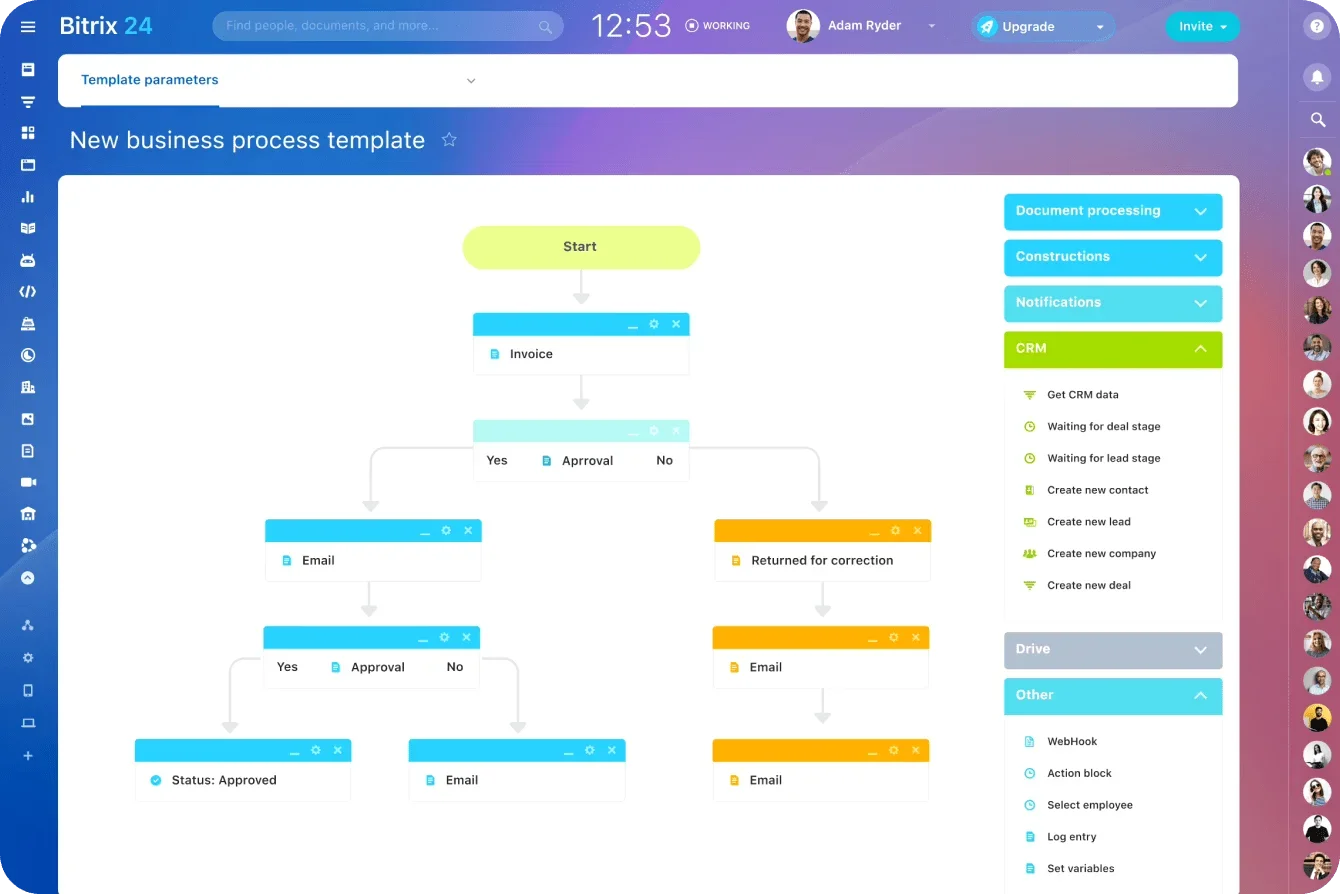
So, it’s little surprise that companies leveraging CRM automation and integration (syncing bookings directly into their CRM) can see lead conversion rates improve by up to 300%. This playbook shows you how to get there.
Step 1: Prequalify before they book (smart website forms)
Before a meeting ever hits your calendar, you need to know who the prospect is, what they need, and whether they’re a meaningful fit. Prequalification protects your team’s time, improves meeting quality, and increases the likelihood that every booking turns into a real pipeline. With Bitrix24, the entire process runs automatically inside your CRM.
Let's break down how this system works, starting with the first touchpoint.
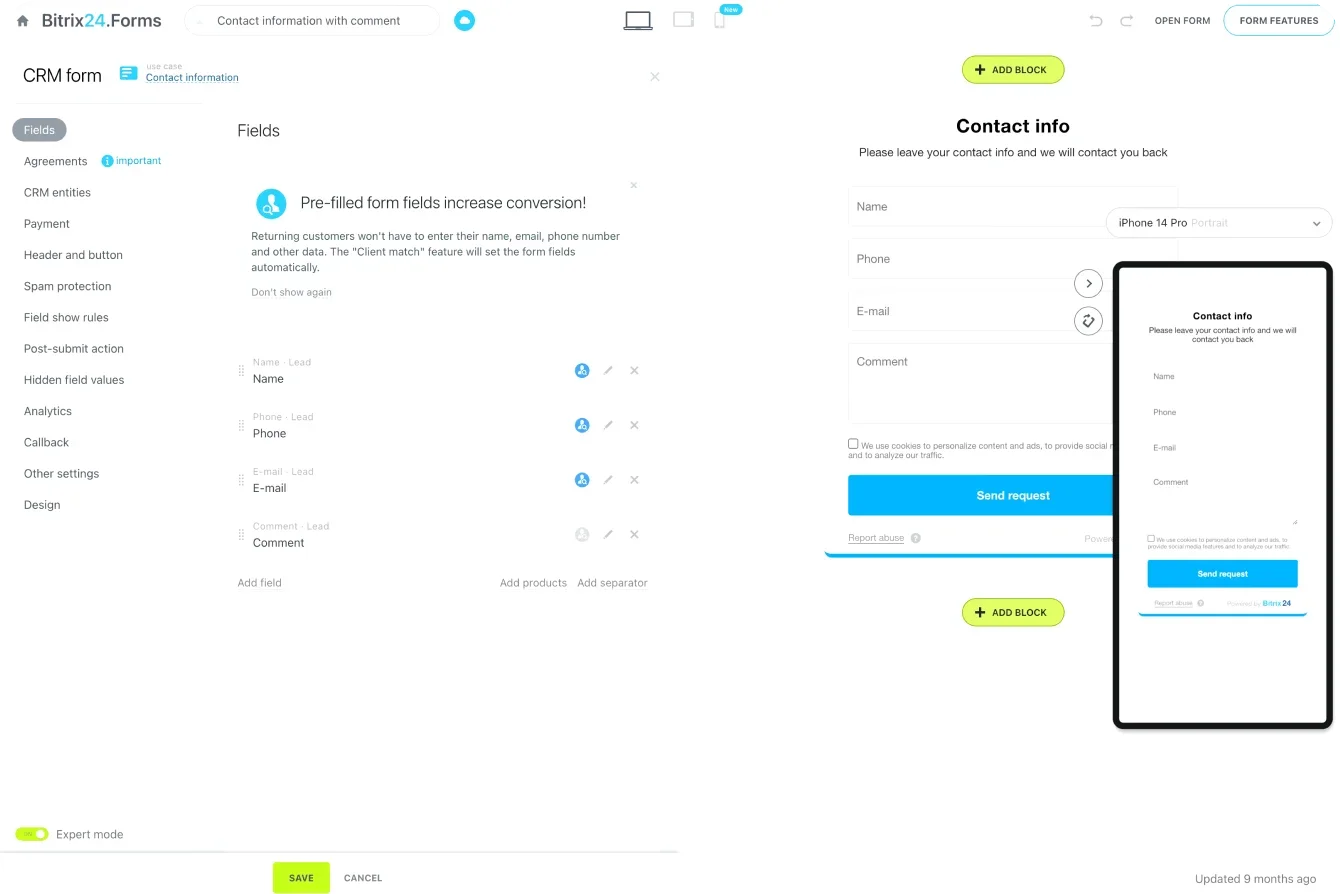
Use website forms to collect the right data
A basic contact form won’t give you the context your reps need. Bitrix24 Website Forms let you gather details that signal intent and priority. You can include fields such as:
-
budget range
-
company size
-
industry
-
urgency
-
product interest
-
region
These inputs help you score and sort leads long before they choose a meeting time.
Add conditional questions to filter leads
Conditional logic adapts the form based on the prospect’s answers. High-intent prospects see paths that move them toward booking. Lower-fit leads can be automatically routed to nurturing instead of the sales calendar. This keeps your reps focused on conversations that matter.
Step 2: Route instantly using CRM logic (lead-to-owner assignment)
Once a qualified lead submits your form, the next priority is getting them to the right person fast. Speed shapes the entire buying experience. Prospects lose interest quickly, and slow follow-up is one of the most common reasons strong opportunities fade. Bitrix24 removes that delay by routing leads automatically based on rules you define inside the CRM.
Assign leads based on meaningful criteria
Every detail collected in your Website Form can drive routing logic. You can assign leads by:
-
region
-
product line
-
deal size
-
industry
-
language
-
priority score
This ensures each prospect is matched with the rep best suited to handle their needs.
Balance workloads with smart assignment
If multiple reps cover the same territory or product, Bitrix24 can distribute leads evenly. You can rotate assignments, prioritize reps with more availability, or direct high-priority leads to experienced team members. This improves responsiveness and prevents bottlenecks.
Instant lead-to-owner pairing
Ownership is assigned the moment the form is submitted. Prospects don’t wait for a manual review or follow-up email. Instead, they move straight into booking a meeting with the correct rep, creating a smoother experience from the start.
Step 3: Booking through shared calendars (real-time availability layer)
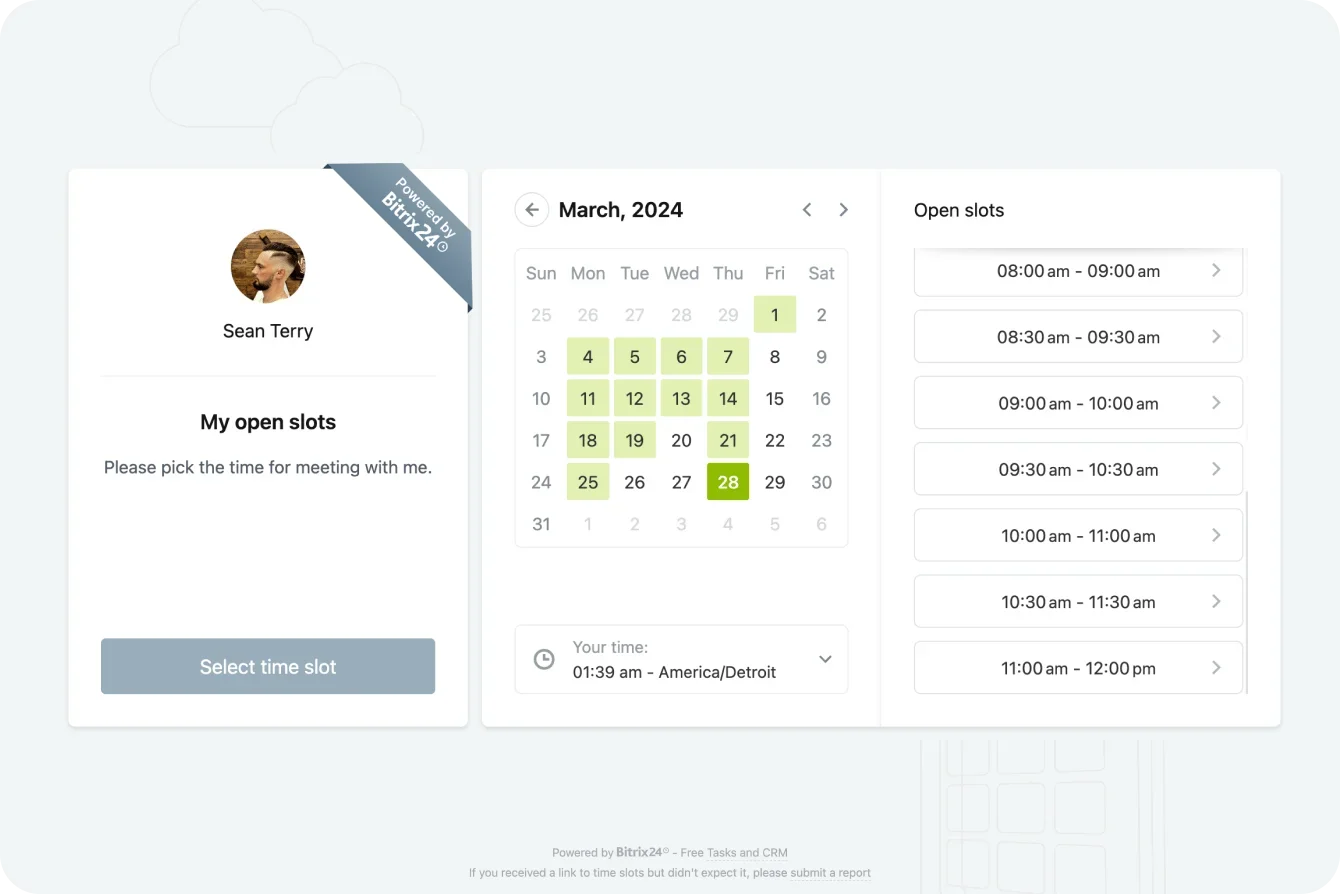
Once the right rep is assigned, the prospect should be able to book a meeting immediately. No back-and-forth emails. No guessing about availability. No waiting for someone to confirm a time. Bitrix24 Shared Calendars give you this real-time scheduling layer inside your CRM, making the entire process faster and more predictable.
Show only the time slots that truly work
Prospects see the rep’s live availability based on working hours, existing meetings, and defined availability rules inside Bitrix24. Only genuinely open slots are shown, which removes uncertainty, reduces back-and-forth, and speeds up booking.
Reduce friction in the booking process
Prospects choose a time, confirm their details, and get an automated invite without waiting for a manual reply. A smooth, immediate booking experience increases the likelihood that they show up ready to engage.
Sync everything with the CRM automatically
When a meeting is booked, Bitrix24 updates the rep’s calendar and the CRM timeline at the same time. Reps know what’s coming. Managers get accurate activity data. Your CRM stays organized without extra data entry.
Provide a consistent customer experience
Because scheduling happens inside Bitrix24, every rep follows the same workflow. Prospects encounter a predictable, polished booking experience, regardless of who they’re meeting.
Shared Calendars move prospects from interest to a confirmed meeting with minimal delay. And because this scheduling layer lives inside your CRM (not on top of it), you get faster operations, cleaner data, and a more reliable path from booking to revenue.
Step 4: Automate deal creation the moment a meeting is booked
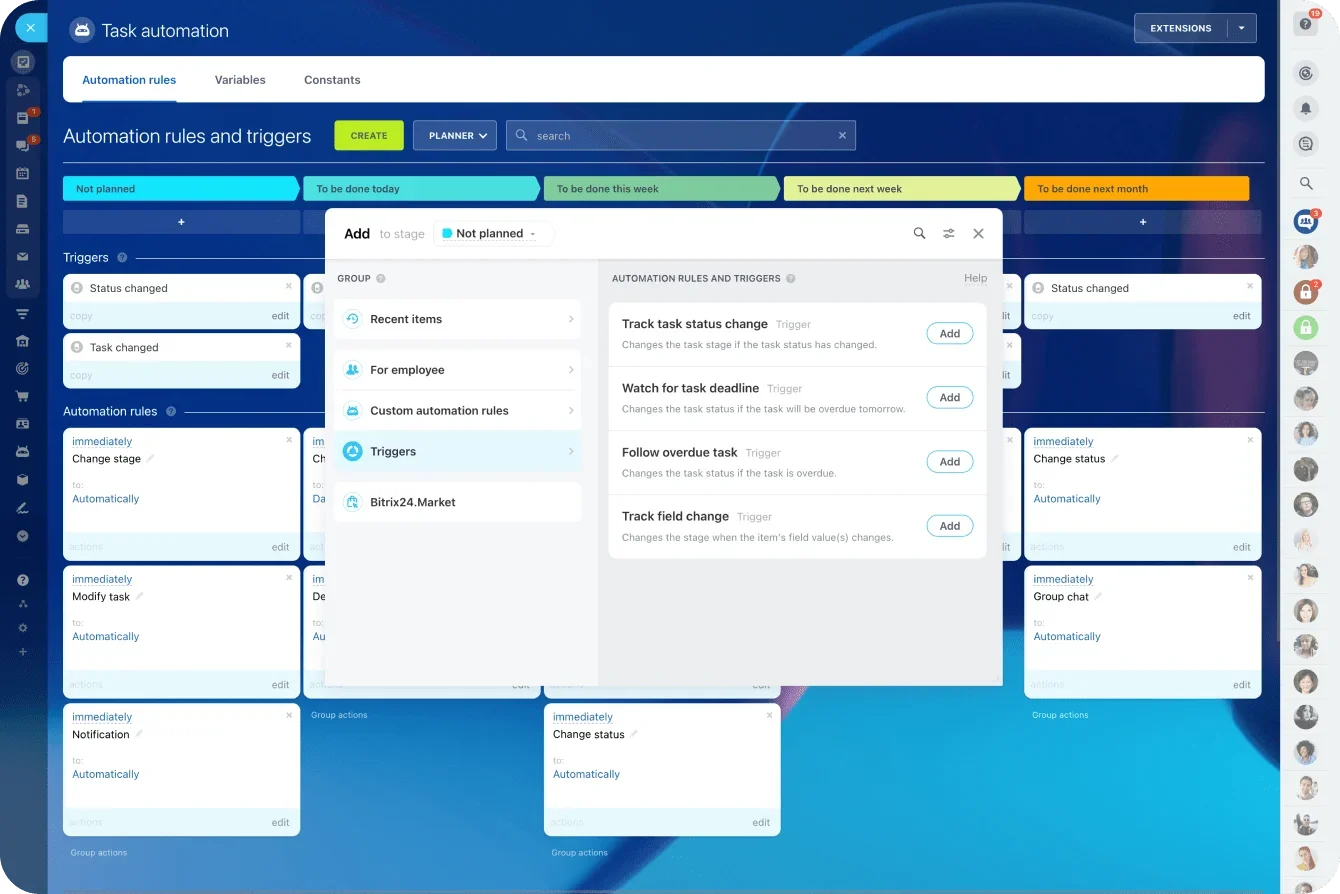
When a prospect books a meeting, your CRM should update itself. Deals, tasks, reminders, and timelines should appear without anyone on your team lifting a finger. This is how you keep momentum high and protect every opportunity. With Bitrix24, booking and pipeline creation happen inside the same system, so nothing gets lost or delayed.
Automatically create a deal in the CRM
The moment a meeting is confirmed, Bitrix24 can create a deal record using the information from your Website Form. It assigns the correct owner, places the deal in the right pipeline stage, and gives your team a clear starting point for follow-up.
Assign tasks without manual input
Reps don’t need to remember what to prepare before the call. Bitrix24 can create tasks automatically, including:
-
reviewing lead details
-
preparing a proposal or demo
-
sending a confirmation
-
updating notes after the meeting
These tasks appear in each rep’s workspace, so expectations are always clear.
Enrich the CRM timeline automatically
Form data, booking details, meeting links, owner assignments, and reminders all land directly in the CRM timeline. Nothing needs to be added manually. This gives your team an accurate, detailed history for forecasting, handoffs, and reporting.
Automating these steps turns every confirmed meeting into meaningful pipeline activity. Reps stay organized. Prospects feel supported. And your workflow remains consistent because Bitrix24 handles everything inside one platform.
Step 5: Automate no-show prevention
Even qualified prospects miss meetings. Schedules change, distractions interrupt, and reminders get overlooked. Most no-shows aren’t intentional; they’re the result of weak confirmation workflows.
When reminders and follow-ups run automatically, attendance rises, and conversations become more productive. Bitrix24 makes this easy because reminders, confirmations, and meeting data all live in the same system.
Send timely email and SMS reminders
Your reminders go out at the right moments without manual scheduling. For example:
-
immediately after booking
-
24 hours before the meeting
-
1 hour before the meeting
Each message can include the rep’s name, the meeting link, and the agenda so prospects know exactly what to expect.
Use confirmation prompts to increase attendance
A simple prompt can significantly improve show-up rates. You can automate a message such as:
“Reply YES to confirm your meeting.”
When the prospect replies, Bitrix24 updates the CRM automatically. Reps know who is engaged and who may need extra attention.
Share helpful pre-call resources
People are more likely to attend when the meeting feels valuable. You can automate pre-call content such as:
-
a welcome video
-
talking points or an agenda
-
relevant case studies
-
a link to upload documents or share details in advance
These touches build confidence and reduce uncertainty.
Trigger smart rescheduling options
If a prospect hasn’t confirmed or hasn’t interacted with reminders, Bitrix24 can send an automated reschedule link. This protects the meeting without requiring your reps to chase down a new time.
Handle missed meetings automatically
If someone still doesn’t show up, Bitrix24 can:
-
create a follow-up task
-
move the deal to another stage
-
send a re-engagement message
-
notify the rep immediately
You maintain momentum even when the meeting doesn’t go as planned.
Automating these steps significantly reduces no-shows and increases the number of qualified conversations your team has each week. Because everything runs inside Bitrix24, reminders, confirmations, and follow-up tasks stay connected and consistent — keeping your booking process reliable from start to finish.
How teams typically go live in seven days
Most Bitrix24 teams follow a simple rollout path:
-
Day 1–2: Configure Website Forms and prequalification fields
-
Day 3: Set routing rules and lead-to-owner automation
-
Day 4: Connect Shared Calendars and availability logic
-
Day 5: Automate deal creation, tasks, and timelines
-
Day 6–7: Add reminders, confirmations, and no-show workflows
Because calendars, forms, and automation live inside one CRM — and can extend via APIs and integrations — there’s no need to stitch together disconnected tools or rebuild processes later.
KPIs that prove your booking system is working
Once your CRM-synced booking workflow is live, you need to confirm that it’s improving your sales performance. The right KPIs show where the system is working well, where friction exists, and how quickly prospects move from interest to opportunity. Bitrix24 gives you these insights through built-in dashboards and reports, so you can track performance without switching tools.
Meeting acceptance rate
This shows how often prospects complete the booking process after submitting your form. A high acceptance rate means your routing rules and Shared Calendars are doing their job. If the rate is low, you may need to simplify your booking steps or adjust availability settings.
Show-up rate
A rising show-up rate indicates that your reminders and confirmation workflows are effective. Many teams see no-shows drop by up to 25 percent once automated reminders and confirmations are in place.
Lead-to-meeting speed
The faster a qualified lead books a meeting, the more likely they are to stay engaged. Instant routing and real-time calendars should shorten this time. A slow lead-to-meeting speed suggests friction in your form, routing logic, or availability.
Meeting-to-opportunity conversion rate
If your prequalification and routing rules are accurate, a meaningful share of booked meetings should convert into opportunities. This metric helps you assess lead quality and the strength of expectations set during the booking process.
Deal velocity (cycle time)
A shorter sales cycle shows that your follow-up workflows, automated tasks, and meeting outcomes are keeping deals in motion. Teams often see cycle times shrink by about 12 percent when post-meeting automations are consistent.
Tracking these KPIs helps you refine your process and keep your booking system performing at a high level. With Bitrix24, all the data you need is already connected to your CRM, making analysis faster, clearer, and more accurate.
The calendar invite that closes
A booked meeting is not an administrative event. It’s a decision point. When that moment is handled manually or outside your CRM, momentum fades and opportunities stall before real conversations begin.
A CRM-synced booking system removes that friction.
Qualified prospects are routed instantly, meetings create deals automatically, and follow-up happens without delay. Your team spends less time coordinating and more time advancing opportunities through the pipeline.
Bitrix24 brings scheduling, automation, and CRM data into one system — so every meeting is measurable, repeatable, and tied directly to revenue.
Build a booking process that converts, not just schedules.
Maximize Your Conversions
Integrate your booking process with Bitrix24 CRM and transform meetings into closing opportunities. Boost lead conversions by up to 300%!
Get Started NowFAQ’s
Which scoring rules route leads by product, region, or tier?
Routing is driven by CRM automation rules that evaluate the data collected in Website Forms and lead records. Fields such as product interest, region, deal size, priority score, or customer tier can be used to assign ownership automatically. These rules run the moment a lead is created, ensuring prospects are routed to the right rep without manual review.
How are reschedules synced with pipeline stages?
When a meeting is rescheduled, the associated calendar event and CRM timeline update automatically. Automation rules can then adjust the deal stage, create follow-up tasks, or trigger reminders based on the new meeting status. This keeps pipeline stages aligned with real buyer activity, even when schedules change.
What happens when multiple reps are available?
If more than one rep meets the routing criteria, Bitrix24 can distribute bookings using defined assignment logic. Teams commonly use round-robin rotation, availability-based assignment, or priority rules to balance workloads and maintain fast response times.
Can we enforce SLA-based speed-to-lead alerts?
Yes. Automation rules can monitor how quickly new leads are assigned and acted on. If a lead isn’t contacted or booked within a defined SLA window, Bitrix24 can trigger alerts, notifications, or escalation tasks to keep response times on track.
How do we track no-show reduction in analytics?
No-show rates can be tracked by comparing booked meetings to completed meetings inside CRM reports and dashboards. Because bookings, reminders, confirmations, and outcomes are logged automatically, teams can measure attendance trends over time and evaluate how automation impacts show-up rates.