The Most Useful CRM Applications Are Boring: Reminders, Records, and Next Steps


A prospect replies at 3 PM and nobody sees it. A call happens and the notes sit in someone's inbox. A deal stalls and nobody knows who owns the next move. These aren't technology failures. They're what happens when a team treats CRM as a reporting tool instead of a work tool.
The fixes aren't sophisticated.
Reminders, records, next steps, and pipeline visibility: that's most of what a CRM needs to do well. The problem is that those functions feel too basic to prioritize, so teams skip past them, hunting for automation, AI features, or better dashboards. The fundamentals decay, and the expensive stack built on top of them doesn't hold.
This article is about getting those four things right.
What these boring CRM applications actually mean
Let’s first define the basics clearly.
Reminders: prompts tied to work that needs to happen, such as a callback tomorrow, a renewal notice next month, or a reactivation email after 60 days of inactivity.
Customer records: a shared profile of a lead, company, or customer that holds the core facts your team needs to work from the same information.
Next steps: the specific next action on an active deal or lead, with an owner and due date.
Pipeline visibility: views that show where deals sit, what is moving, what is stuck, and what needs attention now.
None of this is glamorous. And that’s the point. CRM creates value when it gives people shared context and supports consistent action. It’s less about having every feature and more about making sure the team can see what happened, what matters now, and what should happen next.
Simple rule: if the CRM doesn’t help someone do today's work, they will treat it like reporting. And then it will decay.

Why CRM processes break in real teams
CRM breaks in predictable ways. It's rarely the software. It's almost always one of three things.
Inconsistent data entry
One rep logs every call. Another updates only the deal stage when something moves. A third keeps everything in email and catches up to the CRM at the end of the week, if at all. The result is partial records nobody fully trusts.
Take a typical 12-person sales team. The senior rep documents every call and email. A newer rep updates stages but nothing else. A third uses private spreadsheets and syncs monthly. When the owner asks "which customers are at risk of churn?" there's no clean answer, because the data's scattered across three systems.
Missing next actions
A lead gets marked "qualified." A deal sits in "proposal sent." But there's no task attached to either. The record looks alive even though nothing's scheduled to move it forward. That's how deals go quiet without anyone noticing.
A stale pipeline
Stages become storage bins. Deals stay open because closing them feels like admitting loss, or because nobody has time to cull old records. Managers end up spending meetings asking basic questions the CRM should already answer.
The average B2B sales cycle lasts about 120 days, yet 44% of salespeople give up after one follow-up, and 92% stop after four attempts. If the CRM isn't surfacing what needs attention, that persistence gap gets worse, not better.
Poor handoffs
Stale pipelines are a visibility problem. Handoffs are a continuity problem. Marketing passes a lead without enough context. Sales has a conversation but doesn't log objections or timing. Operations inherits a closed-won account with gaps in contacts, expectations, or scope. Each team starts from scratch, and mistakes compound.
The root cause is usually the same: the CRM's being used as a reporting tool, not a work tool. People update it for management or forecasting, not because it helps them do today's work.
Once that shift happens, usage drops, quality falls, and trust goes with it.
|
Breakdown |
What It Looks Like |
Business Impact |
|---|---|---|
|
Inconsistent records |
Missing notes, owners, or activity history |
Confusion and repeated outreach |
|
No next action |
Deals active in name only |
Slow follow-up and deal drift |
|
Stale pipeline |
Old deals sitting in late stages |
Bad visibility and weak forecasting |
|
Poor handoffs |
Context lost between teams |
Dropped leads and rough onboarding |
30-Day CRM Follow-Up System: Reminders, Records, Next Steps
Enter your email address to get a comprehensive, step-by-step guide

Step 1: Standardize the minimum customer record
Start with the smallest record your team can reliably keep current. A customer record is usable when any teammate can open it and understand who this is, where they are in the process, and what happened recently.
For most SMB teams, the minimum record should include:
- Contact: name, email, phone, and role if relevant
- Company: company name and basic account association
- Stage: where the lead or deal currently sits in your process
- Owner: the person responsible for moving it forward
- Last activity: most recent meaningful interaction or update
That’s the core. You can add source, product interest, territory, contract value, or lead score if your process needs them. But those are secondary unless they directly affect routing or execution.
It helps to separate fields into two categories.
|
Must-have |
Nice-to-have |
|---|---|
|
Contact info |
Social profile links |
|
Company/account link |
Industry enrichment |
|
Current stage |
Employee count |
|
Owner |
Estimated tech stack |
|
Last activity |
Intent data |
Then set three operating rules:
- When records are created: for example, at first meaningful inbound contact, first outbound reply, or first qualified account touch—not every raw list import.
- When records are updated: immediately after meaningful interactions, stage changes, ownership changes, or contact changes.
- When records are considered usable: only when the must-have fields are present.
This is where many teams overbuild: they create 25 required fields because they want better reporting. Research shows 73% of sales and operations leaders say record creation takes too long. Then reps skip records, enter junk, or make up values to get through the form.
A smaller clean record beats a large unreliable one every time.
If a rep can update a record in under a minute after a call, you are probably close to the right level of detail. On platforms like Bitrix24, this works well because the CRM is built around contact and company records that teams update as part of their workflow, and is directly tied to tasks, emails, and activity history.
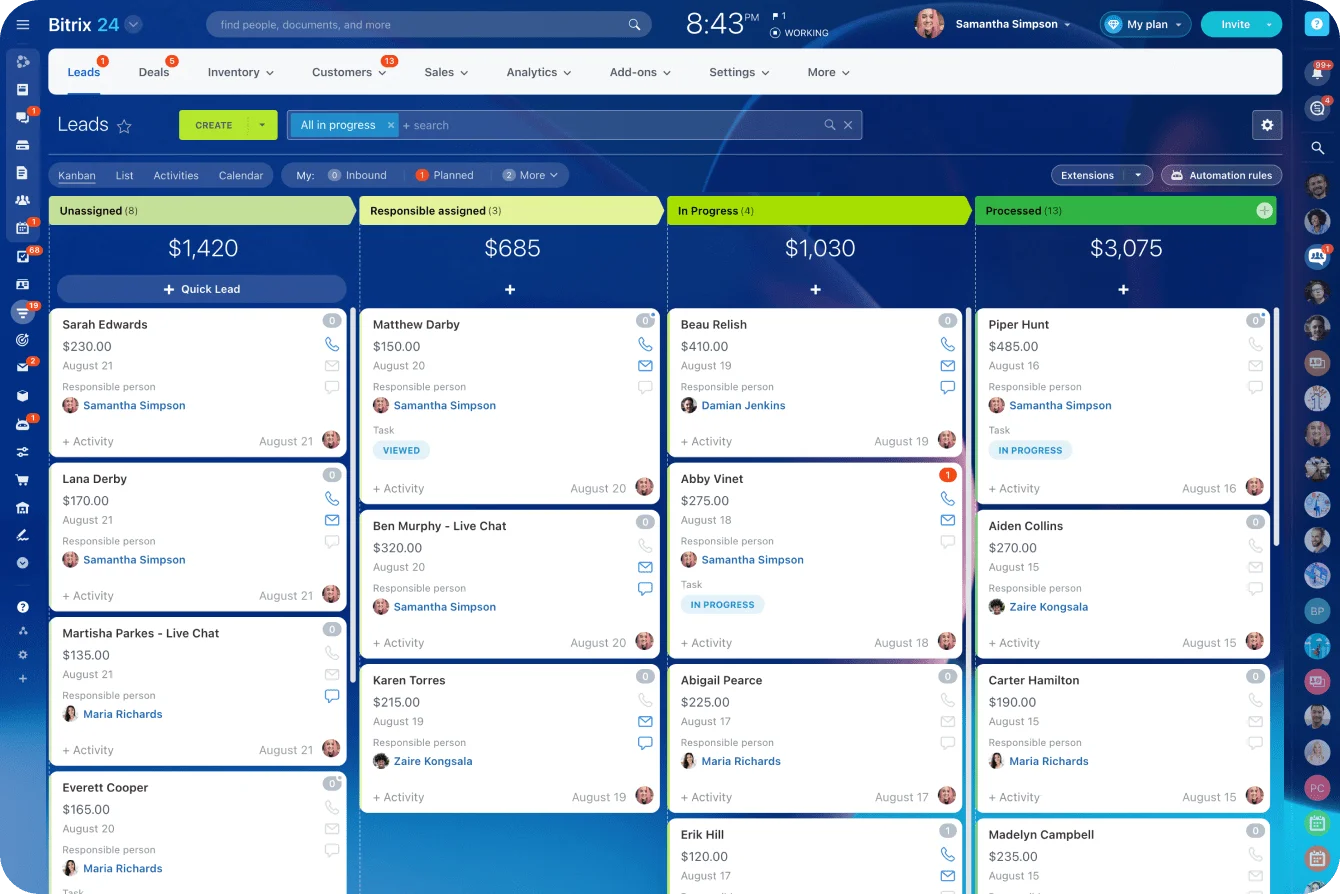
The record becomes the center of execution, not an afterthought.
Step 2: Make every open deal or lead have one clear next step
The next step is the specific piece of work required to move the record forward. Good examples include:
- Send revised pricing by Thursday
- Call buyer after internal review on May 14
- Book technical demo with operations lead
- Confirm renewal terms two weeks before expiration
Bad examples are generic placeholders like "follow up," "check in," or "nurture." Those labels hide the actual work.
Only 2% of sales close at the first meeting. The remaining 98% of sales require follow-up, yet research shows 44% of salespeople give up after the first attempt. If the next step doesn’t describe a real action, it won’t create accountability, and it will join the (long) pile of forgotten tasks.
Make this a rule: no active record without a next step, owner, and due date. If there is no next step, the record is either unqualified, paused, or stale.
That simple rule forces the team to decide what is real.
This also improves manager visibility fast. Instead of asking, "What's going on with this deal?" managers can review the next action and due date. If a proposal was sent, what happens next? If a buyer went quiet, when is the re-engagement attempt scheduled? If legal is blocking the deal, who owns the unblock?
Systems like Bitrix24 connect records directly to tasks and reminders. When you set a next step, it becomes a task assigned to an owner with a due date. It’s not stored separately; it’s embedded in the deal workflow. Reps see their daily work queue, and managers see which deals are waiting for action.
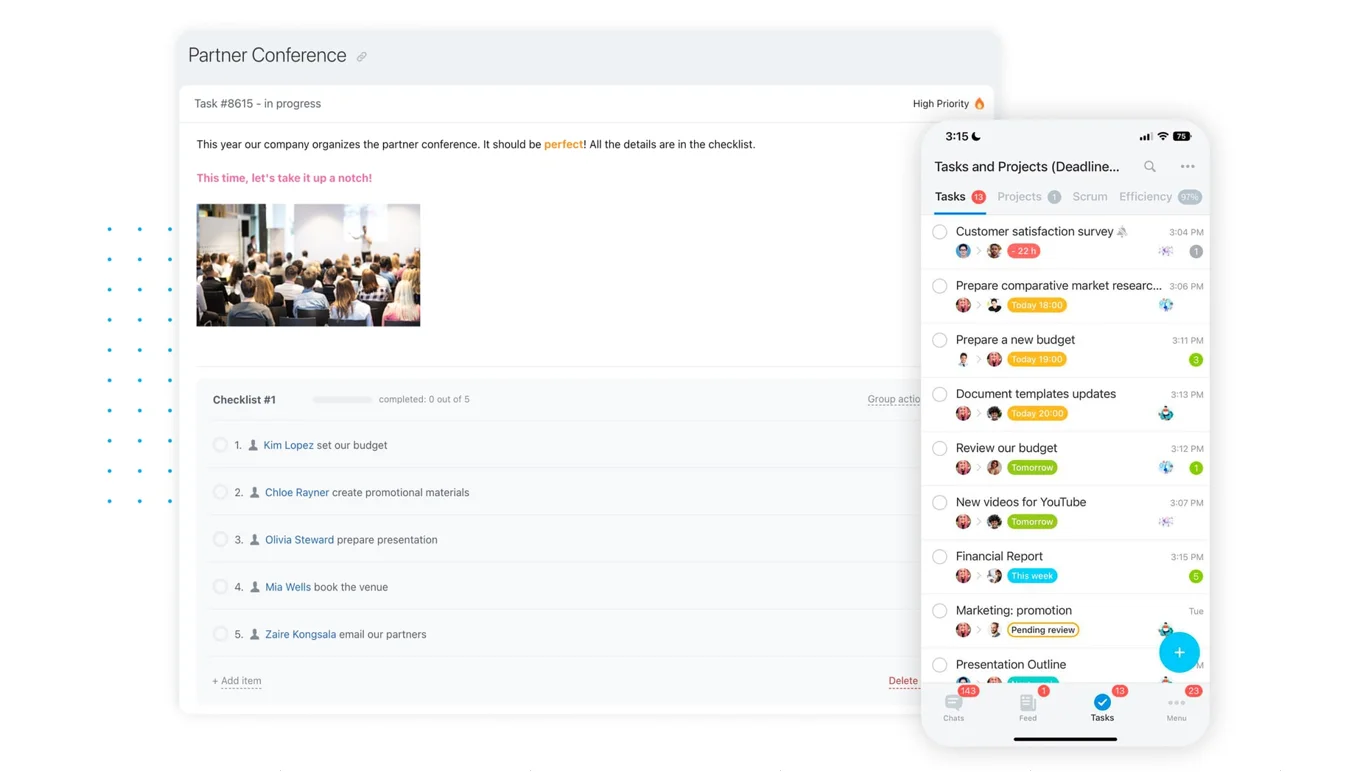
Quick test for next steps:
- Does it describe a concrete action?
- Does one person own it?
- Does it have a date?
- Would another teammate understand it instantly?
That reduces deal drift because work does not disappear into stage labels. It becomes visible, assignable, and reviewable.

Step 3: Turn reminders into a follow-up system, not personal memory
Teams often rely on individual memory for follow-up. That works until volume rises, someone goes on leave, or priorities shift. A CRM should hold the reminder system so follow-up happens because the process requires it, not because someone happens to remember.
Start by identifying the moments that should trigger reminders. In most teams, that includes:
- Calls that need a scheduled callback
- Emails waiting for a response
- Proposals that need review after sending
- Renewals tied to contract dates
- Reactivation campaigns for cold or dormant contacts
Then tie those reminders to simple rules.
Some should be stage-based: e.g., if a deal enters "proposal sent," create a reminder to review in 3 business days.
Some should be inactivity-based: e.g., if no activity occurs for 14 days on an active opportunity, flag it.
Some should be date-based: e.g., if a customer renews in 90 days, trigger the renewal workflow.
Example-in-action:
A regional HVAC service company with 8 technicians and a dispatcher kept losing renewal business because reminders lived in one person's calendar. When that person was sick or on vacation, renewals slipped. They implemented CRM reminders tied to contract dates and inactivity.
Now, when a customer's annual service contract is 90 days from expiration, a task automatically creates and routes to the service coordinator. Renewal conversations happen on schedule, not by accident.
Result: marked increase in contract renewals within six months.
The important part is balance. Automated prompts should support consistency, not replace judgment. You do not want a system that spams reps with low-value tasks or sends robotic outreach just because a timer expired.
A good setup usually looks like this:
|
Trigger |
Reminder |
Purpose |
|---|---|---|
|
Stage changes to proposal sent |
Review in 3 days |
Prevent silent stalls |
|
No activity for 14 days |
Flag owner to re-engage |
Catch drift early |
|
Renewal date in 90 days |
Create renewal task |
Protect retention work |
|
Lead marked no response |
Reactivation in 45 days |
Recover missed opportunities |
Keep reminder ownership explicit. If reminders land in a shared queue with no owner, they become background noise. If they route to the right person based on stage or account ownership, they are far more likely to be acted on.
Reminder rule: automate the prompt, not the relationship. Let the CRM tell people when to act, but make sure the actual outreach still reflects context.
Step 4: Keep pipeline visibility focused on movement and risk
Pipeline visibility sounds like a reporting problem, but it’s really an execution problem. The goal isn’t to produce prettier dashboards. The goal is to help reps and managers see where action is needed now.
That means pipeline views should focus on movement and risk. At minimum, build views around:
- Stage: where records currently sit
- Aging: how long they have been in the pipeline or current stage
- Next-step due dates: what action is due now or overdue
- Blocked deals: records waiting on approvals, documents, or customer responses
Daily review should be lightweight. Reps should look at overdue next steps, records with no recent activity, and anything due today. This is the worklist view. It tells them where to focus effort now.
Weekly review is broader. Managers should look at stage progression, aged deals, overdue next actions, and blocked opportunities. This is where they coach on execution, remove obstacles, and decide whether records should move forward, be pushed back, or be closed out.
One practical tip: create separate views for "needs action" and "forecast." If you mix everything into one dashboard, teams start optimizing for appearance instead of movement. A deal may still matter to the forecast, but if there is no next step and no recent activity, it also belongs in a risk view.
Useful pipeline questions:
- Which active deals have overdue next steps?
- Which records have had no activity in the last 7 or 14 days?
- Which deals are aging beyond the normal time for their stage?
- Which blocked deals need help from management or another team?
That is what good visibility looks like. Not just what is in the pipeline, but what needs to happen to keep it moving.
Step 5: Avoid common mistakes and build for reliability as you scale
Once the basics are working, the next challenge is reliability. A simple CRM setup can handle a surprising amount of growth if you protect it from a few common mistakes.
Too many required fields
As volume grows, teams often respond by collecting more data. That usually lowers compliance and creates junk entries. Keep required fields tied to execution, routing, and ownership. Everything else should earn its place. Most teams should improve discipline before adding customization.
Duplicate records
These create split histories, double outreach, and messy reporting. Put basic deduplication rules in place using email, company, and phone where possible. Also define who resolves duplicates when they are found.
Activity logging nobody uses
If you capture every tiny interaction but no one reads it, the CRM becomes cluttered. Focus on logging meaningful activity: calls, emails, meetings, stage changes, and notes that affect the next move.
Reliability improves when governance stays simple. You do not need a heavy admin model. You need a few clear rules:
- Every active record has one owner
- Every active record has one next step and due date
- Stage changes happen only when defined criteria are met
- Records missing must-have fields are fixed quickly or removed from active queues
- Duplicate cleanup and stale record review happen on a regular schedule
Periodic cleanup matters more as you scale. A monthly review can catch old opportunities, unassigned leads, duplicate companies, and dead reminders before they pile up. Without that, the system gets noisy and trust erodes.
The nice part is that the same setup scales well. More reps? Ownership and next-step rules still work. More channels? Standard records still hold the shared context. More handoffs between sales, marketing, and operations? The minimum record and visible next action become even more valuable.
Scaling principle: add complexity only when the current process is consistently used and clearly insufficient.
FAQ’s
When should we migrate or clean up our CRM?
Do not wait for perfect timing. If the team lacks trust in the current setup, start by fixing the minimum record, next-step rule, and basic views before attempting a full migration. Many teams need process cleanup more than a new platform.
Does mobile CRM use really matter?
Yes, if your team works on the move. Mobile matters most for quick note capture, task completion, and updating next steps right after meetings or calls. If reps have to wait until later, details get lost.
What if our data is incomplete today?
That is normal. Do not stop and launch a giant cleanup project first. Define the must-have fields, require them on active records going forward, and backfill the rest gradually based on priority accounts and open deals.
How do we avoid reminder fatigue?
Keep reminders tied to real work and remove low-value triggers. If people are dismissing most alerts, you have too many. Start small, review which reminders lead to action, and cut the rest.
What kind of CRM tool should an SMB choose?
A system people use daily is better than a more powerful platform that requires constant admin support. Look for platforms designed to connect sales, marketing, and operations without constant customization. Businesses that implement the right CRM system see a 29% increase in sales revenue.
The key is choosing one that makes daily work easier, not harder.
What about long sales cycles or shared inbox workflows?
Long sales cycles make next-step discipline even more important because inactivity is easier to miss. Shared inbox teams should still assign record ownership clearly, even if multiple people handle communication. Shared access should not mean shared ambiguity.
Platforms like Bitrix24's communication tools allow multiple people to see conversations tied to a single record, but the next action and owner remain clear.
What does good look like in practice?
A rep opens the CRM and sees what is due today. A manager reviews aged and blocked deals without chasing updates. Marketing can see whether handed-off leads were worked. Operations receives enough context to continue the customer relationship smoothly. No one is asking, "Did anyone follow up?" because the system makes it obvious.
That’s the real value. The best CRM setup is usually not the most advanced one; it’s the one people actually use every day because it helps them remember, coordinate, and move work forward.
Turn CRM basics into daily sales action
Bitrix24 links records, tasks, reminders, and pipelines so teams follow up on time, share context, and keep deals moving.
Try It FreeCRM platforms built for execution
If you are evaluating a CRM, look for these capabilities:
- Contact and record management that is fast and accessible
- Task and reminder automation tied directly to records
- Clear pipeline views that show what needs action now
- Activity logging that captures meaningful interactions
- Mobile access for updates in the field
Platforms like Bitrix24 CRM are built around these fundamentals. The system connects customer records to tasks, reminders, and communications. A rep can update a deal record, set a next step, and the system automatically reminds them when action is due. A manager can see the full pipeline and identify blocked deals in one view.
That is an execution-focused CRM, not a reporting one.
For more on building strong sales execution, see best practices for integrating CRM automation with marketing strategies and CRM best practices for small businesses.