AI in CRM Without the Hype: Use Cases That Save Time in Sales and Service


TL;DR (Quick Summary)
- Reps and agents lose hours a day rebuilding account history, writing routine follow-ups, and triaging cases by hand.
- AI can take the first pass at the summaries, drafts, priorities, and routing so the work starts half-done, as long as a person still owns every customer-facing call.
- Point it at one specific, repeated failure and keep a human on the decisions that carry risk, and it saves real time. Skip the guardrails and it just produces confident noise faster.
Takeaway: Point AI at one specific, repeated failure and keep a human on every decision that carries risk — that's what turns automation into saved time instead of confident noise.
A rep wraps three calls back to back: a pricing follow-up, an unlogged technical question, a vague promise to reconnect next month. None of it's in the CRM. So the rep works backward through half-remembered notes, updates three records, opens three tasks, writes three follow-ups from memory. The detail from that first call's already gone soft.
That's where the CRM day quietly goes: not selling, not serving, reconstructing.
AI can take the first pass on the summary, the draft, the priority call, the routing decision, so the rep corrects something instead of starting from a blank field. They still check every detail and own every decision. The reconstruction disappears.
What follows is five use cases that survive contact with real sales and service work, how to fit them into workflows you already run, and the failure points worth fixing before you scale any of it.
Where CRM work slows down: Manual updates, missed follow-ups, and inconsistent service handoffs
Most CRM delays start with routine admin, not anything hard. A rep finishes a discovery call and figures they'll log the notes after the next meeting. A manager sees a deal jump a stage but can't tell whether the buyer actually agreed to the next step. A service agent picks up a case and burns five minutes reading emails, comments, and status changes before they can even reply.
That admin eats a real share of the week. Salesforce's 2026 State of Sales found the average seller spends 40% of their time actually selling. The rest goes to data entry, research, planning, and internal coordination.
Small delays create larger process gaps
Those small delays compound:
- Notes entered hours later lose the useful detail.
- Follow-ups get drafted from memory.
- CRM stages stop reflecting the real state of a deal.
- Handoffs depend entirely on how disciplined the last owner was.
- Service agents rebuild the case before they can act on it.
Give that rep from the top of this piece AI in the loop, and the record already holds a summary, suggested next actions, and a draft by the time they're back at the CRM. They still check the details. The rebuild is just done before they start.
Service teams hit the same wall from the other side. An agent gets a case tagged "login problem" when the history shows repeated SSO failures across several contacts on the account. Miss that context and a password-reset queue swallows what's actually a broader access issue.
The goal is narrow: strip the repetitive review and triage out of the CRM day while the people who own the relationship keep making the calls.
30-Day AI CRM Automation Blueprint With Ready-Made Workflows
Enter your email address to get a comprehensive, step-by-step guide

What AI in CRM actually means: Assistive workflow automation inside sales and service processes
AI in CRM adds assistive steps inside work your team already does. It reads the structured fields and the messy stuff sitting next to them: call notes, emails, activity logs, chats, case histories.
Use AI when inputs aren't standardized
Old-school automation is great when the rule is black and white:
- If the region is North America, assign the lead to Team A.
- If a deal enters the proposal stage, create a follow-up task.
- If a service case approaches its SLA threshold, alert the service lead.
It falls apart the moment the input won't sit in a tidy field. A call transcript mentions budget hesitation, a security review, and a launch date nobody's sure of. A customer email describes an outage without ever using your product team's category name.
There's no clean "if" for that.
That's the gap AI fills. From the same messy input, it can produce an operational output:
- a customer-history summary,
- an email draft,
- a priority recommendation,
- a stalled-deal flag,
- or a suggested service queue.
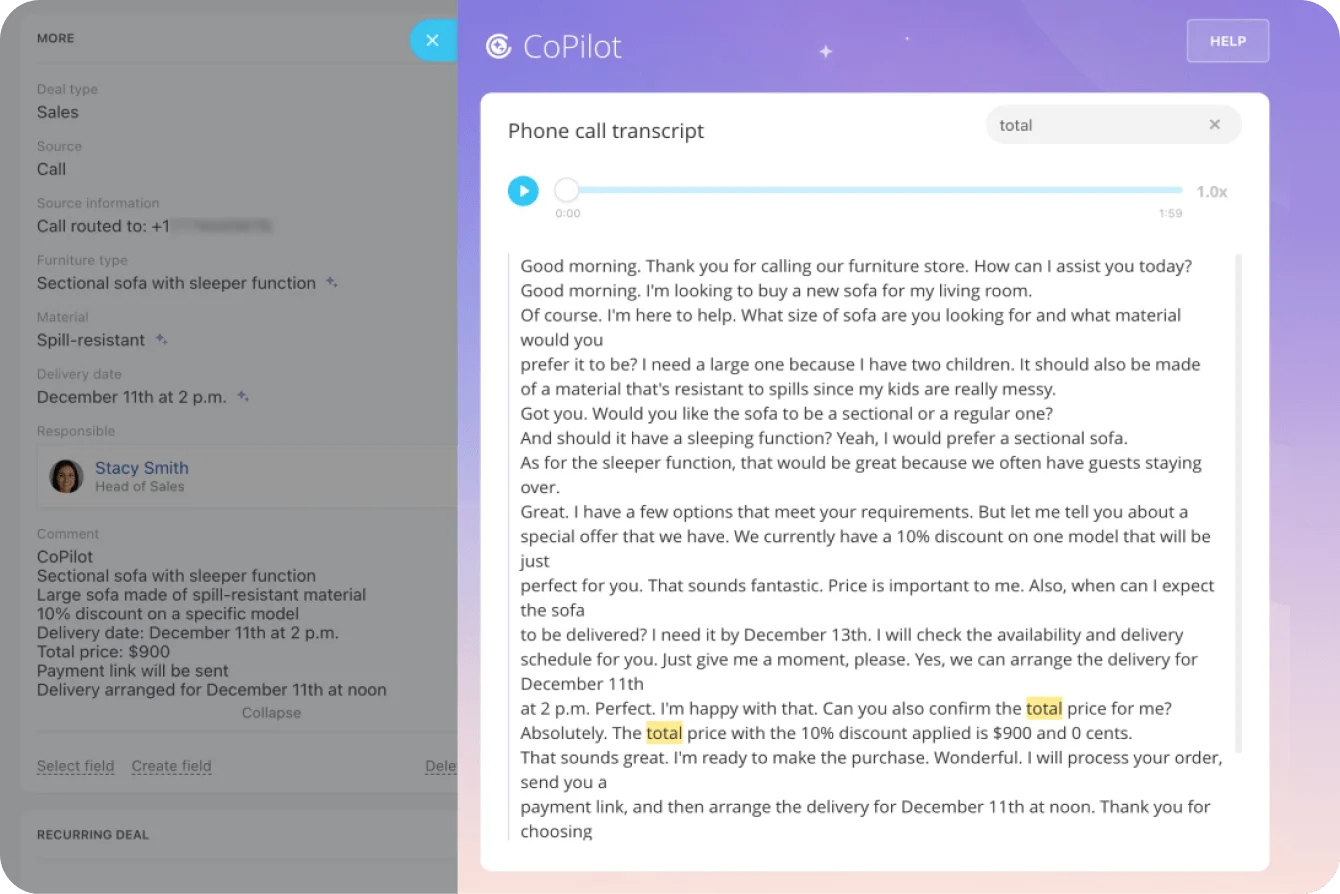
In Bitrix24 CRM, for example, CoPilot transcribes the recording, summarizes the call, and fills CRM fields straight from what was said.
Keep ownership with the employee
AI preps the information and suggests the move. Deal strategy, commercial commitments, sensitive messages, and high-impact service calls still need a named human owner. Employees get a faster starting point, and nobody hands the steering wheel to the model.
Why traditional CRM processes break down at volume
Manual CRM habits hold up at low volume. Experienced reps and agents just remember the stuff that never made it into a field. Grow the pipeline, the account load, and the service queue, and that memory-based system starts failing quietly.
1. Data becomes incomplete or late
The activity happens; the record catches up later, or partway, or not at all. The next person reads the entry, assumes it's current, and acts on a gap they can't see. A rep closing out five opportunities at 6 p.m. remembers the gist of each call and forgets the one qualification detail or objection that mattered.
2. Prioritization becomes subjective
Reps pick what feels urgent: the latest email, whatever's freshest in memory, the deal that's easiest to parse. Agents do the same when the queue backs up. One works the angriest-sounding customer first, one works by account value, one just works oldest to newest. Same queue, three different answers, because nobody agreed on what "urgent" means.
3. Handoffs lose context
When an account manager understands a relationship because they lived it, handing off the account means handing off knowledge that never reached the CRM. You get the usual symptoms:
- overdue next steps,
- aging opportunities,
- repeated customer questions,
- unnecessary service reassignment,
- reopened cases,
- and pipeline reviews spent reconstructing history instead of deciding what to do next.
AI earns its place when it goes after one of these specific failures, not all of them at once.

The core AI CRM workflow: Five practical use cases that save time
These five fit cleanly into sales and service work you already run. Each one starts with CRM data and ends with a specific human action, which is exactly why they're safe to start with.
1. Summarizing customer history
Input: the last three emails, the recent call transcript, the open opportunity, and outstanding tasks.
Output: a 120-word account recap with three next actions.
AI reads the account notes, emails, meetings, opportunities, tickets, and tasks, then writes a short brief. A good one answers five questions:
- What happened recently?
- What has the customer agreed to?
- What's still unresolved?
- Who owns the next action?
- Is anything overdue or blocked?
It's worth most right before a sales call, a handoff, an escalation, or a service reply. Instead of scrolling the whole history, the rep starts from where things actually stand and opens the underlying record only when something needs checking.
Bitrix24 CoPilot does this for CRM conversations and calls, turning the communication trail into a summary and CRM updates.
Pro Tip
Lock the summary format before you roll it out. A fixed structure (latest interaction, concern, commitment, next action, risk) scans in seconds. Free-form paragraphs that change shape every time don't.
2. Drafting follow-up emails or call recaps
Input: a meeting transcript, the attendee list, and the opportunity record.
Output: a draft recap with agreed actions, open questions, and proposed next steps.
This one works because the rep already owns the final message. The AI just gets it to a first draft. Salesforce's 2026 State of Sales report found sellers expect AI agents to cut email-drafting time by 36% once fully rolled out. That's the gap this use case closes.
The workflow kicks in when the call ends:
- The transcript or notes reach the CRM.
- AI pulls out topics, commitments, and unresolved questions.
- A draft follow-up gets created.
- The account owner reviews names, dates, pricing, tone, and next steps.
- The rep edits and sends it.
Nobody finishing a technical demo should have to reconstruct every question from memory half an hour later. The draft already has the discussion points. The rep decides what's actually worth saying.
The risk here is false certainty. A clean draft can make an unconfirmed date read as agreed, or turn "we might look at Q3" into a commitment. That's why anything customer-facing gets a review step.
3. Scoring account or lead priority
Input: recent engagement, opportunity stage, account traits, unanswered activity, and past outcomes.
Output: a priority recommendation with the factors behind it.
Scoring can combine engagement, account traits, activity history, stage progression, and past outcomes to tell a rep where to start. But the number alone is useless. People need to know what drove it.
"Priority score: 87" tells a rep nothing. This tells them something:
- several recent replies,
- an active opportunity,
- pricing activity,
- no next meeting scheduled,
- or a real change in buying behavior.
Bitrix24's AI-powered CRM tools include AI lead scoring built to help sales teams prioritize opportunities inside the CRM.
Pro Tip
Treat the score as a queueing signal, not a verdict. If reps can't see why an account moved up or down, they'll either ignore the ranking or lean on it too hard.
4. Detecting stalled deals
Input: stage age, meeting history, unanswered messages, close-date changes, and recent call notes.
Output: a stalled-deal alert that names the warning signs and asks the owner to review.
A pipeline report tells you a deal has sat in one stage for three weeks. It won't tell you why. AI reads the activity around the delay and looks for the tells:
- no future meeting booked,
- several unanswered messages,
- repeated close-date changes,
- procurement or legal blockers,
- no decision-maker engaged,
- or notes hinting at budget doubt.
Check deals by hand and you catch this on Friday, in the weekly pipeline review, if you catch it at all. Flag it automatically and the owner gets a review item while there's still time to act: update the opportunity, call the customer, change the next step, or note that the deal's fine and moving at its own pace.
5. Routing service issues
Input: the customer's message, product area, previous cases, service terms, language, and account history.
Output: a recommended queue with a confidence level and a fallback route.
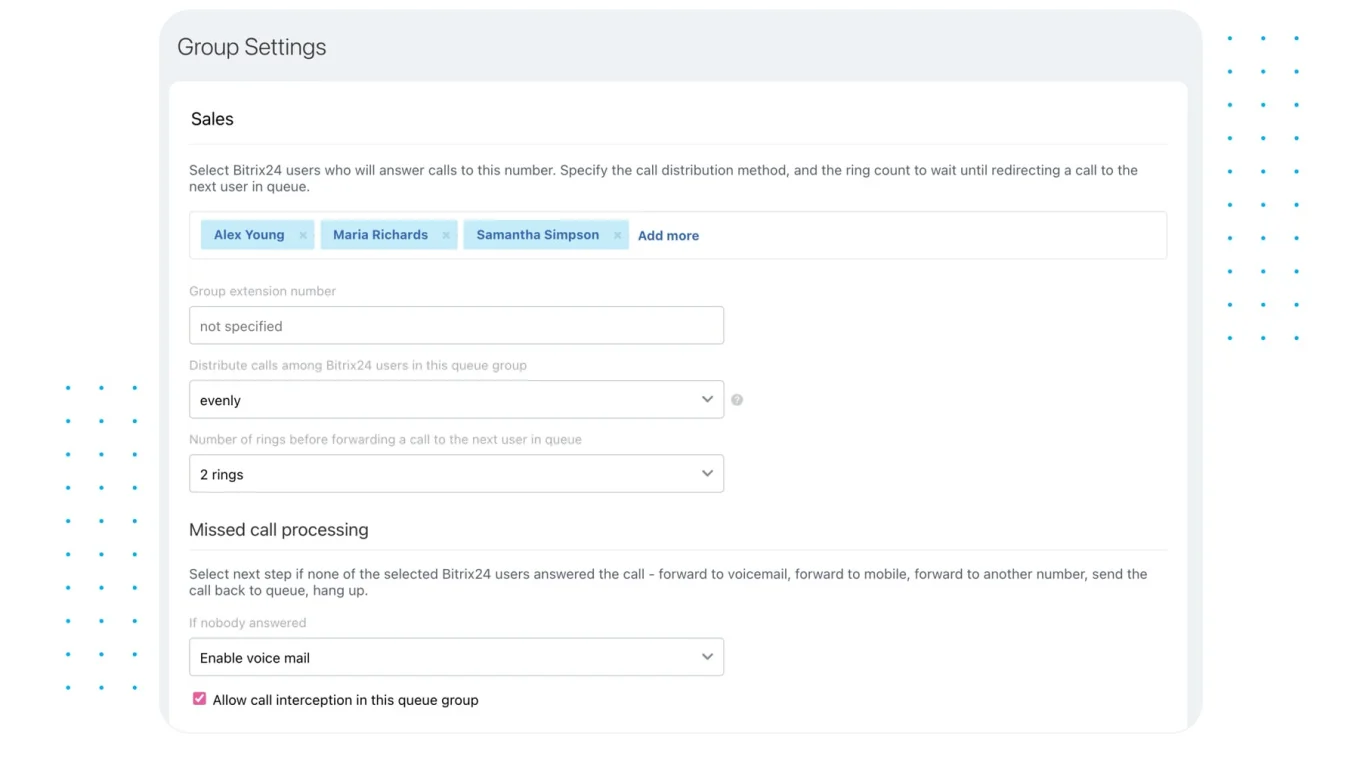
Routing works when the AI classifier sits between intake and assignment. It reads the incoming message against CRM context:
- product area,
- previous cases,
- account status,
- language,
- service terms,
- and existing customer history.
Then it recommends a queue or a specialist.
The hard cases are never clean. "The dashboard isn't loading" turns out to be a permissions problem, an integration failure, or a wider incident hitting half your accounts. For teams on the Bitrix24 Contact Center, routing rules need fallback handling for unclear or multi-category requests, rather than jamming every case into the first queue that matches.
Triggers, routing, and workflow logic: How CRM automation executes in practice
AI goes operational once everyone can answer three questions:
- What starts the workflow?
- Where does the output go?
- What happens when the system isn't sure?
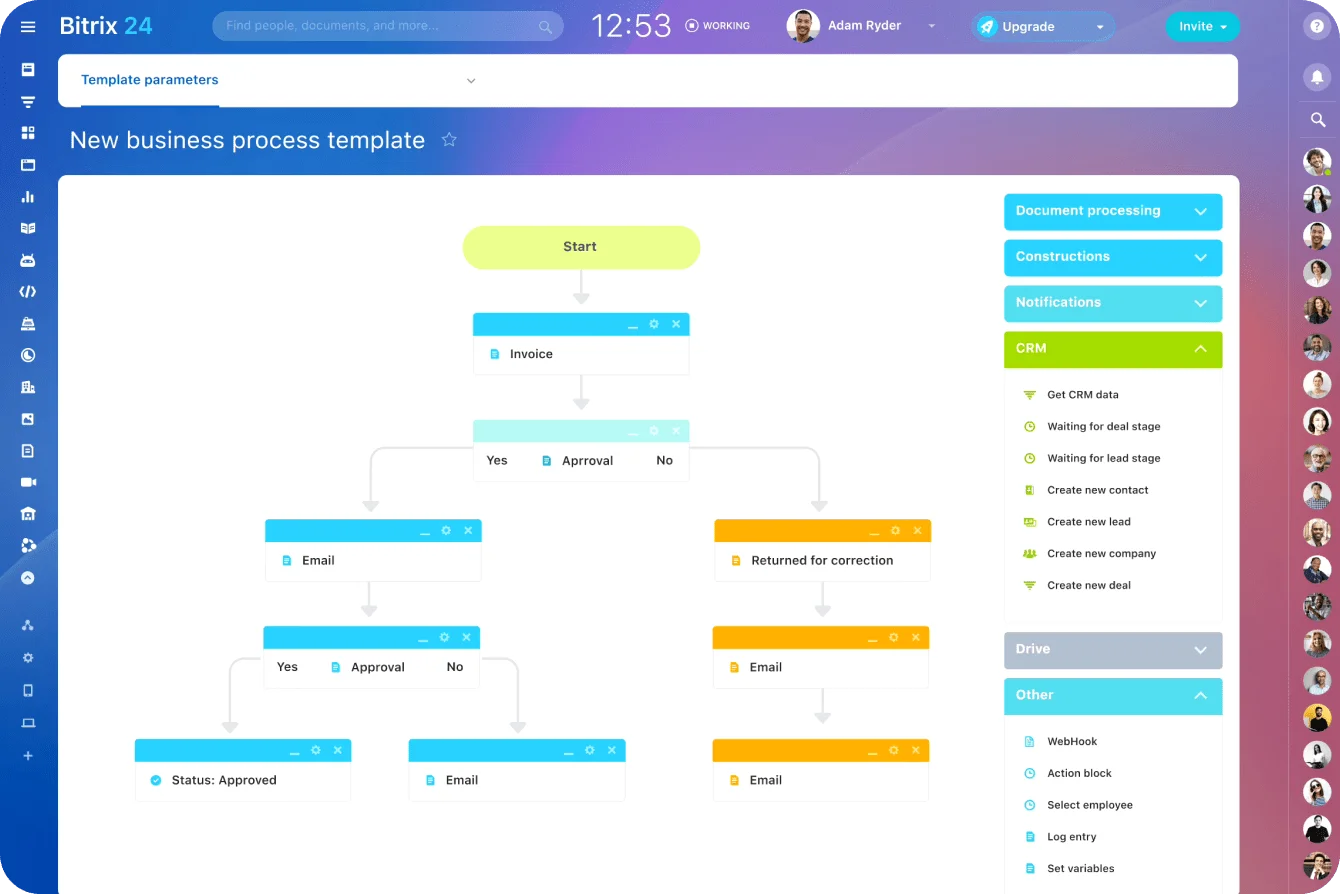
Define the trigger
For sales, the usual triggers:
- a meeting or call completed,
- a transcript becoming available,
- a new inbound lead,
- an opportunity changing stage,
- a customer replying,
- or a deal sitting inactive past an agreed threshold.
For service, it's typically case creation, reassignment, an SLA threshold, or a case sitting unresolved too long.
Make the threshold explicit instead of leaving it to interpretation. Something like "no customer reply for five business days," or "an opportunity over $50,000 stuck in the same stage for 14 days with no meeting booked." Those aren't universal benchmarks. Set them around your own sales cycle and service expectations.
And tie the trigger to a real moment. An account summary generated every hour is noise. The same summary generated the morning of a customer meeting is something the rep will actually use.
Route the output to an owner
Every output needs a destination. A follow-up draft goes to the account owner. A stalled-deal alert goes to the rep first, then escalates to the manager if nothing happens. A high-risk service case can jump straight to a specialist queue with a notification to the service lead.
Internal review steps can run through Bitrix24 task automation, so the output stays attached to an accountable person instead of dying in the CRM timeline.
Use confidence thresholds and fallback rules
Automation gets dangerous when it hides its own uncertainty. One clear category match? Auto-assign it. Two plausible categories? Recommend one and let a person make the final call. Fallback rules handle everything else:
- unknown issue type → general triage,
- missing owner → team queue,
- sparse meeting notes → manual review,
- contradictory account fields → data check,
- low-confidence classification → human assignment.
A fallback queue looks less efficient than full automation. It's a lot cheaper than confidently routing work to the wrong person and paying for the cleanup.
Where human review still matters: Approvals, ownership, and exception handling
A few CRM actions stay human-controlled, period.
Customer communications
AI can draft the follow-up. The account owner still confirms:
- tone,
- pricing,
- deadlines,
- contractual commitments,
- requested deliverables,
- and any statement that could shift the commercial relationship.
Same bar for sensitive service replies.
Priority and escalation decisions
Priority changes need review when they shift where people or budget go. If AI bumps one account above another, the rep or manager gets to see the reason. High-severity escalations (security, billing disputes, regulatory questions, contractual risk) need a named decision-maker on them too.
Exceptions that don't fit the normal flow
Low-confidence summaries, conflicting account data, unclear ownership, fuzzy customer intent: none of these belong in the standard automated path. A ticket spanning several products wants a service lead, not whichever queue scored highest. A deal with unusual procurement terms wants a manager's eyes, even if its activity looks like a run-of-the-mill stall.
A simple human approval checklist
Keep a human in the loop when:
- an external email or service response is about to go out,
- a priority change materially affects which accounts or cases get attention,
- a high-severity case involves security, billing, regulatory, or contractual risk,
- pricing, deadlines, deliverables, or commercial commitments are on the table,
- or confidence is low and the fallback decision could reach the customer.
For external email, default to no auto-send. Let AI write the message, and make a person read it before the customer does.
Operational risks and failure points: Data quality, misrouting, and over-reliance on suggestions
Gartner predicts over 40% of agentic AI projects will be canceled by 2027, not because the models don't work but because of runaway costs, unclear payoff, and missing risk controls. That's the failure mode this section is about. CRM AI also inherits every weakness in the records feeding it.
Poor data produces weak recommendations
Calls that never got logged, account fields two months stale, conversations happening in someone's inbox outside the tracked process: feed that in and the summary comes out full of holes. Scoring and routing break the same way. Nothing prioritizes an opportunity well off fields nobody's touched since spring.
Generated content can sound more certain than the evidence
A follow-up email can read flawlessly and contain a commitment nobody actually made. A deal summary can take a hedged customer comment and, by compressing it to one line, make it sound decided. When an output touches a customer or a commercial decision, people need one-click access to the source material behind it.
Misrouting creates extra work
A case sent to the wrong queue doesn't just sit there. Someone has to read it, spot the mistake, reassign it, and maybe apologize to the customer for the delay. That's a handoff you manufactured.
Employees can start trusting suggestions too much
Accuracy breeds complacency. When summaries are usually right, reps stop opening the source notes. When routing usually works, intake stops scrutinizing the odd case. A few guardrails keep that honest:
- easy access to source records,
- review before sensitive external communication,
- visible reasons behind scores or routing decisions,
- fallback queues,
- audit trails,
- and recurring checks on output quality.
Bias and drift can appear over time
A scoring or routing workflow can run exactly as built and slowly stop fitting the business. Sales patterns shift. New segments show up. Service categories get redrawn. And a model trained on last year's outcomes keeps rewarding last year's patterns.
Review the scoring inputs and classification rules at least quarterly, then sample the outputs for false positives and false negatives. If one segment, product line, or case type is consistently over-prioritized, under-prioritized, or misrouted, the fix is adjustment, not more automation.
Pro Tip
Run the higher-risk stuff in recommendation mode first. Let the system suggest the route or the priority while people still make the call. Compare its picks against theirs over a few review cycles before you let it act on its own.
Scaling AI in CRM: Governance, measurement, and process optimization
Start with one narrow workflow and make it boringly dependable before you add a second. Meeting summaries or inbound triage are far easier to test than a whole automated customer journey.
Standardize the workflow before expanding it
Write it down:
- which data the automation reads,
- what triggers it,
- how outputs are formatted,
- who reviews them,
- where exceptions go,
- and who owns escalation.
If those rules live only in one manager's head, scaling the automation just scales the inconsistency you were trying to kill.
Measure the operational result
For sales, track:
- time spent prepping for account reviews,
- completion of agreed follow-ups,
- stage aging,
- overdue next actions,
- and the share of AI recommendations accepted or corrected.
For service:
- first-response time,
- routing accuracy,
- reassignment rate,
- unresolved case age,
- and resolution time.
Teams on Bitrix24 can pull these into its CRM analytics and reporting tools.
Volume proves nothing on its own. A system can crank out thousands of summaries that everyone ignores or, worse, spends time correcting. So start every target from a baseline. A sales target might be cutting median stage aging 15% in 90 days. A service team might aim to drop reassignment from 12% to 8% in the same window. The specific number matters less than naming three things before rollout: where you are now, where you want to be, and when you'll check.
Review the process as it changes
Stages change. Queues get renamed. Teams reorg. Required fields evolve. And the automation keeps running perfectly against a process that no longer exists. Put reviews on a schedule:
- triggers,
- routing destinations,
- prompts or instructions,
- scoring inputs,
- permissions,
- fallback rules,
- and escalation owners.
A workable cadence: review corrections, exceptions, and missed cases monthly, then run a broader governance review quarterly covering scoring inputs, permissions, routing logic, ownership, and whether the workflow still matches how the business actually works.
An automation built around last year's process won't fit this year's by default.
FAQs
Which use case is usually easiest to start with?
Customer-history summaries and follow-up drafting. Both sit inside work reps already do, and both are easy to test: you can compare the AI's output against the source material before anything reaches a customer.
How much human review is needed?
More for anything customer-facing, any commercial commitment, priority changes, and high-severity service calls. Less for internal summaries and low-risk recommendations, once you've tested their accuracy and set fallback rules.
How good does CRM data need to be before automating?
Not perfect. The core fields the workflow depends on (ownership, stages, contact info, activity history, service categories) do need to be reliable enough for that specific job. Fix the data the use case actually touches. Don't stall every AI project waiting for a spotless database.
Should teams try to automate entire sales or service workflows?
Not at the start. Pick one repeated task:
- summarizing calls,
- preparing follow-ups,
- flagging stalled opportunities,
- or classifying incoming cases.
Once the team trusts it and knows where its exceptions show up, expand from there.
Who needs to be involved, and how long does a pilot take?
Depends on the workflow. Sales Ops or Service Ops usually owns the process definition. IT and security review integrations, permissions, data access, and retention. Frontline reps or agents test whether the output is actually useful. A manager or process owner sets the success metric and decides whether the pilot grows.
For a tightly scoped workflow, plan on 2–6 weeks, with the caveat that it's a planning range, not a promise. A simple call-summary pilot can move fast. A routing workflow that spans several systems, touches sensitive data, or needs security sign-off takes longer.
What should business teams expect in practical terms?
Less time rebuilding account context. More consistent follow-up prep. Earlier warning on stuck records. Faster first-pass triage. What it won't do is rescue bad CRM habits. Stop logging activity, leave ownership vague, or skip fallback rules, and the automation just runs on weak inputs.
Save hours with practical CRM AI
Bitrix24 combines CRM, CoPilot AI, tasks, contact center, and analytics to summarize calls, draft follow-ups, and route work.
Get Started NowStart narrow, make it dependable
The teams that get value out of CRM AI don't automate everything. They find the one place where people keep rebuilding the same history, writing the same follow-up, or triaging the same records by hand, and they point the automation there. Set a baseline. Define the trigger and the review rules. Then watch whether review time actually drops, handoffs actually speed up, and corrections stay in a range you can live with.
Get that wrong and the failure mode is specific: automation that's busy, confident, and quietly making things worse.
Get it right and you buy back the part of the week that was never the job in the first place.
If you're on Bitrix24, pick one measurable workflow, hand a small group clear ownership, test the output against real CRM activity, and expand only once it's dependable.
Still evaluating? Sign up for free and make one real sales or service workflow your test case.