Top 5 Time Management Solutions for Remote Teams


Time management for teams works best when you treat it as a system, not just a set of personal productivity tips. The goal is simple: make priorities clear, protect focus time, balance workloads, and keep work moving without constant meetings or chasing.
Remote work raises the cost of coordination. You cannot rely on quick desk checks, overheard context, or “I’ll catch you after this meeting.” Priorities, ownership, and availability have to be explicit, written down, and visible (especially when people are working across time zones).
This guide is for team leads and managers who want more predictable execution and less coordination overhead.
You’ll get five practical solutions used by high-performing remote teams, plus a quick diagnostic to pinpoint where time is leaking and a simple decision guide to choose the best starting point.
Let’s get into it…
Quick diagnostic: why remote teams lose time (even when everyone is working hard)
Most time loss on remote teams comes from a small set of predictable problems. If you can name which one is happening, you can choose the right fix quickly.
Priorities are unclear or keep changing: In remote teams, this often shows up as decisions living in DMs or scattered threads. People start work without knowing what matters most, then switch midstream when a new message appears. The result is rework, duplicate effort, and more “alignment” calls to reset the plan.
Overlap time becomes meeting time: In remote teams, the few hours everyone overlaps are precious. If those hours get booked with recurring calls and ad hoc syncs, execution time disappears and deep work gets pushed into off-hours. That’s when delivery slows and urgency starts to build.
Workload is invisible, so overload stays hidden: In-office, you can often sense who is overloaded. Remote, you don’t see it until deadlines slip or quality drops. Work piles onto the same reliable people, others wait for direction, and managers spend time firefighting instead of planning.
Estimates are unreliable because async work adds hidden delays: Remote work introduces delays that don’t appear in a task title, including review cycles, approvals, handoffs across time zones, and waiting for responses. When teams don’t account for that effort and delay, timelines drift and commitments weaken.
Repeat work and handoffs depend on memory: Remote teams lose time when “what happens next?” isn’t written down. Recurring tasks, approvals, and handoffs stall because the next owner isn’t clear or isn’t online yet. That creates chasing, bottlenecks, and long message threads to move simple work forward.
Use this diagnostic to identify the dominant pattern right now. Then jump to the matching solution in the next section: prioritization (clarity), time blocking (focus), workload visibility (capacity), time tracking (estimates), or workflows and automation (repeat work).
Remote Time Management Buyer Guide: Top 5 Solutions
Enter your email address to get a comprehensive, step-by-step guide

The fix: The 5 top time management solutions for remote teams
Once you know where time is leaking, the next step is choosing the fix that removes the most friction. The five solutions below are the most reliable team-level systems for improving execution, reducing coordination overhead, and keeping work predictable.
Solution 1: a shared prioritization system
When priorities are unclear, teams waste time reacting to urgency instead of executing on what matters most. Work shifts constantly, alignment meetings multiply, and progress slows.
Definition: A shared prioritization system is a single, visible method for ranking work so everyone knows what matters now, what comes next, and who owns each task.
How to implement
-
Centralize all active work in one shared list or board.
-
Assign one owner and one due or decision date per task.
-
Define 3–4 priority levels and what “urgent” means.
-
Review and confirm weekly priorities in a short planning session.
-
Document priority decisions in the task itself, not in chat threads.
Common pitfall: “Priority inflation” sets in by week two: people label work as urgent to compete for attention, and the system stops being trusted.
Quick fix: introduce a gate: only a named role (team lead/PM/ops) can assign “urgent,” and urgent must meet one written criterion (blocks revenue/customer, blocks other work, or due within 48 hours). Review all urgents in weekly planning.
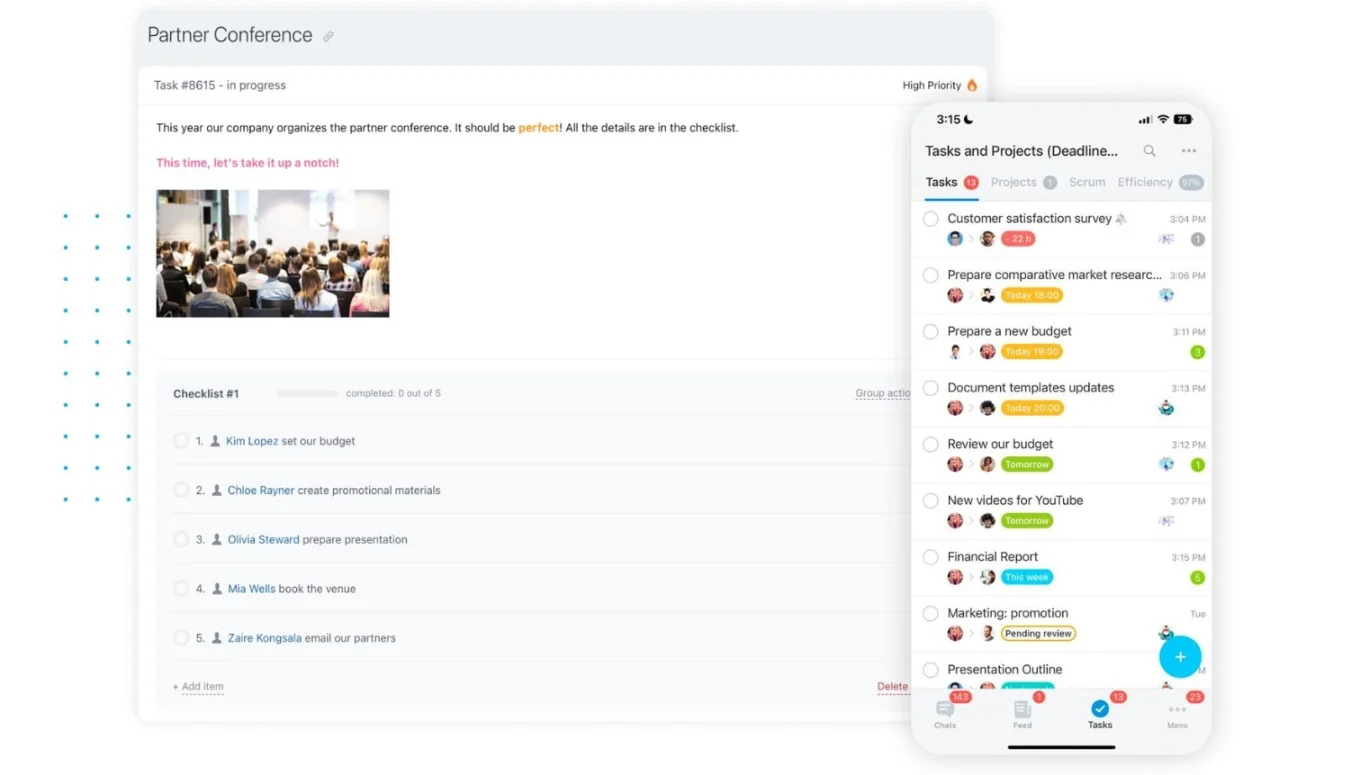
How Bitrix24 supports this: Priorities, owners, deadlines, and discussions live in one workspace, keeping alignment visible and consistent.
Solution 2: time blocking for remote teams (overlap hours + protected deep work)
Remote work stalls when overlap hours get swallowed by meetings and “quick syncs.” When that happens, collaboration expands to fill the day, and deep work gets pushed into evenings or broken into fragments.
Definition: Time blocking schedules work on purpose. Remote teams block overlap hours for collaboration and decisions, then protect local deep-work blocks so execution has space to happen.
How to implement
-
Define 2–4 daily overlap hours for meetings, reviews, and live decisions.
-
Protect a local deep-work block for each person outside overlap hours (no meetings by default).
-
Set meeting rules (agenda required; default to 25/50 minutes).
-
Add one daily admin block so small tasks don’t leak into focus time.
-
Plan the day by mapping the top tasks to specific blocks, not just listing them.
Common pitfall: overlap hours become a meeting dump, and focus time still gets interrupted by messages.
Quick fix: cap overlap meetings (for example, no more than 60–90 minutes/day) and set one async response norm (for example, “reply within 24 hours unless urgent”), so people stop treating every ping as immediate.
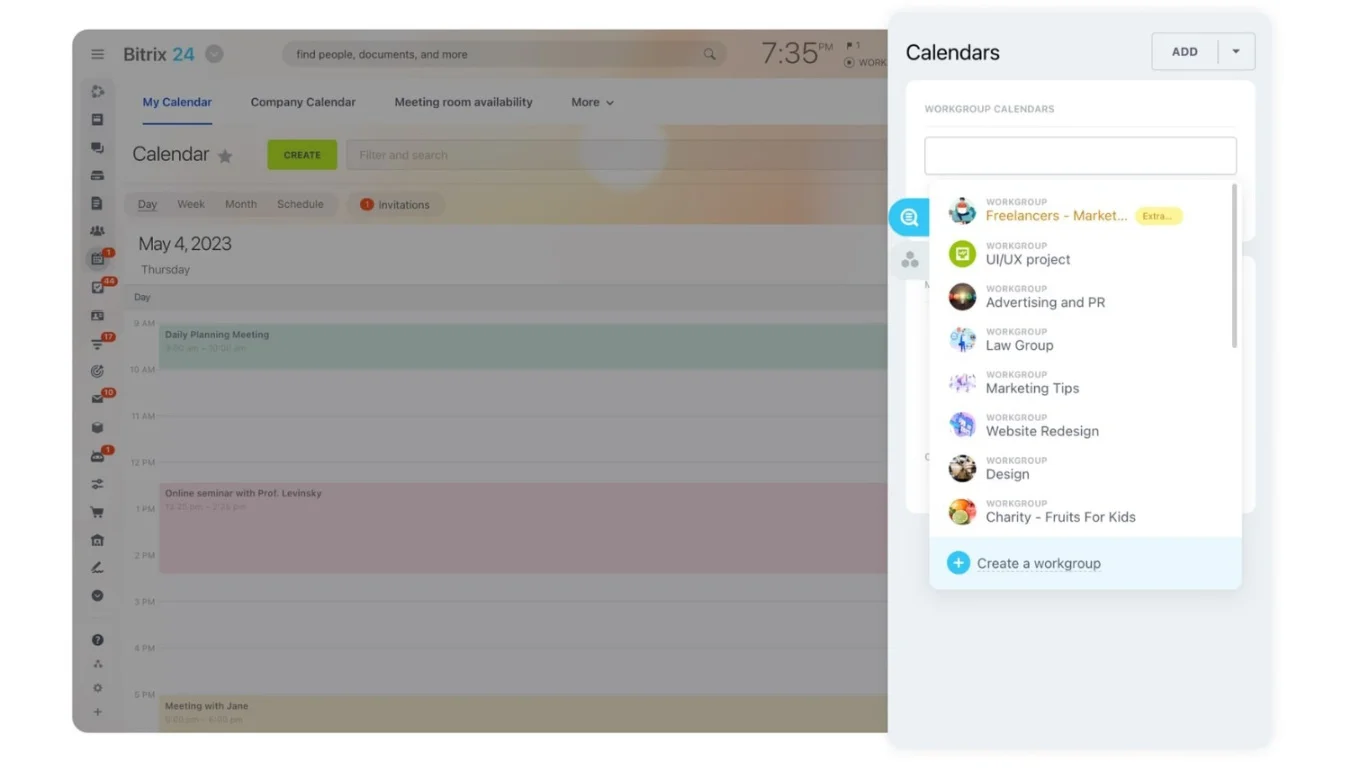
How Bitrix24 supports this: Tasks, calendars, and collaboration tools stay connected, making it easier to plan real work into real time.
Solution 3: workload visibility and simple resource planning
In remote teams, overload is harder to see until something breaks. You don’t get informal signals that someone is swamped, and async handoffs across time zones can hide risk until deadlines are already under threat.
Definition: Workload visibility means having a clear, shared view of who owns what work, what is in progress, and where capacity is tight — so you can rebalance before deadlines slip.
How to implement
-
Keep all active tasks in one system so updates are visible asynchronously.
-
Require owner, due date, and status for each task.
-
Add rough time estimates to priority work (simple ranges are enough).
-
Review workload weekly and rebalance early, before the overlap window fills up with firefighting.
Common pitfall: managers can see overload, but nobody makes trade-offs, so “visibility” becomes a ritual and burnout continues.
Quick fix: set a rebalancing trigger: if someone has more than X priority tasks due this week (or is above 80% estimated capacity), the workload review must produce one decision — reassign, de-scope, or renegotiate the deadline.
How Bitrix24 supports this: Ownership, timelines, and risk indicators are visible in one place, reducing reactive planning.
Solution 4: time tracking tied directly to work
Time tracking fails when it feels like admin. It works when it improves planning; especially in remote teams, where async reviews, approvals, and time zone handoffs add hidden time.
Definition: Effective time tracking happens inside tasks and is used to improve future estimates, not to monitor activity.
How to implement
-
Track time only for work with poor estimates.
-
Log time directly inside tasks.
-
Compare estimated vs. actual effort.
-
Adjust future plans based on real data.
Common pitfall: time logs become either too granular (admin-heavy) or too vague (no insight), so the data doesn’t change planning.
Quick fix: track only 2–3 work categories where prediction matters (e.g., client delivery, campaigns, launches) and run a weekly “estimate calibration” rule: update future estimates when actuals are consistently off by 25% or more.
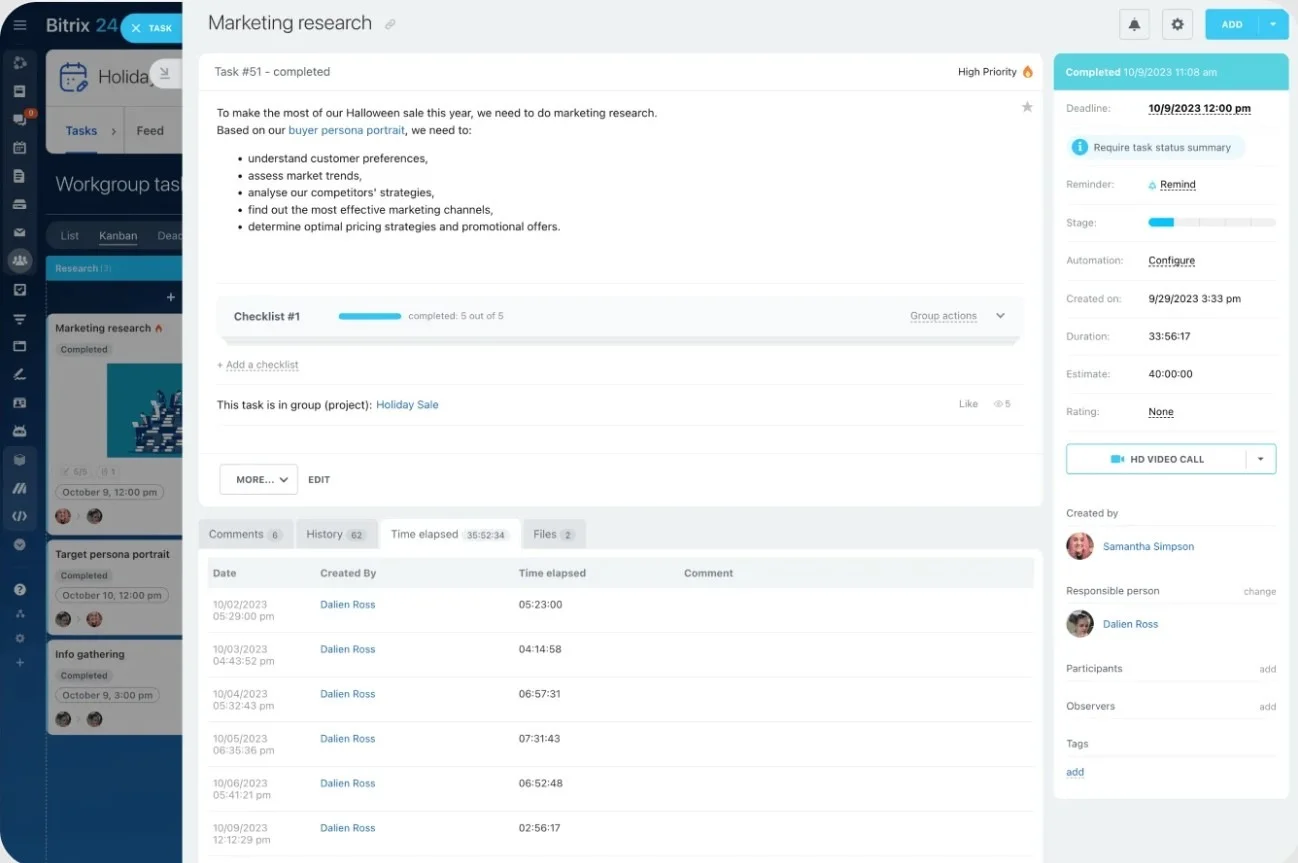
How Bitrix24 supports this: Time tracking lives inside tasks, making effort data easier to trust and use.
Solution 5: standardized workflows and lightweight automation
Repeated coordination drains time. The same work gets rebuilt, approvals stall, and progress depends on memory, especially in remote teams where the next owner may be offline and handoffs can lose a full day.
Definition: Standardized workflows define how repeat work is done, while automation removes the need to remember each step.
How to implement
-
Identify one recurring, messy process.
-
Define clear steps and ownership.
-
Turn it into a reusable template.
-
Automate one trigger that moves work forward.
Common pitfall: automation fires, but ownership is unclear (notifications get ignored, and the workflow quietly breaks).
Quick fix: assign one “workflow owner” per automated process and set a lightweight audit: once per week, check stuck items older than X days and adjust the workflow step that caused the jam before adding new automation.
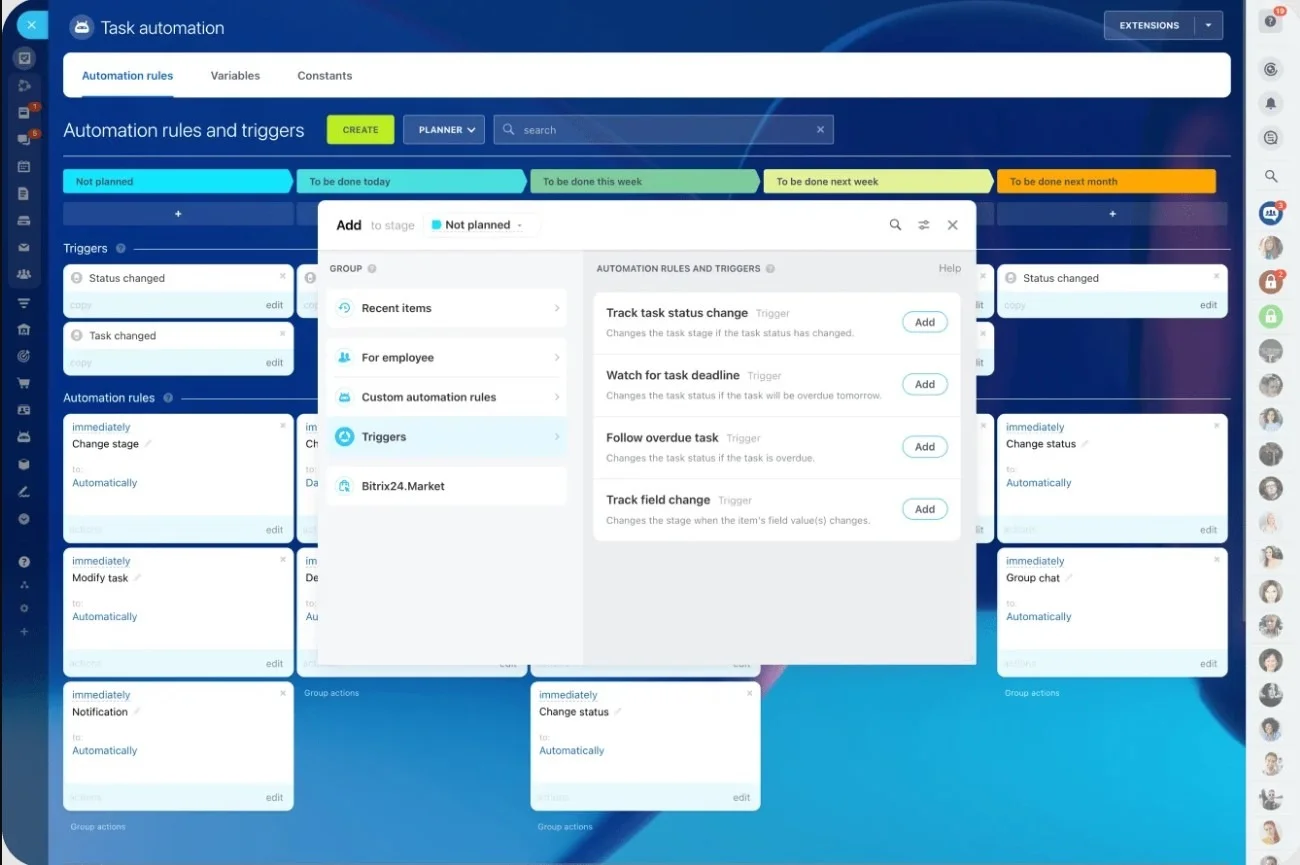
How Bitrix24 supports this: Tasks, templates, and automation work together in one workspace, reducing manual follow-ups and delays.
How to choose the right starting point
This table helps you quickly identify the time management solution that best addresses your team’s biggest source of friction right now.
|
Team problem |
Best starting solution |
Why it helps |
|---|---|---|
|
Priorities change often and without warning |
Shared prioritization |
Creates consistent decisions |
|
Calendars are full, and focus time is rare |
Time blocking |
Protects execution time |
|
Important work spills into evenings or weekends |
Time blocking |
Reserves time for key work |
|
The same people are overloaded |
Workload visibility |
Reveals capacity issues |
|
Deadlines slip without early warning |
Workload visibility |
Surfaces risk early |
|
Estimates are often wrong |
Time tracking |
Improves planning accuracy |
|
Projects drag longer than expected |
Time tracking |
Shows where time goes |
|
Work is rebuilt from scratch repeatedly |
Workflows and automation |
Reduces repeat effort |
|
Approvals and handoffs slow progress |
Workflows and automation |
Keeps work moving |
If you are unsure where to start, begin with shared prioritization. Clear priorities create the foundation for every other time management system.
Because Bitrix24 supports all five systems in one workspace, you can start with one improvement and expand over time without switching tools or retraining your team.
A 2-minute checklist to evaluate team time management tools
Use this checklist when trialing or reviewing a tool. If you answer “no” to several of these, adoption will be hard, no matter how good the feature list looks.
-
Can every task have one clear owner, due date, and status by default?
If this requires custom setup or constant policing, the system will decay quickly.
-
Can the team see progress without asking for updates?
You should be able to tell what’s moving, what’s blocked, and what’s overdue without checking chat or holding a meeting.
-
Does the tool reduce interruptions instead of creating more?
Focus time should be visible and respected. Updates should happen inside the work, not through scattered messages.
-
Can workload and risk be spotted in under a minute?
A good system makes overload and deadline risk obvious without exporting data or updating spreadsheets.
-
Do handoffs and approvals move work forward automatically?
Ownership changes, reminders, and next steps should not depend on someone remembering to follow up.
-
Will different roles actually use it the same way?
The tool should support lists, boards, or timelines so people don’t revert to side systems.
If a tool passes most of these checks, it’s likely to support real time management habits rather than just documenting work.
Bitrix24 fits this checklist well because it combines tasks, calendars, collaboration, visibility, and automation in one workspace, making it easier for teams to adopt the system and keep it working over time.
Turning time management into a system that scales for remote teams
Time management problems in remote teams are rarely about effort. They come from unclear priorities, overloaded overlap hours, hidden workload, and handoffs that depend on someone being online.
When you fix those issues with the right systems, execution becomes calmer, faster, and more predictable (even across time zones).
Start with the single change that removes the most friction for your team today.
If you want those systems to stick without adding more tools or overhead, use Bitrix24 to bring priorities, time, workload, and workflows into one workspace so progress stays visible asynchronously.
Optimize Remote Team Performance
Leverage Bitrix24's integrated workspace to adopt these time management solutions, enhancing team efficiency, reducing overhead, and driving predictable outcomes.
Get Started NowFAQ: time management solutions for remote teams
What is the most effective time management approach for teams?
The most effective approach combines shared priorities, protected focus time, and visible workloads. Teams improve fastest when these three basics are in place because they reduce rework, interruptions, and last-minute firefighting. From there, you can add automation or time tracking only where it’s genuinely needed.
How long does it take to see results from team time management changes?
Most teams notice clearer priorities and fewer delays within 2–4 weeks if one system is implemented consistently. The quickest wins usually come from prioritization and focus protection, because they immediately reduce daily friction. Bigger improvements (like better forecasting) typically take longer because they depend on cleaner habits and data.
How do you manage time when teams work across multiple projects?
Centralize tasks, limit work in progress per person, and review workload weekly to prevent silent over-commitment. Use timelines to spot clashes early, rather than discovering them during delivery. If everything is a priority, reduce active commitments before adding more processes.
Is time tracking necessary for every team?
No. Time tracking is most useful when estimates are consistently wrong or delivery dates slip, and you need a reality check for planning. Keep it lightweight and tied to tasks, and use it to improve future estimates rather than monitor activity. If it doesn’t change planning decisions, it’s not worth the effort.
What causes teams to miss deadlines most often?
Unclear ownership, hidden overload, and slow handoffs cause most deadline failures. Fixing these three removes the most common sources of delay: tasks sitting without a driver, capacity issues discovered too late, and approvals or next steps that stall. Simple reminders and clear “next owner” rules help work keep moving.
Do teams need multiple tools to manage time well?
No. Fewer tools usually work better if they cover tasks, calendars, workload visibility, and basic automation in one place.