Retention Starts in Week One: How to Turn First Usage Into a Repeat Habit


TL;DR (Quick Summary)
Activation can look healthy while retention quietly fails. The fix is to design week one around a fast second and third meaningful use, rather than treating completed setup as the finish line.
- Why users disappear after initial activation: Second use is the real test.
- What turning first usage into a repeat habit means: Repeat value without forced dependence.
- Why first-week retention processes break: Handoffs and prompts miss the user’s actual readiness.
- Step 1: Define the first repeatable value moment: Pick one outcome worth repeating.
- Step 2: Remove friction between first success and second use: Make repeating easier than stopping.
- Step 3: Orchestrate week-one prompts around user context: Trigger the next action based on behavior.
- Step 4: Reinforce progress and prove compounding value: Show improvement the user can verify.
- Step 5: Measure, troubleshoot, and scale repeat behavior: Track the handoff, fix the biggest break, and automate proven paths.
Takeaway: Retention starts before users decide whether your product belongs in their routine. When week one doesn’t produce repeatable value, later lifecycle campaigns have little to save.
A user completes onboarding, gets a result, and looks activated. Then three days later, they’re gone.
That gap between first success and second use is where retention often starts to break. The user proved they could get value once. What they haven’t yet proved is that the product is useful enough, easy enough, or relevant enough to return to during real work.
That distinction matters.
Amplitude reports that 69% of products with strong day-seven activation were also strong three-month retention performers. Early activation is a useful signal, but the stronger test is whether users come back and repeat the behavior that produced value in the first place.
For product, lifecycle, and customer success teams, that shifts the week-one question from “Did the user activate?” to “What needs to happen for them to do this again?”
The rest of this guide shows you how to define that repeatable value moment, remove the friction around it, and coordinate the right follow-up before momentum disappears.
Why users disappear after initial activation
Most teams treat activation as the big checkpoint. A user signs in, connects data, invites a teammate, publishes something, or completes a workflow.
On paper, that looks like progress, right? But it can also hide weak intent to repeat the behavior.
Users may finish setup because onboarding guided them, a sales representative walked them through it, or curiosity got them to try once. None of those conditions guarantees that they’ll return without help.
Consider a sales team importing its active deals into a new CRM: the import may satisfy the activation criteria, but retention depends on what happens when a representative needs to update a deal the next morning.
If that next step is unclear, the team may return to its spreadsheet while the new account remains technically “activated.”
Second use gives a clearer signal
A second meaningful use shows that the user recognized enough value to repeat the behavior, or at least understood how the product could solve another real problem.
Week one is the narrow period when users decide whether a product belongs in their workflow or in the pile of tools they might revisit later.
In many cases, later means never.
When users complete one guided action and then stall, the business has recorded a temporary event without creating momentum.
7-Day Habit Loop Onboarding Plan Template
Enter your email address to get a comprehensive, step-by-step guide

What “turning first usage into a repeat habit” means
Meaningful use is an action tied to an outcome the user cares about. Repeat behavior is the exact meaningful action the user completes again. The first repeatable value moment is the earliest point at which that repeated action produces another visible result.
Examples of meaningful use include:
- Generating another report for a team meeting.
- Completing a second task from a reusable template.
- Reviewing a new batch of alerts and acting on the findings.
- Updating another live opportunity in the sales pipeline.
- Running the same workflow for a second client or project.
Opening the app, reading a tooltip, or clicking through a tour only matters when that activity helps the user achieve an outcome.
Move past setup
Typical onboarding covers account setup, configuration, permissions, integrations, and education.
Habit-building begins after the first result appears. Its job is to make the next valuable action clear and easier to complete.
For example, a project manager may create a first project with help from an implementation specialist. The repeat behavior occurs when that manager creates the next project using saved tasks, owners, permissions, and documents without rebuilding everything manually.
Build voluntary repeat behavior
Effective retention work helps users recognize repeat value sooner. Notification volume, manufactured urgency, and unnecessary workflow lock-in create deferred churn.
The practical test is straightforward: after the first use, can the user quickly explain why another use would help them?

Why first-week retention processes break
The most common failure is simple: users complete setup but never experience an outcome strong enough to want again.
Teams celebrate setup because it’s easy to measure. Users judge the result because that’s what affects their work.
Ownership gets lost between teams
Marketing promises one outcome, sales frames another, onboarding teaches a broader workflow, and the product promotes a different set of actions.
Each team may be doing reasonable work, but the user experiences a disconnected chain of handoffs. No one owns the path from first success to repeated success.
A stronger operating model gives one person or team responsibility for first-use-to-second-use conversion. Product, lifecycle marketing, customer success, sales, and support still contribute, but someone has to maintain the path and call out breaks.
Prompts follow a calendar instead of the user
Follow-up emails often arrive on a fixed schedule, regardless of what the user has completed. In-app prompts appear during the wrong task. Customer success reaches out with education when the user needs a shortcut.
This creates predictable mismatches:
|
Break point |
What the team sees |
What the user experiences |
|---|---|---|
|
Setup completed |
Activated account |
“I did the admin work. What should I do now?” |
|
First task finished |
Initial success event |
“That worked once, but repeating it looks annoying.” |
|
Follow-up campaign sent |
Email engagement opportunity |
“This message has nothing to do with what I just did.” |
|
CSM outreach scheduled |
Lifecycle touchpoint covered |
“I need a useful next step, not a check-in.” |
Week-one retention breaks when the operating model follows internal milestones instead of user readiness.

Step 1: Define the first repeatable value moment
Start by choosing the specific action a user should want to complete again within week one.
This is the first repeatable value moment: the earliest meaningful action that can reasonably happen more than once and produce another visible result.
Choose a repeat behavior
Many teams select a feature as the target.
“Used dashboard filters” is weak because it describes an interface action.
“Ran a second report that answered a live team question” connects the action to a useful result.
The outcome gives users a reason to return. It should produce something they can see, share, save, complete, or improve.
For each segment, select one primary repeat behavior. Pushing three “critical” actions during the first week splits attention and makes it harder to tell which behavior matters.
Document four elements
A product manager, lifecycle owner, and customer-facing team member can usually define the first repeatable value moment in one working session.
Capture:
- User segment: Who the retention path serves.
- Repeat behavior: The exact action the user should complete again.
- Visible outcome: What the user receives or improves.
- Target timing: When the second use should reasonably happen.
For a recruiting platform, the repeat behavior might be reviewing a second batch of candidates using the same scorecard. The visible outcome is a more consistent screening process. The target timing may be within 72 hours of reviewing the first batch.
Timing must follow the natural cadence of the job. For an analytics product, the first repeatable value moment might be refreshing a saved report before the next weekly meeting rather than returning the following day.
For a workflow automation product, it might be triggering a second rule on a similar process and confirming that the task, approval, or notification was routed correctly.
Asking either user to return on an artificial schedule may create activity without proving that the product belongs in their real workflow.
Assign an operational owner
Once the behavior is defined, record who monitors it and who acts when a user stalls. Without that assignment, the metric may appear on a dashboard but never change anyone’s work.
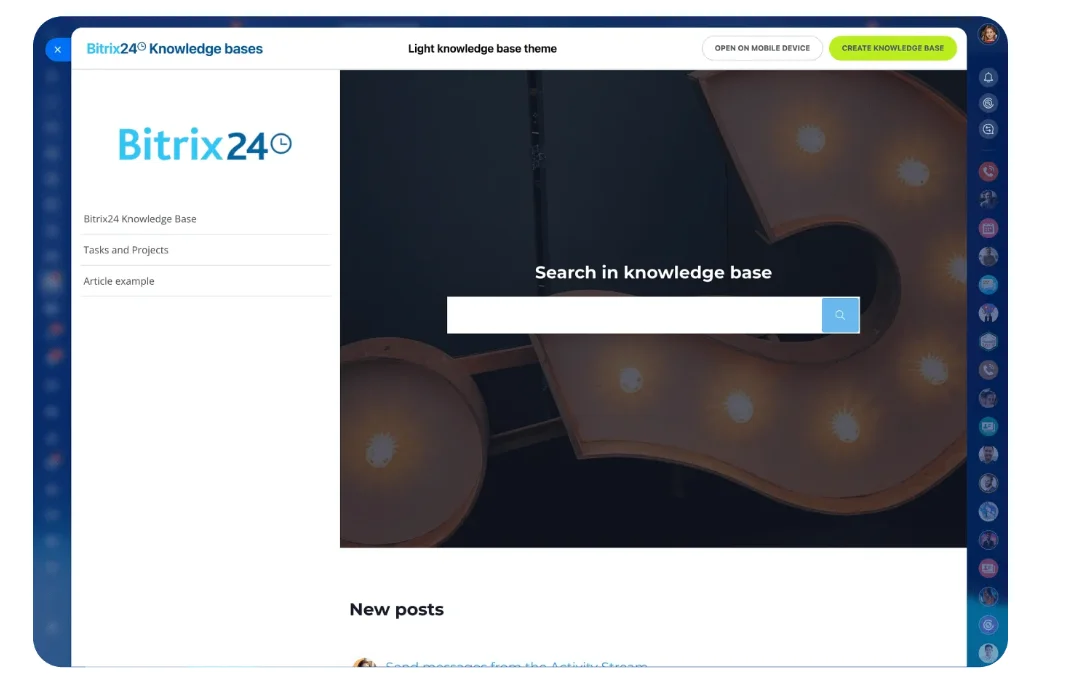
Teams using the Bitrix24 knowledge base can document segment definitions, target actions, ownership, and escalation rules in a shared space. This prevents sales, onboarding, and customer success from using different definitions of “successful activation.”
Pro Tip
Write the repeat behavior as a sentence a new employee could evaluate without extra explanation: “The user completed X again and received Y.”
If the definition relies on vague terms such as “engaged deeply,” it isn’t ready to measure.
If you can’t define the behavior clearly, the rest of the retention process will remain fuzzy.
Step 2: Remove friction between first success and second use
Once the first repeatable value moment is defined, map what happens immediately after the first success.
The points where users pause, switch tools, or ask for help are where retention work needs to get practical.
Audit the post-success path
Walk through the journey as a user would:
- Complete the first meaningful action.
- Leave the product.
- Return later without guidance.
- Attempt the same type of action again.
Record every decision, field, permission request, upload, approval, and configuration step between the first and second success.
The blockers are often small:
- Another data import.
- A blank template.
- An unclear button.
- Missing access.
- Settings that weren’t saved.
- An approval that requires another department.
- A tutorial that interrupts the real task.
Individually, these problems look minor. Together, they make returning feel harder than stopping.
Remove, defer, automate, or prefill
Useful fixes are often unglamorous:
- Apply sensible defaults so users don’t repeat basic configuration.
- Offer a template based on the last successful action.
- Preload the next workflow with prior selections.
- Defer advanced settings until the user needs them.
- Reduce approval requirements for low-risk repeat actions.
- Place the next task directly beside the completed result.
- Save filters, views, owners, and permissions when appropriate.
A project manager who finishes a first launch plan may be willing to create another. That willingness disappears if the second project requires rebuilding the task structure, assigning every owner, and locating the same documents again.
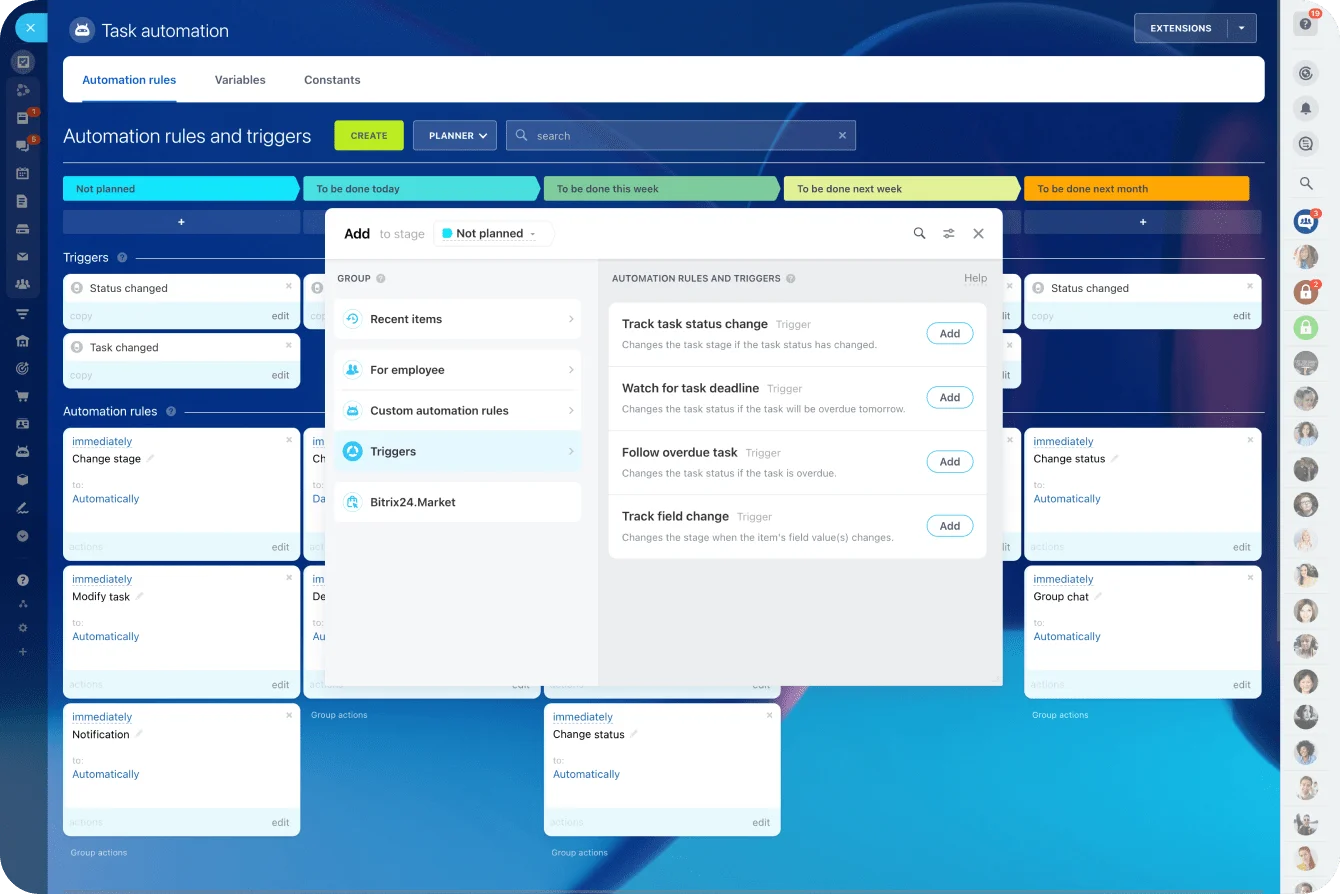
Within Bitrix24, teams can use task automation to create follow-up tasks, assign owners, or start the next internal step after a milestone is completed. The automation should remove coordination work instead of adding another notification for the user to dismiss.
Test the second-use effort
Repeating should feel easier than pausing.
Ask a person unfamiliar with the onboarding flow to complete the second meaningful action without coaching. Watch where they hesitate.
A short usability test often exposes issues that funnel data can’t explain, such as:
- Unclear labels.
- Uncertainty about whether an action saved.
- Missing context from the first session.
- Too many choices on the next screen.
- Permissions that worked during onboarding but fail later.
One useful diagnostic is to count decisions rather than clicks. A flow with several obvious clicks may be easier than a screen requiring one high-effort decision.
When second use asks the user to rethink setup, choose between unfamiliar options, or seek internal approval, momentum disappears quickly.
Step 3: Orchestrate week-one prompts around user context
Prompts work best when they respond to behavior. Fixed lifecycle schedules frequently send them at the wrong moment.
In week one, prompts should connect to an unfinished task, a recent win, a likely next action, or a known stall point.
Build a signal-to-action map
Use this sequence:
- Define behaviors that signal readiness, hesitation, or drop-off.
- Map one next action to each signal.
- Select the channel that fits the moment.
- Write the prompt around that action and its payoff.
- Suppress the message when the user has already acted or encountered a separate problem.
A user who completed one project template but hasn’t launched another within the expected window could receive a prompt opening a prefilled second template.
A newsletter covering five unrelated features adds noise and gives the user another reason to ignore future messages.
Match the channel to the blocker
Choose the channel based on what the user needs next:
- In-app prompt: Use when the user is active and can take the next step immediately.
- Email: Use when the next action requires preparation or happens outside the product.
- Push notification: Use for time-sensitive actions that the user has chosen to receive.
- CSM task: Use for high-value accounts, complex implementations, or organizational blockers.
- Support follow-up: Use when a technical problem has interrupted the retention path.
For a high-value account, human outreach may work better than automation. A CSM can reference the completed action, explain the next useful step, and offer help with a specific blocker.
“Just checking in” puts the work of diagnosing the problem back on the customer.

Use prompts tied to recent behavior
A useful prompt references what the user has already done and proposes one next action.
- In-app: “You created the Q3 launch plan. Start the next project with the same owners and task structure.”
- Email: “Your first weekly report is saved. Refresh it before Friday’s meeting to compare this week with last week.”
- CSM task: “The team completed its first candidate review. Offer to copy the scorecard into the next open role and check whether permissions are blocking the hiring manager.”
Each message is narrow. It gives the user one next move and one reason to complete it.
Keep customer context in one place
A team using Bitrix24 CRM can keep lifecycle status, recent conversations, ownership, and follow-up tasks attached to the same customer record.
This reduces the risk of marketing sending an automated nudge while a support or implementation issue remains unresolved.
For cross-team handoffs, the Bitrix24 Contact Center can keep customer messages and communication history connected to the CRM. The customer shouldn’t have to repeat the same context to sales, support, and customer success.
Pro Tip
Add suppression rules before adding more messages. Pause routine prompts when there’s an open support issue, failed integration, billing problem, or active conversation with a CSM.
A well-timed retention email still feels careless when the product isn’t working.
Keep each message narrow: one prompt, one next move, and one clear payoff. Broader education can come later.
Step 4: Reinforce progress and prove compounding value
Users are more likely to repeat an action when they can see that the first action changed something.
Progress signals need to be visible, accurate, and connected to the user’s goal.
Use measurable progress signals
Display what improved after first use:
- Tasks completed.
- Records processed.
- Errors resolved.
- Work moved to the next stage.
- Team activity unlocked.
- A report created or updated.
- A response sent or approved.
Only claim outcomes the product can actually measure. Estimated time savings should be presented as fact only when they come from a defensible calculation.
A useful message might say, “You’ve completed two candidate reviews using the same scorecard,” or “The updated report is ready to share with your team.”
Both statements connect activity to a visible result. Generic encouragement such as “Great progress” leaves the user guessing about what changed.
Check the quality of each progress signal
Before displaying a progress message, confirm that:
- The product can verify the result.
- The signal explains what changed.
- The result connects to the user’s original goal.
- The message helps the user understand what to do next.
- The result can be shared when the user needs to prove value internally.
If the message fails those checks, it may be celebrating activity rather than communicating value.
Make repeated actions build on each other
The second action should inherit value from the first.
Useful continuity features include:
- Saved preferences.
- Reusable templates.
- Historical comparisons.
- Previous owners and permissions.
- Cumulative records.
- Saved views and filters.
- Suggested next actions based on earlier work.
This matters in products where value emerges over time.
A dashboard becomes more useful when it contains several reporting periods. A CRM becomes more useful when customer interactions are recorded consistently. A project system becomes more useful when completed work informs the next plan.
Without continuity, every session feels like starting over.
Help users prove value internally
Many users need to justify continued use to a manager, client, or team lead.
Give them proof they can share:
- A completed-work summary.
- A report showing changes over time.
- A list of resolved issues.
- A pipeline or project-status snapshot.
- A record of team participation.
- An export tied to the original goal.
A user who can demonstrate progress internally is more likely to secure the access, budget, participation, or approval needed for continued adoption.
Quick check: if a user completes the core action twice during week one, will they have concrete evidence that the product helped?
If the answer is unclear, the product may be recording activity without making the value visible.
Step 5: Measure, troubleshoot, and scale repeat behavior
Measure the handoff from first use to repeated use directly.
An activation dashboard can’t explain whether users returned and received value again.
Track a small set of operational metrics
The most useful measures are plain:
- First-use-to-second-use conversion: The percentage of users who repeat the meaningful action.
- Time to repeat action: The hours or days between first success and second use.
- Second-use-to-third-use conversion: Whether the behavior continues after the novelty wears off.
- Week-one drop-off point: The exact stage where users stop.
- Segment performance: How repeat behavior differs by role, use case, acquisition source, plan, or implementation type.
Avoid defining the return event as “any activity” unless almost every activity represents value.
Reopening the app to find a missing setting doesn’t qualify as meaningful retention.
Set targets around the product’s real cadence
Time-to-repeat targets should match how frequently the underlying job occurs.
A communication product may need another meaningful use within a day. A reporting product may naturally repeat every week. Payroll, compliance, and planning products may operate on monthly or quarterly cycles.
Compare users with similar jobs and expected cadences. A universal “return within seven days” target can misclassify healthy users in low-frequency products and weak users in products intended for daily work.
Run a weekly retention review
Product, lifecycle marketing, customer success, and support should review the first-to-second-use path together.
A focused weekly session is usually more useful than a monthly presentation filled with broad engagement metrics.
Review:
- The largest drop-off since the previous review.
- Recent support tickets and customer conversations from that stage.
- A sample of user sessions or workflow records.
- Whether prompts matched the user’s behavior.
- Whether the outcome gave users a reason to return.
- One change to test before the next review.
Separate analysis from operational response
Product analytics tools should remain the source for detailed in-product events and cohort behavior.
Bitrix24 can support the operational response through its CRM analytics and reporting tools, customer records, assigned tasks, and behavior-based follow-ups.
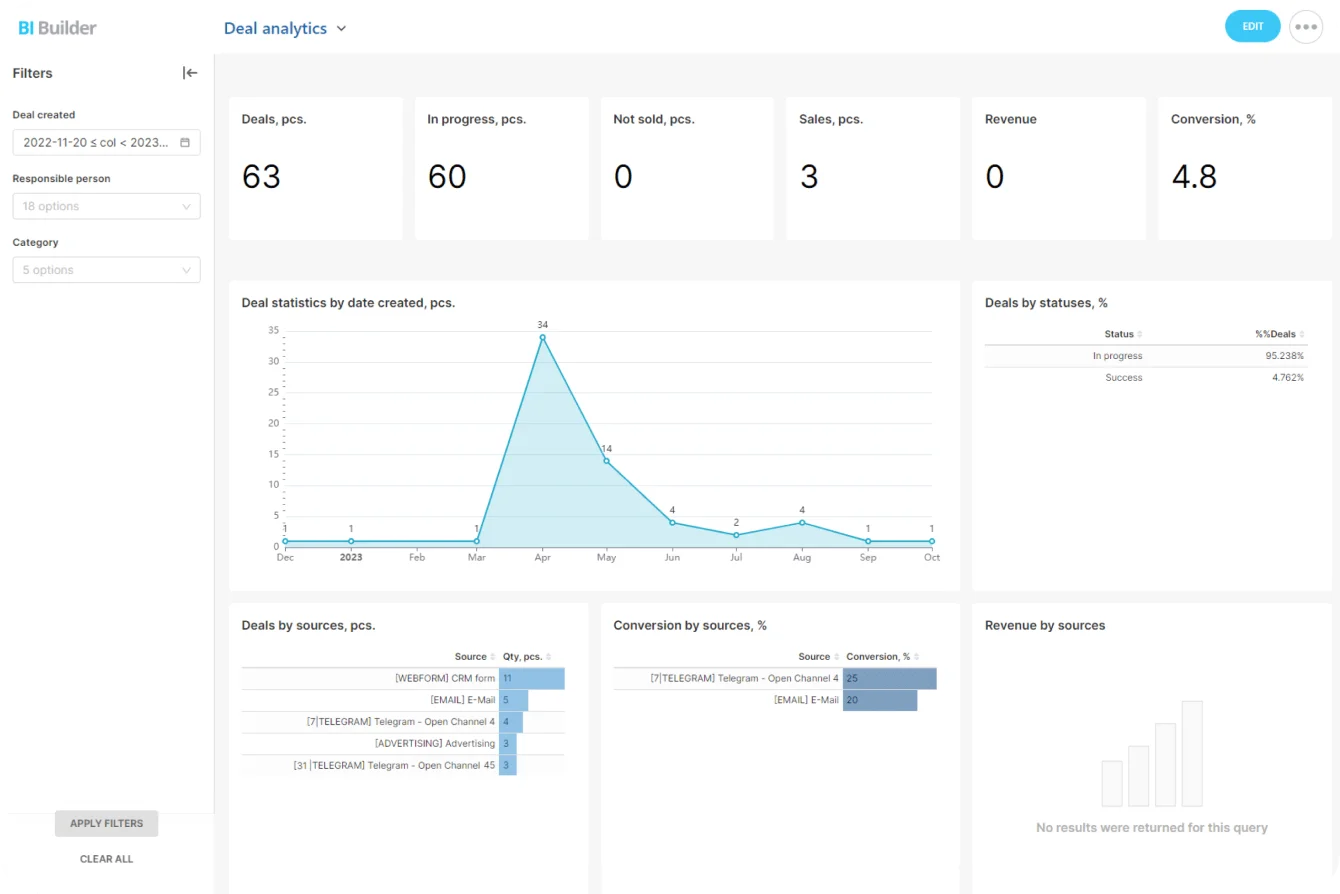
Use specialized product-event analytics when you need precise information about feature-level behavior.
Where systems need to exchange status or event information, use tested integrations rather than relying on employees to copy updates manually.
Validate the data before triggering customer communication. A mislabeled event can send a “great progress” message to someone whose workflow actually failed.
Troubleshoot the exact drop-off
Common mistakes become easier to identify once the correct path is visible:
- Too many “must-see” features compete for attention.
- Setup completion is mistaken for value.
- The next action requires more effort than the first.
- Generic nudges ignore recent behavior.
- Messages continue after errors or support requests.
- Value is real but invisible to the user.
- Teams optimize separate touchpoints without one owner for the full journey.
Test one meaningful change at a time. Adjusting the prompt, template, default settings, and timing simultaneously may improve results, but you won’t know which change helped.
Pro Tip
Pair every funnel drop-off with qualitative evidence. Review support tickets, customer calls, session recordings, or implementation notes from that exact stage.
The metric identifies the problem area, while the user’s experience explains the cause.
Standardize only after the path works
As volume grows, standardize by segment. Different user types may need different repeat behaviors, timing windows, prompt logic, and proof points.
Automate triggers only after the path works manually. If a user completes action A and stalls for the expected period, launch message B or assign task C.
Small changes to timing, copy, defaults, or templates can improve repeat usage without disrupting the whole experience. Large onboarding redesigns often introduce several variables at once and make results harder to interpret.
FAQ
What if our cohorts are small?
Use directional patterns rather than waiting for perfect statistical significance. Review recordings, support tickets, implementation notes, and CSM conversations alongside product data.
Track the same repeat behavior for several cohorts and look for recurring friction. One complaint may be an exception. The same hesitation appearing across several users deserves attention.
What if implementation takes longer than a week?
Define “week one” relative to the first usable outcome, rather than the contract signature or kickoff date.
For an enterprise product, implementation may take several weeks. The retention clock begins when the user can first complete meaningful work. Keep implementation progress metrics separate from product-use retention metrics.
How do shared accounts affect this?
Track repeat behavior at both user and account levels.
In collaborative products, the original user may complete the first action while a teammate completes the second. That can still represent healthy adoption, provided the account is receiving repeated value and responsibility isn’t being passed around because the workflow is confusing.
Do we need a large tooling stack for this?
No. You need trustworthy event tracking, behavior-based triggers, clear ownership, and a way to monitor the week-one conversion path.
Start with the smallest setup that lets the team identify a stalled user and take the correct next action. Add tools when manual coordination becomes unreliable.
How long until we see retention improvement?
If the issue is a narrow first-week bottleneck, movement may appear after a few cohorts once the team removes friction or fixes prompt timing.
Longer-term retention takes more time to confirm. Increased clicks or message engagement alone don’t prove success. The user must repeat the meaningful action.
What about products with infrequent natural usage?
Use the real cadence of the job to define the next meaningful use.
A payroll system may produce healthy repeat behavior during the next pay cycle. A compliance product may need to preserve context until the next review, filing, or audit task.
A tax product, event platform, or quarterly planning tool won’t have the same return window as a communication app. Measure whether users return when the next legitimate need appears and whether the product preserves enough context to make that return easy.
What if value depends on external events?
Anchor prompts and proof points to those events, such as inventory changes, incoming applications, incidents, approvals, or deadlines.
The timing logic must account for whether the event occurred. Prompting a user to review new applications when none have arrived makes the product feel disconnected from reality.
Turn first success into repeat customer habits
Bitrix24 unites CRM, tasks, automation, and customer communications so teams can coordinate onboarding and drive timely follow-ups.
Get Started NowMake second use the operating target
Retention starts to become real when users return because the product makes the next job easier, faster, or more consistent than the alternative.
That second use is the proof point. It shows that the first success wasn’t a one-off, and that the product has started earning a place in the user’s normal workflow.
Bitrix24 helps sales, onboarding, support, and customer success teams keep the context, ownership, tasks, communication, and follow-up around those moments in one place.
Sign up for Bitrix24 free and turn first success into repeat use.


