From Marketing Plan to Marketing Calendar: What the Software Actually Has to Hold


TL;DR (Quick Summary)
Marketing plans lose their operating logic the moment they become calendars: the dates survive, the reasoning behind them doesn't. The fix is to make the calendar hold the same object you fund, assign, launch, and measure.
- The operating gap → Dates make the jump from deck to calendar; the reasoning behind them stays behind.
- The minimum planning object → Give every date its owner, dependencies, budget line, and metric before it counts as real.
- Decisions over dates → Sequence the approvals and handoffs that carry work to launch.
- Dependencies and budget → Put both on the work itself, where launches actually break.
- Measurement → Fix the KPI and its source of truth before the channel goes live.
- Month-three failure modes → Run a messy real campaign through the tool and score it pass or fail.
- Governance → Protect the few fields that hold the plan together, and leave the rest open.
Takeaway: A calendar you can trust carries ownership, dependencies, budget, and measurement on every date. A publish date on its own won't tell you whether the campaign is ready to go.
Plenty of marketing calendars are accurate, yet useless. Every date is right. What's gone is the reason behind it: why this campaign matters, who owns it, what has to land first, which budget it draws on, and how anyone will know it worked.
That reasoning lived in the strategy deck, and it rarely makes the trip into the calendar.
Get the calendar to carry it and a scheduled date tells you the work behind it is ready. Miss it and you learn the truth at launch, in front of whoever was waiting on the thing.
This article gives you the minimum set of fields every campaign has to carry from deck to launch, and four month-three tests to run on any planning tool before you trust it.
Start with the operating gap: why a strategy deck turns into a weak calendar by month three
A strategy deck holds goals and target segments, campaign themes, channel priorities, budget assumptions, expected outcomes, and the major launch windows. Then someone moves it into a spreadsheet, a project board, or an editorial calendar.
Dates make the trip, and so do channel names. Budget logic, dependencies, approval status, and measurement definitions scatter into separate docs, chat threads, and meetings nobody minuted.
That fragmentation runs well beyond marketing. Atlassian's 2024 State of Teams research, based on 5,000 knowledge workers, found that 56% said teams at their company plan and track work in different ways, which makes collaboration harder.
It starts with who gets left out. Charge per seat, and the people who own the dependencies- the legal reviewer, the partner contact, the landing-page owner, are the first cut from the licence.
Their part of the plan drops back into email. Bitrix24's paid plans charge one flat rate per organization rather than per user, with Standard covering up to 50 people, so those contributors sit in the same system as the campaign rather than becoming the reason someone opens a third tool.
How false confidence appears
The paid media team sees a campaign scheduled for Thursday. The landing-page owner is still waiting on legal. Everyone has a date; nobody has a read on whether it can go live.
So the calendar has to answer more than what's happening when. It also has to answer:
- What have we committed to?
- Who owns the outcome?
- What has to be done first?
- Which budget line pays for it?
- What could stop the launch?
- How will we judge the result?
Budget context and dependency logic cause the most damage when they vanish. Once they're gone, every mid-quarter change is guesswork, because nobody can see what's free to move and what breaks if it does.
Pro tip: In a weekly marketing meeting, pick one campaign due in the next two weeks and ask those six questions. If answering them means opening three systems and messaging two people, the calendar isn't carrying enough planning context.
That's the real test for planning software: does it keep those decisions attached to the work as the quarter shifts?
Marketing Ops Requirements Checklist: Fields, Workflows, Permissions Map
Enter your email address to get a comprehensive, step-by-step guide

Define the minimum planning object the calendar must preserve across execution
Before you shortlist software, decide what has to survive from planning through launch and review. Call it the minimum planning object.
The fields every campaign needs
Each object holds seven things: the campaign it belongs to, the channel it runs on, the accountable owner, the assets it depends on, the budget line behind it, the measurement that defines success, and where it stands right now.
Here's one filled in, illustrative rather than real:
- Campaign: Q3 product webinar, "Automating month-end close"
- Channels: registration page, invitation email, reminder email, paid LinkedIn, partner newsletter
- Owner: demand-generation lead across the campaign, with a named owner on each activation
- Dependencies: deck approved before the invitation sends, landing page live before paid launch, tracking in place before anything activates
- Budget line: a code from your finance scheme, say DG-Q3-WEB-014
- Measurement: KPI is sales-qualified demo requests, source of truth is CRM plus UTM tags, growth ops reads the result
- Status: invitation scheduled for launch week, currently Blocked by asset, with the deck in legal review
Forget the specific values. What matters is that every field has an owner and a value before the date lands on the calendar.
Keep campaign and activation levels separate
One campaign spawns several channel activations. A webinar campaign includes:
- Registration page
- Invitation email
- Reminder email
- Paid promotion
- Partner promotion
- Follow-up sequence
- Post-event content
Different people own each one, but they all roll up to the same campaign, budget source, and measurement plan. Drop that hierarchy and the calendar becomes a flat list of disconnected tasks.
The hierarchy costs something, and it isn't always worth paying. For a two-person team firing off a few one-off posts, the campaign and the activation are the same thing, and the rollup is dead weight. It earns its keep the moment several people own pieces of one funded commitment and a slip in one piece moves the others.
Test whether the structure reflects real work
The operating unit has to match what leadership actually argues about in budget reviews. When a landing page slips, the marketing lead needs to see, in one place:
- which campaign it hits,
- who owns the fix,
- what else is now blocked,
- whether the launch date moves,
- which budget takes the hit.
Bitrix24 task management lets each activation carry its own owner, deadline, and files while still rolling up to the parent campaign or project, so the execution layer sits under the commitment instead of scattered beside it. Can't trace the knock-on effects of a delay? The planning record has a hole in it.

Design the calendar around decisions that move work to launch
Once the object is defined, build the calendar around the decisions that carry it to launch.
Follow the actual execution sequence
The flow runs in a fixed order:
- Commit the campaign.
- Break it into channel activations.
- Assign ownership.
- Attach the required assets.
- Confirm the budget's there.
- Define how you'll measure it.
- Approve it for launch.
Interfaces differ. The sequence doesn't.
Make the handoffs explicit
Four handoffs carry the risk. Strategy hands an approved plan to a campaign owner, who turns intent into accountable execution. The campaign owner hands channel-specific work to operators. Creative and content hand finished, reviewed assets to whoever ships them. Execution hands the result to reporting, judged against the objective set before launch.
The break shows up when an operator marks their piece "ready" because their own work is done, while another team still owns an open dependency. The email marketer has copy, audience, and send time locked. The landing-page URL in that email still points at a staging page that 404s.
The email's ready. The campaign isn't.
Use statuses that reflect readiness
Give the work states that mean something:
- Approved
- Awaiting approval
- Blocked by asset
- Budget not confirmed
- Measurement setup incomplete
- Launch-ready
- Live
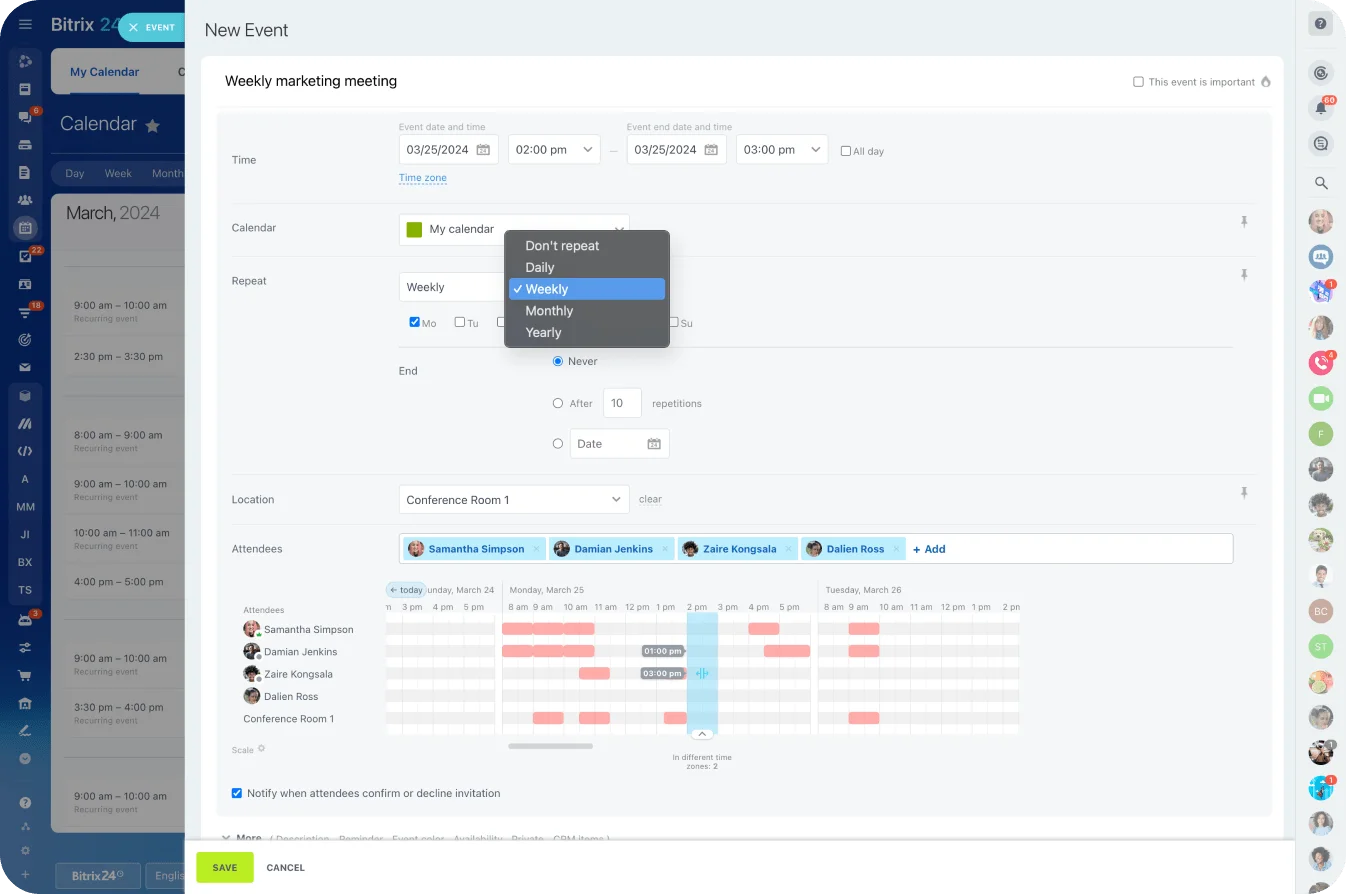
A shared Bitrix24 calendar gives the time view- what's due and when- while the readiness detail stays in the tasks and projects underneath. That split is deliberate. The calendar isn't meant to be the system of record for every field.
Creative files stay in a DAM, spend transactions in finance or the ad platforms, performance data in analytics. The calendar carries just enough status for someone to know whether the work can move.

Make dependencies and budget visible where execution actually breaks
A date is only credible when its dependencies and budget travel with it. Both are where false confidence hides.
Dependency blindness
An item reads "on track" right up until someone finds the asset it needs isn't done.
The pattern repeats:
- Paid media booked, landing page still in revision.
- Webinar invitations scheduled, deck not through review.
- Customer story dated, legal sign-off still open.
The dependencies worth tracking are the gating ones, not every production subtask:
- Landing page before paid launch
- Webinar deck before the invitation
- Legal review before the customer story publishes
- Tracking live before any activation
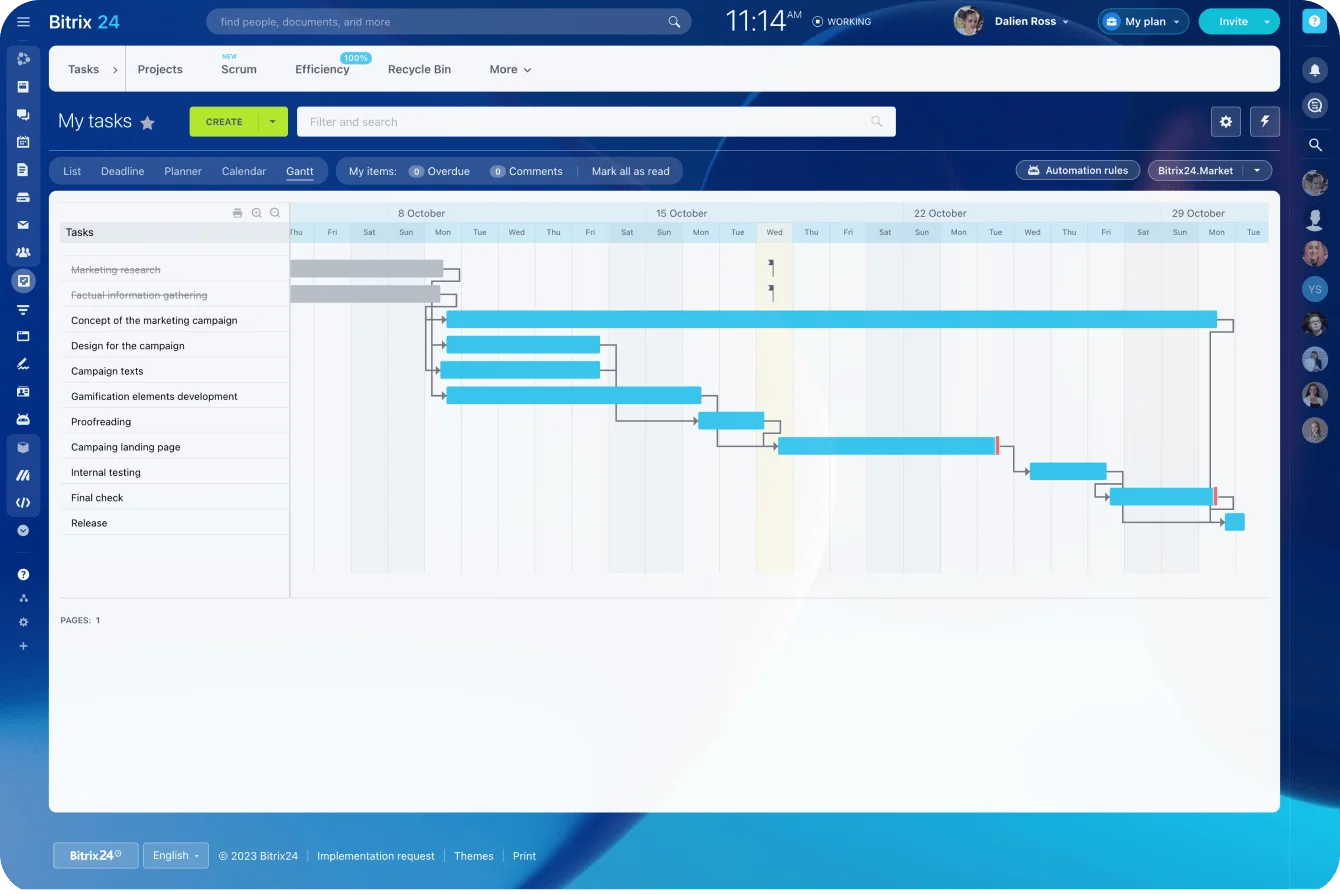
In Bitrix24, Gantt chart dependencies show how linked tasks move together. Shift a gating task and the team sees what slides behind it, instead of finding out one manual calendar edit at a time.
Budget blindness
Budget failures are quieter and just as expensive. A team keeps adding activity because the calendar has room, even after the campaign's spend has moved. The usual shape: a channel budget gets reallocated in a Friday conversation, nobody touches the calendar's budget line, and by Monday two owners are both planning against money that's already committed.
That bites in a tight year. Gartner's 2026 CMO Spend Survey of 401 marketing leaders found that marketing budgets averaged 7.8% of company revenue, while 56% of respondents said their marketing organization lacked the budget required to deliver its 2026 strategy.
Ewan McIntyre, Gartner VP Analyst and Chief of Research, put the pressure plainly: "CMOs are being asked to deliver growth, efficiency and transformation without meaningful budget expansion."
At that level of constraint, adding work the money can't cover turns a plan into a wish.
Add simple launch controls
A workable setup runs on one hard rule. A campaign earns launch-ready only when:
- an accountable owner is named,
- every gating asset is approved, not just drafted,
- the budget line is attached and confirmed,
- the KPI and its source of truth are set,
- tracking is live and tested.
Miss one and the status stays honest: blocked, not ready.
Pro tip: Don't turn budget tracking into a second finance system. For the calendar, a budget line, an allocation status, and an owner do the job. Keep the transactions in finance or the ad platform and link back when you need the detail.
Build measurement into the calendar so reporting can follow the same operating object
Define measurement before launch, while the team can still agree what success means and confirm the tracking exists.
Record the measurement agreement
Each campaign that matters records four things: the KPI, its source of truth, the reporting cadence, and who reads the result. That agreement lives in the planning record; the analytics tool handles the actual reporting.
The failure is rarely a missing analytics tool. The team settles the KPI in a meeting and never writes it into the record, so three weeks on, "how did the webinar do?" draws three different answers. Attaching the mapping to the campaign object closes that gap.
The examples below show the shape of it, metadata that lives in the plan, not numbers pulled from analytics:
|
Activation |
KPI |
Source of truth |
Cadence |
Interpreter |
|---|---|---|---|---|
|
Paid social (demand-gen) |
Sales-qualified demo requests |
CRM + UTM tags |
Weekly |
Growth ops |
|
Product webinar |
Qualified attendees, then follow-up meetings |
Webinar platform + CRM |
Post-event, then weekly |
Campaign owner |
|
Customer story |
Influenced pipeline |
CRM, content-touch attribution |
Monthly |
Marketing ops |
These are examples, not targets. The point is that everyone agrees the metric before launch, so nobody reaches for the flattering number after.
The source-of-truth column matters more than it looks. When Uber's ads kept turning up on a site it had told its ad networks to avoid, its head of performance marketing, Kevin Frisch, started switching networks off. They cut $100m of its $150m annual rider ad spend and "basically saw no change in our number of rider app installs." Installs the networks had been claiming turned out to be organic. The networks had been grading their own homework, and it took pulling the money to find out.
Define the metric before the channel goes live
Take a webinar. Depending on the goal, the headline result could be:
- Registrations
- Attendance rate
- Qualified attendees
- Follow-up meetings
- Influenced pipeline
- Revenue from the opportunities it creates
All measurable. All answering different questions. Label the field "webinar performance" and people grab whatever's easiest to pull later: one reports registrations, another attendance, sales wants influenced opportunities. Name the intended metric before launch and the argument disappears.
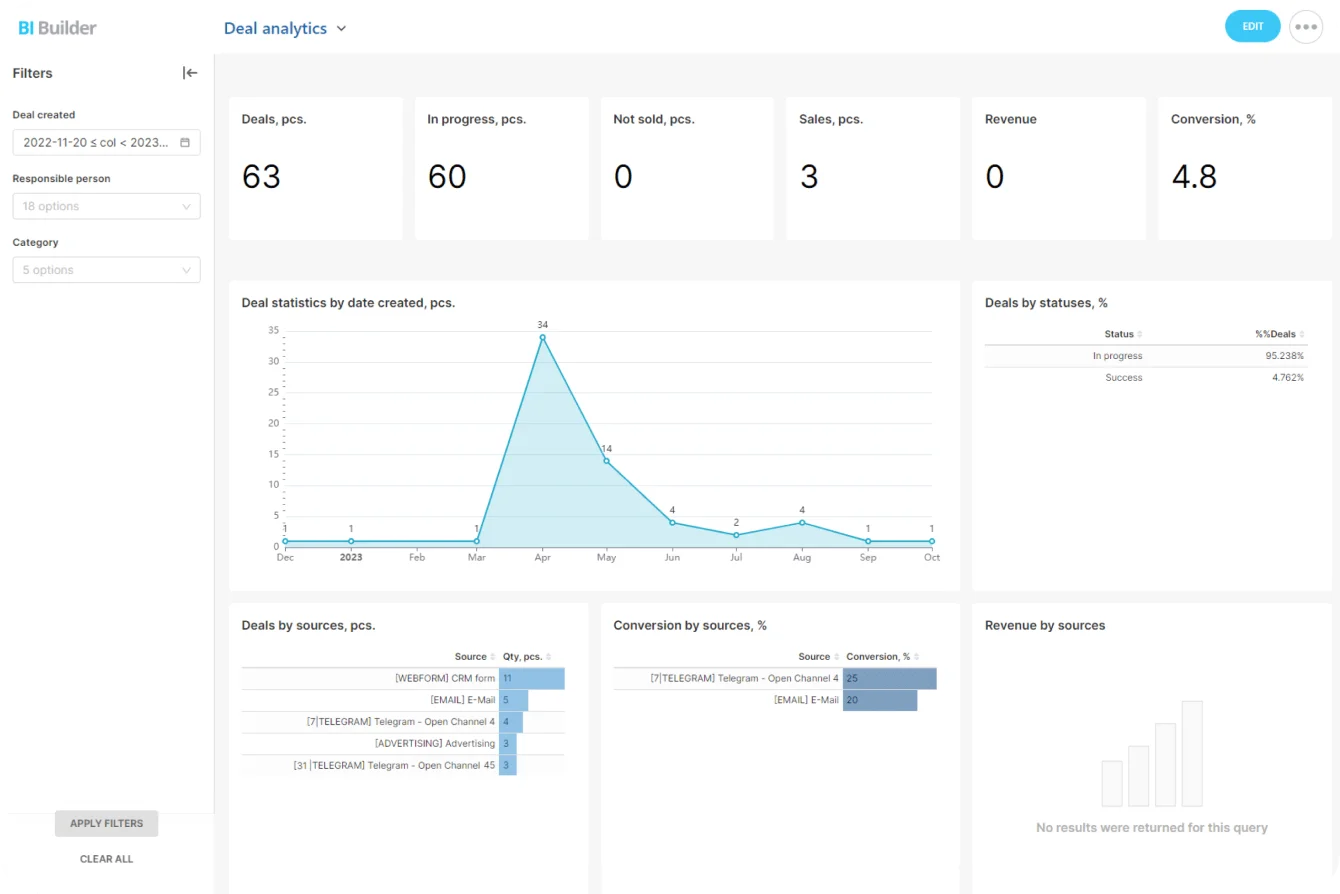
Where sales outcomes are part of the objective, Bitrix24 CRM keeps customer and deal activity tied to the follow-up work, and its analytics and reporting tools cover the CRM-side reporting, while channel analytics stay in the ad, email, or web platforms where they live. The division is deliberate: the planning record holds the agreement, the specialist tools hold the data.
Close the review loop
After launch, compare the plan to what happened:
- planned versus executed activities,
- spend versus allocation,
- expected versus actual outcomes,
- scheduled versus actual launch dates,
- expected versus actual dependency delays.
The ops lead runs that at the end of each campaign; channel owners bring their own numbers. Do it and the next planning cycle starts with evidence: which dependencies keep slipping launches, which channels burn more than budgeted, which metric definitions keep causing fights.
Use month-three failure modes to evaluate marketing planning software
A feature list tells you what a tool can display. A better question is what it does once the quarter turns messy. By month three, assets slip, budgets move, dates change, people take leave, and three teams are editing the same campaign. Test against that. Run each check on a copy of a real recent campaign and score it pass or fail.
1. Ownership changes
Ask:
- Can contributors update their own work without changing the parent campaign?
- Can several channel operators work under one accountable campaign owner?
- Can ownership changes be controlled?
- Can you see who changed a critical field?
Pass: a contributor updates their own activation without touching the parent campaign's owner, budget tag, or launch status, and every change to a critical field is attributed to a person.
Fail: anyone can silently reassign campaign ownership or flip launch status, and you can't tell who did it.
2. Dependency changes
Take a real campaign and simulate a delayed asset approval. Can you tell:
- Which activity is blocked?
- Which later dates are affected?
- Who needs to respond?
- Whether the new date conflicts with another launch?
Pass: moving one gating asset surfaces the blocked activity, the downstream dates, and any clash with another launch, inside the tool, with no manual recount.
Fail: one delayed creative asset forces five manual calendar edits, and the conflicts only show up when someone happens to notice.
3. Budget reallocation
Move part of a campaign budget from one channel to another. Check whether the tool keeps:
- The original campaign association
- Updated budget attribution
- Channel ownership
- Measurement fields
- A usable record of what changed
Pass: the reallocation updates attribution while holding the campaign link, ownership, and measurement, and leaves a record of the change.
Fail: the move drops the campaign association or the measurement fields, or leaves no trace of what changed or why.
4. Shipped, slipped, and cut work
Quarter-end reviews have to tell apart work that:
- Launched as planned
- Launched late
- Was deliberately rescheduled
- Was canceled
- Never became launch-ready
Pass: all five outcomes stay visible and distinct at quarter-end.
Fail: everything collapses into "complete" or drops off the active calendar, and the team loses the planning data.
Pro tip: Run these on a copy of a real recent campaign. Demo data is too tidy. A campaign that took a date change, a budget adjustment, and three reviewers will expose the weak spots far faster.
If your planning software only feels clear when nothing changes, it won't hold up through a real quarter.
Set governance rules that keep the calendar trustworthy after setup
Good software still needs rules about who touches what. The version you don't forget: a launch reads "live" in the calendar and never actually shipped, because status was a free-text field anyone could set and someone cleared their own board on a Friday. Nobody remembers doing it. You hear the thing went out wrong from a customer, not from the tool that was supposed to be tracking it.
Decide who can change what
Map edit rights to the roles you already have. Marketing ops or planning leads create campaign records. Campaign leads or managers control who owns what. Whoever's accountable for spend keeps the budget tags. Operators update their own channel tasks. A launch closes only when the agreed condition is met. Measurement fields get set before launch and change only when the objective genuinely changes.
Then let the tool's role-based permissions hold those lines, instead of trusting everyone to behave. If your software can't restrict who creates campaign objects, edits budget tags, or closes launches, that governance model is an honour system with a login screen.
There's a limit to this, however. Tighten permissions too far, so a channel owner can't update their own status without filing a request, and people route around the tool, straight back into the spreadsheet you were trying to kill. Protect the handful of fields that carry the plan's integrity, ownership, budget, launch state, measurement, and leave the rest open.
Add a lightweight operating rhythm
The calendar also needs tending. Weekly, the campaign or ops lead spends 15 to 30 minutes on launches due in the next few weeks, catching blocked assets and stalled approvals early. Mid-month, campaign owners check planned activity against what's actually left in the budget and log any moves. Before each launch, the owner confirms ownership, assets, approval, budget, tracking, and measurement are all in place. At cycle end, the team records what shipped, what moved, what got cut, what it cost, and what feeds the next round.
Keep that rhythm and the exceptions stay in the record, out of private threads and undocumented calls.
Keep every campaign launch-ready in Bitrix24
Plan campaigns, assign owners, track dependencies, budgets, and CRM results in one flat-rate workspace built for team visibility.
Get Started NowTrust the calendar only after it survives month three
Most calendar failures look fine the day before. The Thursday launch has a date. The invitation has a send time. The budget line has a number, right up until a Friday conversation moves the money and nobody touches the record. The date is always there. The owner, the open dependency and the money behind it are what went missing, and the calendar had no field to say so.
So don't judge planning software on a clean demo. Load a real campaign, the one with the late deck and the reallocated budget, and run the month-three tests. If a tool can't show you what slides when the deck slips, it won't show you at launch either.
Bitrix24 puts those pieces in one place: tasks with owners and Gantt dependencies under a campaign project, a shared calendar over the top, CRM for the sales-side result. And it's all on flat-rate plans, so the legal reviewer and the partner contact work in the same system (instead of someone's inbox).
Takeaway: A marketing calendar is trustworthy only when ownership, dependencies, budget, and measurement travel with each date. If those answers still depend on somebody's memory, the calendar is showing dates without preserving the plan behind them.