The Stack Changes at 10, 50, and 200 People: What to Add and What to Drop


TL;DR (Quick Summary)
A software stack needs to change when a team outgrows the way it coordinates work. Failures cluster around three sizes (ten, fifty, and two hundred people), and they change shape as you grow: first invisible commitments, then fuzzy ownership between teams, then reporting and access nobody controls. Add the tool that fixes the break in front of you, drop what's turned into dead weight, and change the operating habit alongside it.
- Headcount is the wrong trigger → change the stack when a specific control fails, not when you cross a number.
- Ten people, work goes invisible → put commitments in a shared tracker with owners and dates, and stop letting chat be the record.
- The stack only works if the week has a shape → run one intake, triage, review, and cleanup pass, every week.
- Fifty people, ownership blurs across teams → name who owns work at each boundary, with real intake and lightweight approvals.
- Handoffs turn into downstream cleanup → define what a valid handoff carries, and let the receiving team reject a bad one.
- Two hundred people, reporting and access drift → standardize metric definitions, move to role-based access, audit the integrations.
- The mature stack rots without maintenance → review access, metrics, and tools on a cycle, and retire whatever's duplicated or bypassed.
Takeaway: Add software to a failing control, not to a headcount, and change the operating habit alongside it. The tool never fixes a process that still runs on memory and unclear ownership.
Use headcount checkpoints to trigger operating-model reviews
Headcount doesn't tell you when to change your software stack. A failing control does. The reason 10, 50, and 200 keep coming up is that specific coordination problems surface around those sizes, not that the numbers mean anything on their own.
Informal coordination has a ceiling. What ran fine on hallway conversations and a good memory stops holding once you add people, functions, and handoffs. And no amount of talking will fix that! So treat the checkpoint as a prompt to look, not a rule that forces a purchase.
A twelve-person team already split into two functions hits the fifty-person problems early. A sixty-person team where everyone still shares one room might not.
The pattern repeats at each size: something specific breaks, a specific capability fixes it, and a habit has to change or the tool just sits there. Skip the habit and you've bought a more expensive way to stay disorganized.
Diagnose the failure before adding software
Every stack decision starts with the same question: what's breaking, and does software fix it? Five questions get you there:
- What operational failure keeps showing up?
- What does the stack need to do now that it didn't before?
- Where should the authoritative record live?
- Who owns the workflow?
- What behavior has to change for the system to work?
Tie the decision to the operating problem, not the feature list. Communication, ownership, approvals, reporting, permissions, and source-of-truth come first. The specialized tool three people are excited about comes later (if at all).
Know when a simple process is still enough
Some purchases wait. A process that runs a few times a year, handled by two people, lives fine inside a tool you already own. The moment it turns frequent or business-critical, you need three things nailed down: where work enters, who owns it, and where its final status is recorded.
Pro tip: before you approve a tool, write the failure it fixes in one sentence. If the team can only list features it wants, the purchase needs more scrutiny.
Tech Stack Audit Scorecard: Cut Waste, Add Winners Fast
Enter your email address to get a comprehensive, step-by-step guide

At 10 people, replace hallway coordination with visible work tracking and one source of truth
At ten people you can still talk to everyone. What you can't do is remember everything, and that's where it breaks. A commitment lives in a Slack message, a hallway promise, someone's private notes, and an email thread nobody reopens. Everyone knows the priorities in broad strokes. Nobody has a reliable view of what's due, what's blocked, and what's waiting on a decision.
What starts going wrong
The problem is invisible commitments. People work off different versions of the plan, so priorities drift. When something slips, you spend the first hour reconstructing what was agreed before you can start fixing it.
You've seen the signs:
- Tasks lost in chat
- Two people working from different instructions
- Nobody sure who owns the next step
- Deadlines remembered only when someone asks
- Decisions relitigated because no one wrote down the first one
What to add
The stack stays simple here. You need a shared tracker where active work, owners, statuses, and due dates sit in one place. You need a single home for process notes, decisions, and meeting outcomes so they don't rot inside old conversations. And you need a standing planning slot that turns discussion into named actions with dates.
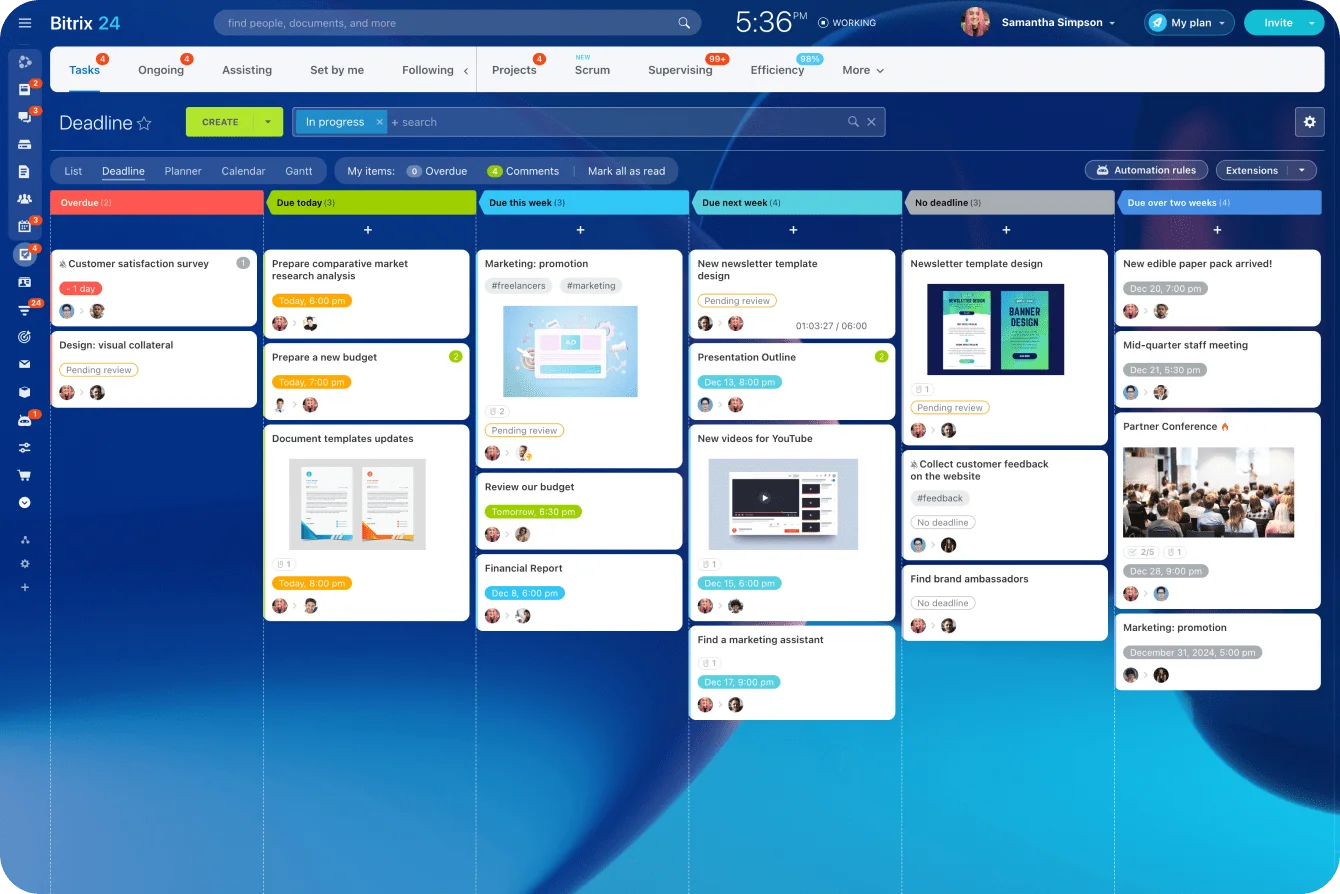
Bitrix24 task management gives assignments, deadlines, statuses, and project activity one shared place. Process guidance and decisions live in a Bitrix24 knowledge base instead of getting buried in chat. Bitrix24 uses flat-rate paid plans with defined user limits, so a ten-person team can choose the tier that fits its size without paying a separate price for every individual seat.
A ten-person company doesn't need a heavy project-management layer; what it needs is commitments to survive the meeting they were made in.
What to stop doing
Chat can't be the system of record. It's good for talking and quick coordination and terrible for memory: a decision drops off the screen the second unrelated messages pile on top of it.
The pattern is familiar. A founder asks someone in chat to update pricing by Friday. Two days later another thread changes the requirement. Nobody updates the task or the decision record, and now two people are building from two different sets of instructions.
The fix is boring, but it works: record decisions as you make them, give every task a named owner, add a due date when timing matters, and update the tracker the moment priorities move.
Make the 10-person stack run as a repeatable weekly process
The tools do almost nothing on their own. At this size, the software rarely fails; the ritual does. A board no one reviews becomes another junk drawer, and inside a month the team is back on chat and memory.
Give the week a shape: intake, triage, review, cleanup.
- New work enters through one visible channel, not a scatter of DMs.
- One person triages each request: keep it, route it, or send it back.
- Review the board: confirm priorities, surface blockers, close what's done, drop what's dead.
- Keep statuses to four: not started, in progress, blocked, done.
- Clean up: archive finished projects, reassign ownerless tasks, capture decisions that only exist in chat.
Give new work one entrance
One channel, one queue, one person deciding what happens to each request. Early on, that's the founder, a chief of staff, an ops lead, or whoever runs the team. It isn't a full-time job; a short daily pass covers it.
The triager settles whether the request is real, whether it carries enough detail to act on, where it belongs, who takes the next step, and when it's due. Skip the intake rule and priority defaults to volume: the loudest request wins.
Review commitments weekly
The weekly review is the control point. Confirm what matters this week, flag what's blocked, close what's finished, delete what's gone stale. When something's blocked, write down the blocker. When a priority changes, change the task, not a verbal aside in Tuesday's standup that half the room misses.
Every project and every recurring responsibility needs one accountable owner. "Ops and finance" isn't an owner. One person keeps the work moving, even when five people touch it.
Keep the system clean
A little housekeeping stops the tracker from becoming the next pile of stale information. Each week, sweep for tasks with no recent activity, projects ready to archive, duplicate docs, tasks with no owner, items stuck "in progress" for weeks, and decisions living only in someone's chat history.
Pro tip: in the review, ask one more question. What work happened this week that never hit the board? The repeat answers show you exactly where intake is leaking.

At 50 people, solve cross-functional ambiguity by formalizing ownership, handoffs, and departmental systems
By fifty people, you have real functions. Sales, marketing, product, finance, customer success, and ops each carry their own managers, tools, and priorities. Work crosses between them all day, and the moment responsibility changes hands turns fuzzy.
The failure at this size is rarely a missing tool. Most fifty-person companies already own more software than they use. What they're missing is an agreement about who owns a piece of work once it crosses a line, and no app supplies that.
Give important workflows a known home
Teams build their own systems as they grow. Marketing tracks campaigns in one place, finance approves in another, sales runs customer activity somewhere else. That works, as long as everyone knows which system holds the current truth for shared work.
Every workflow that matters needs the same things settled:
- A defined intake point
- A queue owner
- A system of record
- A clear status model
- A rule for when responsibility changes
Customer-facing work is the usual example. Bitrix24 CRM keeps customer activity and deal information attached to the account, while operational work moves into a project or task flow with a named owner.
Formalize shared-team intake
Ops, design, legal, IT, and data support half the company at once. Take requests through whichever DM lands first and the queue goes ungovernable the moment volume climbs. Give the work a front door: a standard intake path and a backlog everyone can see.
Someone needs the authority to:
- Triage requests
- Return the incomplete ones
- Set priority
- Route work to the right owner
- Escalate what's genuinely urgent
That authority heads off the classic fifty-person failure, where every department stamps its request urgent, the shared team has no way to rank competing demands, and priority quietly reverts to whoever outranks everyone else or complains the loudest.
That's the exact outcome intake exists to kill.
Add lightweight approvals
Budgets, campaign launches, pricing exceptions, vendor setup, system changes: none of these belong on someone's memory or default to the founder's desk. A basic flow covers it:
- Request submitted
- Required information checked
- Reviewer assigned
- Decision recorded
- Approved work routed onward
The record is the point. Six months on, anyone can pull up who approved what and what they were looking at when they did. If routine ownership fights still need the founder to settle them, the operating model hasn't caught up to the company.
At 50 people, standardize how work moves between teams so tools do not create new silos
The hard part at this size is the seam between teams and systems. A good handoff carries enough context that the receiving team starts working instead of starting an investigation.

Define what a valid handoff contains
For every major transition, define four things:
- What information has to come with the work
- Who can accept or reject it
- When ownership officially changes
- Where status gets recorded
Sales to implementation is the standard case. Implementation needs approved scope, contract terms, customer contacts, committed dates, and known constraints. Hand over half of that and the project's been assigned but not handed off: the receiving team chases the missing details, corrects the assumptions nobody flagged, and absorbs work that belonged upstream.
Example-in-action:
Sales marks a deal closed and pushes it to implementation with a promised go-live. The implementation lead runs it against the checklist: signed scope, final contract terms, a named customer contact, the committed go-live window, known technical constraints.
Date's there. Contact's there. Scope still reads "pending signature."
The lead sends it back, notes what's missing, and ownership stays with sales until it's resolved. That one return costs a few minutes. Building three weeks of implementation around scope that later changes costs a great deal more.
Let teams bounce incomplete handoffs back instead of quietly cleaning them up. The team that keeps absorbing bad handoffs to be helpful is the reason the upstream team never fixes them.
Connect the workflow across systems
Some work legitimately changes systems. A signed deal starts in CRM and spawns implementation tasks. A pricing exception starts in sales and routes through finance. Make the transition explicit and traceable.
When several teams need a shared execution space, Bitrix24 workgroups and collaboration tools keep tasks, discussion, and related activity together instead of splitting a handoff across unrelated message threads.
Put basic governance around new tools
Someone owns software policy: who buys, who builds, who decides. Depending on the shop, that's operations, IT, finance, or a small cross-functional admin group.
This matters more than it sounds. Gartner projects that by 2027, 75% of employees will acquire, modify, or create technology outside IT's visibility, up from 41% in 2022. At fifty people, that shows up as unapproved tools holding pieces of a shared workflow. A light purchase policy buys you one thing worth having: you know where your customer data lives before an incident tells you.
Teams need to know:
- When to configure a platform they already run
- When a new app needs review
- Who approves integrations
- How duplicate tools get spotted
- Who owns the system after the purchase
Keep a workflow in an authoritative platform you already have when it handles the data, access, and ownership cleanly. Reach for a new system when the current one forces the same manual workarounds every week or can't support the controls the process needs.
Pro tip: audit the recurring exceptions before you buy anything. If a handoff breaks every week because the same field is missing, fixing intake beats adding software.
At 200 people, add reporting layers, role-based permissions, and auditability before scale creates control failures
At two hundred people, the stack has a new job: trusted visibility and controlled access, on top of the coordination it already handles. Three things start to break: reporting people believe, access that stays scoped, and management visibility that doesn't depend on walking the floor.
Reporting loses trust
Leadership reads the roll-up dashboard. The managers underneath it know some of those numbers depend on exports, local spreadsheet formulas, and manual categorization.
Two departments use the same metric name and calculate it two different ways.
The figure on the board and the ones three managers recomputed in their own spreadsheets the night before don't match, so the review opens by litigating whose number is right instead of deciding what to do about it.
The signs:
- Meetings that open with an argument about whose number is right
- Reports that need manual fixes before every review
- Teams keeping private versions of shared metrics
- "Active customer" and "pipeline" meaning different things in different rooms
- One person who's the only one who understands how a key report works
Fix it by establishing:
- Standard metric definitions
- Named owners for the reports that matter
- Agreed source systems
- Rules for handling corrections
- A process for changing a definition
Name the function that owns this, or the definitions stay contested. In most companies it's revenue operations, a data or analytics team, or finance, with one of them holding the canonical definition of each shared metric and governing the dashboards built on it. Without that, "what counts as an active customer" becomes a standing argument instead of a settled rule.
Bitrix24 CRM analytics and reporting tools support shared reporting where customer, sales, and pipeline data already live, which cuts the dependence on privately maintained spreadsheets.
Access accumulates
Permissions grow through exceptions. Someone covers for a colleague, joins a temporary project, changes roles, or gets emergency access in a crisis that nobody ever takes back.
Multiply that across a few hundred people and a dozen systems and you've lost track of who can touch what. You find out during an access review, or worse, during an incident, when the contractor who rolled off last spring turns out to still have admin on the billing system.
The direction to move:
- Role-based permissions tied to job responsibilities
- Regular access reviews
- Named application owners
- Expiry or follow-up on temporary access
- Defined approval paths for elevated permissions
For systems holding sensitive business or customer data, Bitrix24 security controls form part of that access model alongside your own provisioning policies.
Managers need exception-based visibility
More management layers mean leaders can't see the work directly anymore. The dashboard has to surface the problems for them:
- Backlog growth
- Overdue work
- Pending approvals
- SLA misses
- Reopened tasks
- Repeated workflow exceptions
A good dashboard tells a manager where to look. If reading it means calling the analyst who built the spreadsheet, the reporting isn't finished.

Run the 200-person stack with governance, exception handling, and periodic retirement of old tools
The stack needs maintenance now, or it grows without bound. Keep adding systems, fields, reports, permissions, and integrations, and eventually teams stop agreeing on which record is the real one. You pay for it twice: once in licenses nobody opens (Zylo finds 36% of SaaS licenses sit unused, on average), and again in the review that stalls while two people argue over which report to trust.
Nobody owns the call to retire anything, so nothing gets retired.
Review access, metrics, and ownership
Run access reviews on a schedule and confirm permissions still match people's jobs. Revisit the metric definitions too, especially after a team changes its process or its tools.
Every critical platform needs a named owner, responsible for:
- Field and data structure
- Workflow rules
- Permission design
- Integrations
- Change requests
- System documentation
Keep the reviews light, but don't skip the changes that ripple outward: anything touching automations, integrations, or reports other teams depend on.
Audit integrations
Integrations don't stay healthy on their own. A connected stack still throws conflicting records:
- A customer status updates in one system and fails in another
- A renamed field quietly kills an automation
- Duplicate records appear after a sync change
- Approval history vanishes when data moves between platforms
- A broken integration drops everyone back into manual re-entry
For workflows that span platforms, Bitrix24 integrations connect the systems, though ownership still decides whether it holds. Someone has to own the answer to three questions: what syncs where, which system wins when records conflict, and who investigates a failure.
Design a path for exceptions
Emergencies happen. Design the exception before you're in one, so you're following a rule instead of improvising. Temporary access gets an owner and a review date. Contractor access runs inside defined limits. A migration might force a temporary parallel tracker, but it comes with an end date and an explicit rule for which system stays authoritative.
Give the exception a shape up front. As an illustration: an urgent-access rule grants elevated permissions for a fixed 24-hour window, names an approver at the moment it's granted, and auto-expires with a mandatory review inside 7 days. The exact numbers matter less than the two properties behind them. Every emergency grant has an owner. Every grant has a built-in end. Access with no expiry is access nobody remembers to remove.
When a dashboard disagrees with local records, find out why:
- A definition changed
- An integration failed
- A process step got skipped
- The source data was wrong
- Someone overrode it by hand
Don't let repeat conflicts settle into normal.
Retire tools deliberately
Adding software gets a budget line and a champion. Removing it gets neither, which is how you end up paying for systems nobody owns, integrations nobody maintains, and duplicate records nobody trusts.
Review the stack on a cycle and ask:
- Does this still support an active workflow?
- Is another platform already recording the same thing?
- Who owns it?
- Which teams actually use it?
- What breaks if it's gone?
- Can its records be archived safely?
The honest answer to that fifth question usually surfaces a week after you've killed the tool, when a report three teams rely on quietly stops updating and no one remembers it was fed by the system you switched off. That's the case for retiring on purpose, with an owner and a rollback, rather than by neglect.
One decision rule covers all three checkpoints:
- Add a tool when it supports a control you now need
- Retire a tool when it duplicates records or bypasses the agreed workflow
- Change the operating habit alongside the tool
Quick reference: Add / Drop / Habit
|
Checkpoint |
Add |
Drop |
Change the habit |
|---|---|---|---|
|
10 people |
Shared task tracker; one documentation home |
Chat as the system of record |
Weekly review that turns talk into owned, dated actions |
|
50 people |
Defined intake, named owners, lightweight approvals |
First-come DM triage; silently fixing broken handoffs |
Return incomplete handoffs instead of absorbing them |
|
200 people |
Standard metric definitions, role-based access, audited integrations |
Private metric spreadsheets; access that outlived its reason |
Scheduled reviews of access, definitions, and unused tools |
Keep growth organized with Bitrix24
Bitrix24 brings tasks, CRM, docs, approvals, reporting, and access controls into one platform, helping teams coordinate as they grow.
Get Started NowThe tool is the easy part
The same move works at every size, and it's never the software. Find the control that's failing, put in the smallest thing that fixes it, and change the habit that let it fail. Headcount triggers none of that. It tells you where to look: visibility at ten, ownership and handoffs at fifty, reporting and access at two hundred.
Companies that buy the tool and skip the habit change get the worst of both worlds: more systems, more logins, more dashboards, and less trust in any of them. The stack grows while the coordination gets worse. You've automated the confusion.
Keeping the core of the work on fewer authoritative platforms is how you avoid that. When tasks, CRM, and documentation live in one system, as they do in Bitrix24, most of the duplicate-record and broken-handoff problems never get the chance to start.
Takeaway: Add software when coordination starts failing, retire it when it duplicates records or bypasses the workflow, and change the operating habit alongside the tool. A new app won't fix a process that still runs on memory, side messages, or unclear ownership.


