What Good CRM Implementation Looks Like in the First Four Weeks


About 50 to 70% of CRM implementations fail to deliver real value. Rarely because the software is bad. Almost always because the first month gets spent on setup instead of adoption.
Teams spin on custom objects, field definitions, and integration checklists while nobody agrees on what a "qualified deal" actually means. Too many fields with no rules for how to fill them. Pipeline stages that mean different things to different reps. Records with no owner.
By month two, the system looks configured, sure. It’s just a shame nobody trusts it.
The fix isn't more features or deeper customization. It focuses on one core job for month one, either pipeline visibility or lead follow-up consistency, and the discipline to keep everything else out.
This article walks through exactly what that looks like, week by week.
What good CRM implementation means in the first four weeks
In the first month, good CRM implementation means creating a workflow the team trusts for capturing, assigning, updating, and reviewing active revenue work. It doesn’t mean building the final version of the system. This is especially critical for SMBs balancing limited resources with growth demands.
That scope matters. Month one should stay tight: essential fields, a simple pipeline, clear ownership, a few useful automations, and a weekly review rhythm. If those pieces work, the CRM becomes usable fast. If they do not, extra customization only adds noise.
What month-one success actually looks like
A strong first month usually produces a few visible results:
- New leads enter the system in a consistent way
- Every active deal has an owner and a current stage
- The team knows what each stage means
- Follow-up is less likely to slip
- Managers can review pipeline health without rebuilding reports by hand
That is the standard to aim for. Not "fully customized." Not "integrated with everything." Just usable and reliable enough that the team starts working in one place.
|
Area |
What good looks like |
|---|---|
|
Fields |
Only core data is required, and entry rules are clear |
|
Pipeline |
Stages reflect the real sales motion and have clear move-forward criteria |
|
Ownership |
Every lead and deal has a responsible person |
|
Automation |
A few workflows reduce misses without creating confusion |
|
Reviews |
The team checks usage and data quality every week |
Why CRM implementation breaks early
The most common failure pattern is overbuilding before the team agrees on process.
A company starts debating custom objects, dozens of lifecycle labels, and advanced reporting before it has settled basic questions like: What counts as a qualified deal? When does a rep own it? What must happen before a deal moves stages? This is a critical step in sales pipeline management that many teams skip.
That creates a system full of options but weak in decision-making. People fill in fields differently. Managers interpret reports differently. Sales and marketing use the same words for different things. The CRM becomes technically configured but operationally unclear.

Where ownership gaps cause real problems
Ownership gaps make it worse. If nobody clearly owns new records, stale opportunities, or customer handoffs, follow-up slips almost immediately.
Here's a real scenario: a marketing team creates a lead in the system but doesn't assign it. Three days pass. The sales team assumes it's being worked. By day five, the lead has gone cold and multiple follow-up chances are lost. Once records start aging without action, trust drops. People stop relying on the CRM because it no longer reflects reality.
The training and data problem
Adoption also fails for simpler reasons than most teams expect. Training is often too broad, too fast, or too theoretical. Reps are shown every menu instead of the few actions they need every day. Meanwhile, imported data includes duplicates, missing fields, and outdated contacts, so users start by cleaning messes instead of doing work.
When automation backfires
Then task automation gets layered on too early. This sounds efficient, but it can hide process problems instead of fixing them. For example, if lead routing is unclear, an automation might assign records faster but still send them to the wrong person. If stage definitions are weak, a workflow can move deals automatically while accuracy gets worse.
All of these failures have the same root: process decisions that should have been made in week one get skipped. Here's what those decisions look like.
CRM Launch Starter Kit: Roles, Timeline, Risk Checks
Enter your email address to get a comprehensive, step-by-step guide

Step 1: Week 1 — set the CRM goal, core use case, and success rules
Start with one main job for the CRM in month one. Pick the use case that matters most right now, not the one that sounds most ambitious. For many small and mid-sized teams, that means either pipeline visibility or lead follow-up consistency.
If you try to make the CRM solve everything at once, setup decisions get muddy fast. Instead, choose a clear operating priority. For example:
- "We need every open deal in one pipeline with a real stage and next step."
- "We need inbound leads assigned within one hour and followed up consistently."
- "We need to stop losing track of sales conversations across inboxes and spreadsheets."
Once that job is clear, define the success rules—the minimum behaviors the team agrees to follow. Keep them specific: "Every new lead must have source, owner, status, and next action by end of day" is usable, while "Use the CRM" is too vague.
What to agree on in week one
Agree on three things:
- What must be tracked: the records and activities required to run the process
- Who must use it: which roles are responsible for entering or updating data
- What good usage looks like: the actions that show adoption is real
Pick your first metrics
Then choose a small set of weekly metrics. The point is not deep reporting yet. The point is checking whether the rollout is working. If you're implementing lead assignment and follow-up processes, focus on key lead management metrics first.
Good week-one metrics often include:
- Percent of new leads assigned within target time
- Percent of active deals with owner, stage, and next step
- Number of overdue follow-up tasks
- Number of records missing required fields
Quick rule: if a metric does not help you spot usage or process problems in week one, it can wait.
Step 2: Week 1 — design only the essential fields and data standards
Fields are where good intentions often turn into admin drag. The fix is simple: only create the fields your team needs to run sales work and basic reporting right now.
For most teams, the minimum set covers three record types: contacts, companies, and deals.
Essential fields for month one
Typical essentials:
Contact: first name, last name, email, phone, job title, lifecycle status
Company: company name, website, industry, employee size or revenue band, location
Deal: deal name, owner, stage, amount, expected close date, source, next step
If a field doesn’t support routing, follow-up, segmentation, or reporting in month one, question it. Nice-to-have fields sound harmless, but they slow entry and lower completion rates. Ten mostly empty fields are worse than five consistently used ones.
Why data standards are more important than field count
Data standards matter just as much as field count. A data standard is the shared rule for how a value should be entered. Without it, even good fields become messy. "United States," "US," and "U.S." might all show up in the same report. Lead sources turn into a long list of near-duplicates. Deal names become impossible to scan.
Set these standards early:
- Naming format for deals and companies (e.g., "[Client Name] – [Product/Service]")
- Required fields for record creation (e.g., no contact can be created without email)
- Dropdown values instead of free text where possible
- Consistent lead source categories (e.g., Direct Outreach, Website Form, Referral)
- Rules for creating new companies versus attaching to existing ones
This is also the point to prevent duplicates. Decide what counts as a duplicate and who resolves it. Usually that means email for contacts, domain for companies, and a naming rule for deals.
Simple test: Can a new rep create a clean record in under a minute without guessing? If not, the field design is still too heavy. In Bitrix24's CRM interface, you can set required fields and dropdown restrictions at record creation, which forces consistency from day one.

Step 3: Week 2 — build a simple pipeline with clear stage exit criteria
A pipeline is the ordered set of steps a deal moves through from first real opportunity to close. Most effective pipelines have 5 to 7 stages, depending on sales complexity. In month one, keep it short. The goal is to reflect the buyer journey in a usable way, not map every internal step your team performs.
Many teams create too many stages because they mix customer progress with internal activity. "Sent brochure," "had internal review," and "waiting for pricing approval" may matter operationally, but they usually don’t deserve separate deal stages.
A simpler pipeline is easier to use and easier to trust. For example:
- New opportunity
- Qualified
- Meeting scheduled
- Proposal sent
- Negotiation
- Closed won / Closed lost
The important part is not the labels; it’s the exit criteria for each stage. Exit criteria are the specific conditions that must be true before a deal can move forward, which prevents stage changes based on optimism or habit.
Defining stage exit criteria that work
Examples:
- A deal cannot move to Qualified until budget, need, and buyer role are confirmed
- A deal cannot move to Proposal sent until pricing is actually delivered to the buyer
- A deal cannot move to Negotiation until the buyer has responded to the proposal
This also helps forecasting. Stage names should imply something meaningful about deal confidence. If one rep uses "Qualified" to mean "interesting lead" and another uses it to mean "serious buyer with timeline," pipeline reports become unreliable.
|
Stage |
What it should mean |
Required to enter |
|---|---|---|
|
Qualified |
Real opportunity worth active pursuit |
Need confirmed, owner assigned |
|
Meeting scheduled |
Buyer committed to a live sales conversation |
Date booked |
|
Proposal sent |
Commercial offer delivered |
Proposal sent to buyer |
|
Negotiation |
Buyer is actively evaluating terms |
Buyer response received |
If the team can explain every stage in one sentence and move deals consistently, the pipeline is good enough for month one. Companies that define a formal sales process achieve 18% more revenue growth, so getting this right early pays off quickly.
Step 4: Week 2 — assign ownership, handoffs, and response expectations
Once records and stages exist, ownership needs to be explicit. Ownership means one named person is responsible for the next action on a record. Without it, records sit in the system looking managed while nobody is actually moving them.
Set ownership across four categories
Define ownership across four categories:
- New leads
- Open deals
- Closed customers
- Stale or inactive records
This is especially important when multiple teams touch the same customer journey. Marketing may create the lead, sales may qualify and close it, and operations may handle onboarding. Those transitions need clear handoff points, not assumptions.
How to document handoffs
Document the handoffs in plain language. For example:
"Marketing owns inbound leads until qualification threshold is met. Sales owns qualified deals through close. Operations takes ownership after closed won and onboarding kickoff."
Then set response-time rules. These are the service levels that keep records from going cold. A new demo request might require assignment within 15 minutes and first outreach within one hour. A lower-intent content lead might allow a slower response (24 hours).
Reassignment logic and accountability
You also need reassignment logic. If the owner misses the response window, who gets notified? When does the record get reassigned? How are vacations or capacity issues handled?
A common ownership mistake: assigning leads to teams instead of people. A queue can help routing, but a person must ultimately still be accountable for action.
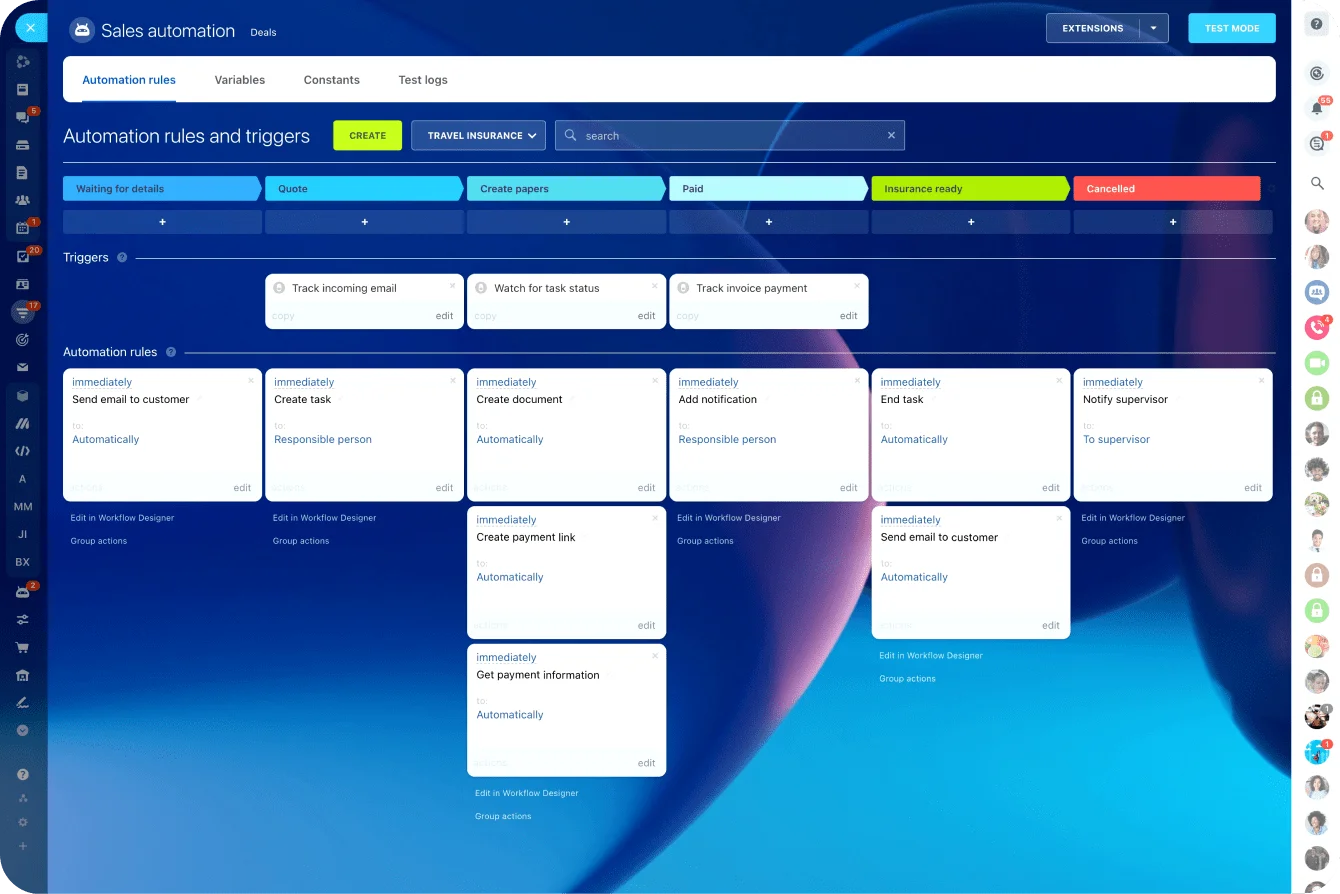
Step 5: Week 3 — add the smallest set of automations that protect consistency
Automation should support the process you already agreed on, not define the process for you. In month three or six, you can get more ambitious. In week three, stay focused on simple actions that reduce manual misses.
The best first automations are usually:
- Lead assignment based on territory, source, or round-robin rules
- Task creation when a new lead or deal enters a key stage
- Lifecycle or status updates triggered by clear record changes
- Reminders for overdue follow-up
These are useful because they reinforce consistency without hiding what the team is doing. They reduce the chance that a record sits untouched, but they still leave visible responsibility with the user. Companies using marketing automation see 53% higher conversion rates from initial response to qualified lead.
What to avoid in week three
Avoid more complex automations early on, especially if they rely on shaky data or unclear stage logic. For example, auto-advancing deal stages, branching based on loosely maintained fields, or triggering multi-step sequences from incomplete records can create a lot of noise fast.
Before turning anything on for the full team, test with real scenarios. Use a small set of sample records and walk through actual situations:
- A new inbound lead with full data
- A lead missing a phone number
- A deal reassigned after no response
- A customer closed won and handed to operations
Check the result from the user's perspective. Was the right owner assigned? Was the task created at the right time? Did the update make sense in the record? If not, fix the process or the rule before rollout.
Keep this principle: if an automation makes the workflow harder to explain, it’s too much for month one.
Step 6: Week 4 — launch review habits, fix gaps, and prepare to scale
By week four, the goal shifts from building to stabilizing. The CRM now needs review habits that keep data usable and expose weak spots before they spread.
Run a weekly review that looks at a few operational checks:
- Pipeline hygiene: Are active deals current and owned?
- Stage accuracy: Do records meet the criteria for where they sit?
- Overdue tasks: Where is follow-up slipping?
- Conversion signals: Are leads and deals moving in a believable pattern?
This does not need to be a long meeting. A 20- to 30-minute review is often enough if the rules are clear. The purpose is to catch friction while usage is still forming.
Spotting and fixing early mistakes
Look for early mistakes that show up again and again:
- Required fields skipped through imports or workarounds
- Deals moved stages without meeting exit criteria
- Duplicate records created by multiple users or forms
- Automations turned on but ignored or misunderstood
When you find a gap, fix it with the lightest possible change. That may mean tightening a required field, editing a dropdown, retraining one team, or pausing an automation that is causing confusion. It does not mean redesigning the whole CRM every Friday.
Change control and ownership audits
To prepare for scale, add a little control around changes. Decide who can approve new fields, stage changes, automation edits, and imports. That is your change control — a simple rule that prevents the system from drifting every time someone wants a new report.
After month one, expand in phases only after the core process stays clean for a few weeks. Add integrations, extra segmentation, new reports, or more detailed workflows gradually, not all at once.
A strong first month creates a CRM teams will actually trust
A CRM should help people make decisions and follow through. Month one is just about proving that's possible: clean fields, a believable pipeline, clear ownership, and a weekly habit of checking what's slipping.
Get that working and the system earns trust. Once it's trusted, optimization makes sense.
Until then, more complexity creates more admin and less of both.
Make CRM adoption work from week one
Bitrix24 helps teams manage leads, pipelines, ownership, tasks, and follow-ups in one CRM so rollout turns into daily adoption.
Start TodayFAQ
How long should data cleanup take before importing into a new CRM if our spreadsheet is messy?
For a small to mid-sized database, plan for a few days to two weeks depending on volume and quality. Do not wait for perfect cleanup before launching, but do fix the basics first: duplicates, missing owners, bad emails, broken company names, and inconsistent source values. Clean enough to support routing and reporting, then improve the rest in batches.
What should we do if two teams need different pipeline views but share the same customer records?
Keep one shared customer record structure, then create separate filtered views or distinct pipelines only if the sales motions are truly different. Do not duplicate customer records just to satisfy reporting preferences. Shared records with role-based views usually create less confusion. In Bitrix24, you can set role-based visibility so each team sees only their pipeline without duplicating data.
Can we launch with email and calendar sync off, then add integrations later without disrupting adoption?
Yes. That is often the smarter move if your team is new to the CRM. Start with core record management and pipeline usage. Add email and calendar sync later once data rules, ownership, and stages are stable. Just be clear about how activity should be logged in the meantime.
How many records should we test with before importing the full database?
Usually 25 to 100 records is enough for testing, as long as they represent different scenarios: clean records, incomplete records, duplicates, multiple sources, and different deal stages. The goal is not volume. It is coverage of real conditions.
What is a realistic first-month adoption target for a small sales team using a CRM for the first time?
A practical target is that nearly all new leads and active deals are created and updated in the CRM, even if historical data is still uneven. For a small team, aiming for 80% to 90% compliance on new activity is realistic. Focus first on current work, not perfect backfill.