Becoming a Virtual Assistant: The Skills and Tools Clients Actually Pay For


TL;DR (Quick Summary)
Most VAs stay stuck at admin rates because they sell availability: more hours, more task types, a longer service list. The ones who charge more sell something else, ownership of a workflow the business relies on. Price rises with proximity to outcomes, not with hours logged.
- Why some VAs stay at admin rates while others move up → Rates track how close your work sits to systems the business runs on, not the hours you log.
- What the four support tiers are really buying → Each tier up trades task completion for trust to hold a system unwatched.
- Which tools to learn first → Learn categories through the workflows behind them, not features off a badge list.
- How to prove you can do the work with no famous clients → Show the thinking: a sample SOP or CRM cleanup beats a screenshot.
- The habits that turn tasks into retainers → A client who has less to chase and check keeps paying.
- Which specializations grow and which get squeezed → Predictable work loses ground; judgment and exception-handling hold value.
- How to specialize without narrowing too early → Package one recurring workflow, keep taking related work.
Takeaway: If you want to price higher, stop selling availability. Build proof that you can run a process, protect a system, and make a business easier to operate.
Being reliable help with anything makes you easy to hire and easy to compare on price. The VAs who break out of that move toward the work that touches sales, marketing, onboarding, reporting, or internal operations - the systems a business can't afford to have quietly break.
This guide shows you how to become the VA a client can't swap out without something breaking, even if you've never had a famous client.
Why some virtual assistants stay stuck at admin rates while others move into higher-value support
More hours won't raise your rate. Neither will agreeing to more kinds of tasks. Both help you get hired; neither makes the work worth more.
What changes your pricing power is where your work sits in the business.
Complexity affects what clients will pay
The gap already shows up in marketplace pricing. Upwork’s virtual assistant cost guide lists administrative and data-entry VAs at roughly $12–$20+ per hour, marketing, customer service, and accounting support at $20–$35+, and advanced VA, consultant, and executive-assistant support at $38–$50+.
Upwork notes these ranges reflect freelancers in North America with more than 1,000 hours and a 90% success rate, so treat them as a signal, not a universal rate card. Location, experience, reputation, contract type, and client budget all move the number.
The pattern underneath is what matters: responsibilities gain value as they move closer to the systems a business runs on.
Be honest about two things. The tiers aren't a ladder you climb by adding hours. A VA can spend years doing more admin and never move up, because more of the same work doesn't change what it's worth. And the jump between tiers is a jump in trust. A client hands over CRM maintenance only once they believe a mistake won't quietly corrupt their pipeline.
That belief is the thing you're building.
Proximity to outcomes changes the conversation
Two VAs support the same sales team. One schedules prospect calls when asked. The other reviews the CRM every week, flags deals with no next step, clears duplicate records, checks whether follow-up tasks got created, and hands the sales lead a short list of records that need attention.
Both are useful. The second is hard to replace, because their work decides whether the sales system stays usable.
The pattern repeats everywhere. Calendar management saves time. Campaign operations protect launches. CRM maintenance protects pipeline visibility. Onboarding support catches the handoffs that would otherwise get dropped. SOP maintenance keeps recurring work from living in one person's head. Once a client trusts you to keep one of those running without checking your work, the higher rate argues for itself.
Virtual Assistant Service Menu and Pricing Calculator Template
Enter your email address to get a comprehensive, step-by-step guide

The four support tiers clients value differently and what each one is really buying
1. Admin support: convenience and time back
Admin support covers calendars, inboxes, scheduling, travel, file handling, meeting coordination, follow-up, and document work.
It demands accuracy, discretion, and organization. But the client's bar is task completion: keep things moving, stay responsive, don't let details fall through.
These tasks are common, so clients compare providers the way they compare flights: price first, then whoever responds fastest.
2. Marketing support: reliable campaign execution
Marketing support gets valuable the moment it goes past copying posts into a scheduler.
A marketing VA might:
- Maintain the content calendar
- Collect final assets from writers and designers
- Check links and tracking parameters
- Load email campaigns
- Schedule social posts
- Confirm approvals before publishing
- Pull basic campaign reports
Take a weekly newsletter workflow: The approved copy lands Tuesday. The VA loads it into the email platform, checks links and formatting, confirms the segment, schedules the send, and logs the campaign in the tracker.
The value lives in the checking, not the loading. What separates a marketing VA from a scheduler is catching the tracking link that still points to last month's campaign, or the segment that quietly includes people who unsubscribed. Anyone can load a send. Catching the thing that would've gone out wrong is the paid skill.
In June 2021, part of HBO Max's mailing list received an email with the subject line "Integration Test Email #1" and a single line of body text explaining that the template was for tests only. The company's support account owned up within hours and said an intern had sent it. The internet was kind to the intern. A small business's customers won't be as forgiving, and a VA holding the send button has no intern to point to.
3. CRM support: trustworthy sales data
CRM support carries more trust, because mistakes hit sales visibility and follow-up.
The work can include:
- Contact and company data cleanup
- Duplicate management
- Tags and segmentation
- Deal-stage updates
- Follow-up tasks
- Reporting views
- Basic automations
- Stale-record checks
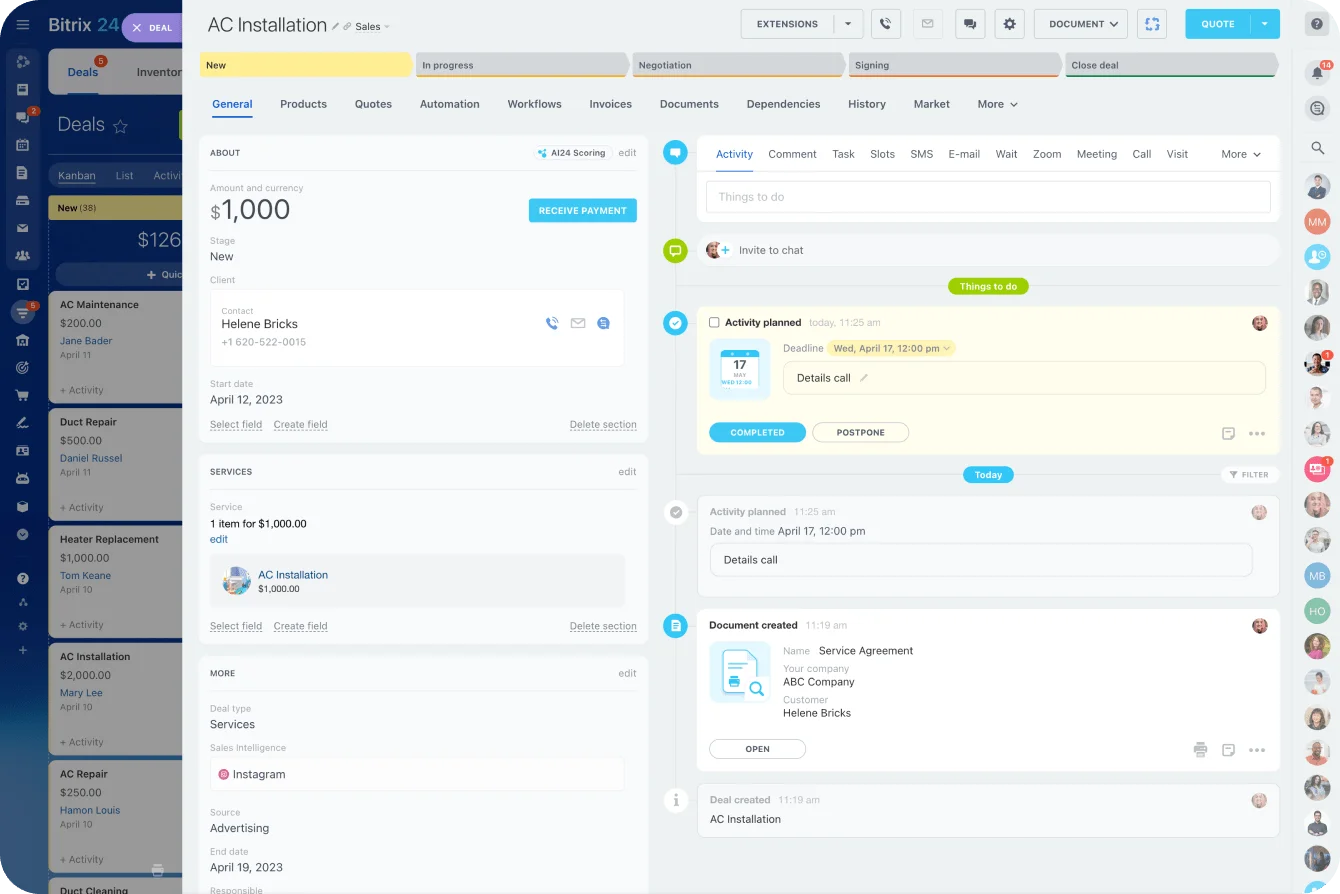
Bad CRM maintenance breaks things quietly. Deals sit in the wrong stage. Records duplicate. Follow-ups vanish. Then managers stop trusting their own reports.
In Bitrix24, for example, a VA working inside the CRM runs a weekly check for deals with no next action, updates incomplete records, and flags the ones that need a salesperson's judgment instead of changing them.
That last step is where inexperienced VAs do the most damage. The urge to tidy up by merging two similar records, or nudging a stalled deal to closed-lost, is exactly the urge to resist. Good CRM support means knowing which calls stay with the sales owner, and treating an ambiguous record as something to flag rather than fix.
4. Operations support: workflow continuity
Operations support ties several parts of the business together.
Typical responsibilities:
- Client onboarding
- SOP maintenance
- Billing coordination
- Project intake
- Internal documentation
- Recurring reporting
- Automation checks
- Handoffs between team members
This tier runs on judgment, because instructions never cover every exception.
An operations VA managing client onboarding makes sure:
- The signed client is added to the correct system.
- The onboarding task list is created.
- The internal owner is assigned.
- Required documents have been collected.
- The kickoff meeting is scheduled.
- Missing information is chased before it blocks delivery.
- The handoff is recorded for the delivery team.
The client is buying continuity: someone who knows what happens next and notices when it hasn't. The value shows up on the day the process breaks, when a contract arrives without a signed scope, or a kickoff gets booked before the required documents landed.
A checklist-follower stalls there and waits to be asked. An operations VA spots the gap and chases it before delivery grinds.
Pro Tip: If you want to move up a tier, don't add ten services at once. Take one recurring process you already touch and learn what happens right before and right after your part of it. That's where the higher-value work tends to hide.
The tools worth learning first depend on the workflows behind the work
New VAs collect software badges and tutorials. A long app list looks good on a profile. Clients care about one thing: whether you can keep their process moving.
Learn tools by function instead.
|
Function |
Common tools |
What competence looks like |
|---|---|---|
|
Communication and scheduling |
Google Workspace, Microsoft 365, Calendly, Slack, Zoom |
Managing meetings, email flow, files, and coordination cleanly |
|
Project management |
Asana, ClickUp, Trello, Bitrix24 |
Keeping tasks current, owners clear, blockers visible, and deadlines realistic |
|
Documentation |
Notion, Google Docs, Microsoft Word, Bitrix24 |
Creating usable SOPs, checklists, trackers, and reference pages |
|
Marketing execution |
Mailchimp, ConvertKit (Kit), Canva, social schedulers |
Loading campaigns, organizing assets, checking details, and supporting content operations |
|
CRM |
HubSpot, Pipedrive, Zoho, Bitrix24, similar CRM systems |
Maintaining records, segmentation, pipeline views, follow-up logic, and basic reporting |
|
Automation |
Zapier, Make, built-in workflow tools |
Connecting routine actions while checking exceptions and failures |
Start with the categories that repeat across clients
Choosing what to learn first? Pick the categories that show up in almost every business:
- Email and calendar
- Shared documents
- Task management
- Documentation
- One CRM
- One email marketing platform
- One automation platform
Working knowledge of one or two platforms beats shallow familiarity with ten. The category matters more than the brand. A VA who understands how deal stages, pipelines, and follow-up logic behave picks up an unfamiliar CRM in a week. A VA who only memorized where HubSpot hides its buttons is stuck the moment a client runs Pipedrive.
Learn one recurring process end to end
Skip the afternoon of watching every project-software tutorial. Build a sample client-onboarding board instead.
Create:
- Owners
- Due dates
- Dependencies
- Status rules
- Approval steps
- An exception for missing information
You'll learn more about how project work actually behaves than any menu tour teaches you.
Familiarity and competence aren't the same. Familiarity means you can find the feature. Competence means you know what gets updated, what triggers the next step, what needs checking, and who to tell when something breaks.
Learn the maintenance work too
Setting something up is half the job.
In Bitrix24, a Knowledge Base holds instructions, training materials, and other internal reference content. Maintaining one means spotting outdated instructions, controlling access, recording process changes, and stopping conflicting versions of the same guidance from circulating.
CRMs, task boards, and automations work the same way. The person who keeps the system useful after setup owns the part nobody else wants. Setup ends. Maintenance is the unglamorous, recurring work that decays the moment it's ignored, and the decay stays invisible until it isn't. You find out the Monday a report comes back wrong, trace it to an automation nobody wrote down, and learn the VA who built it moved on a year ago.
That's why a client keeps paying someone to hold the system: the alternative is discovering how it worked only after it's stopped working.
Pro Tip: Build practice projects around real operating problems. "Create a clean onboarding workflow" teaches you more than trying to learn every feature in five project-management apps.

How to prove you can do the work when you cannot name big clients
You don't need recognizable logos to prove competence. A buyer wants to know one thing: will handing you the work cut their workload, or add supervision?
Build proof around operating problems
Portfolio pieces that carry weight:
- A sample SOP
- A mock CRM cleanup
- A reporting template
- An inbox triage system
- A campaign calendar
- A short Loom walkthrough
- A process map
- A client-onboarding checklist
- A sample weekly operations report
Each one makes your thinking visible. A CRM sample shows which fields you'd standardize, what you'd leave alone without confirmation, and how you'd flag a questionable record. An SOP shows whether another person could follow your instructions.
A buyer can't tell competent work from a lucky screenshot, but they can tell whether an SOP is clear enough to hand off, and that judgment is what they're hiring.
Be clear about where the work came from
Label practice work as practice work. Same for examples from your own business or volunteer projects.
Don't invent client stories, revenue results, or performance gains. Beyond the honesty problem, fabricated numbers are easy to puncture. One follow-up question about a made-up 40% efficiency gain finds nothing behind it, and you've lost the engagement over a detail you never needed.
Explain the operating problem and your approach instead.
Weak: "Helped improve CRM efficiency."
Better: "Created a sample CRM maintenance process covering duplicate review, required fields, stale deals, ownership checks, and weekly exception reporting."
The second version shows what you actually do.
Reduce buyer risk without cutting your rate
You can also make a first engagement easier to approve:
- A paid trial sprint
- A fixed-scope CRM cleanup
- An onboarding audit
- A content-calendar setup
- An SOP documentation package
- A short workflow review with recommendations
A defined starting point lets the client judge your work before handing over a whole process.
A trial sprint works when the scope and the deliverable are both fixed, so the client knows exactly what they're approving. An illustrative example: a one-week CRM hygiene sprint, capped at a set number of hours, delivering a de-duplicated contact list, a standardized set of required fields, a list of stale deals flagged for the sales owner's review, and a one-page summary of what changed and what's worth maintaining weekly. The client gets a finished result they can inspect, not a promise, and you've shown the exact workflow you want to be retained for.
Hold your rate and shrink the scope. Discounting your hourly to win a trial just teaches the client what your time costs.
Pro Tip: Keep a small "proof pack" ready to send. Three strong examples with short explanations beat a folder of 25 unrelated samples.
The operating habits that turn one-off tasks into long-term retainers
Speed doesn't keep a retainer. What keeps it is a client who has less to remember, chase, and check because you're on it. That comes from habits, repeated.
Create a visible operating rhythm
Small habits carry weight:
- Acknowledge new requests
- Record decisions
- Keep task statuses current
- Make deadlines visible
- Document recurring procedures
- Flag blockers early
- Close loops when work is finished
- Send brief, consistent status updates
A workable weekly rhythm: a Monday priority review, a midweek cleanup of open items, a Friday summary of completed work, blockers, and anything the client needs to decide.
The status update is the habit clients notice most, and the one most VAs botch by burying it in a wall of text. Keep it skimmable. A Friday summary reads: Done this week, three items, one line each. Blocked / need from you, the two decisions or inputs you're waiting on, named. Next week, what you'll pick up unless told otherwise. The blocked section earns its place, because it turns your waiting into the client's to-do list instead of a silent stall.
That cadence kills the "where are we with this?" messages that eat everyone's time.
Teams on Bitrix24 keep the operational record in shared workgroups and collaboration tools rather than scattering updates across private messages, task comments, and separate spreadsheets. One shared record also protects you: when a client misremembers what was agreed, the logged decision settles it without friction.
Look for recurring weak spots
A stronger operator notices repeats:
- The same onboarding question every week
- CRM fields left blank again and again
- Meeting actions that vanish after the call
- Clients submitting incomplete project briefs
- Reports rebuilt by hand every month
- A checklist that no longer matches the process
Spotting one doesn't mean redesigning the company. The useful fix is usually small: update a checklist, add a required field, change a naming rule, document an exception, set up a recurring cleanup task.
Restraint is the skill here. A VA who answers one blank field with a proposed CRM overhaul creates more work and more risk than the problem warranted. The one who adds a single required field and moves on gets trusted with the bigger changes later.
Automate predictable steps, then check the exceptions
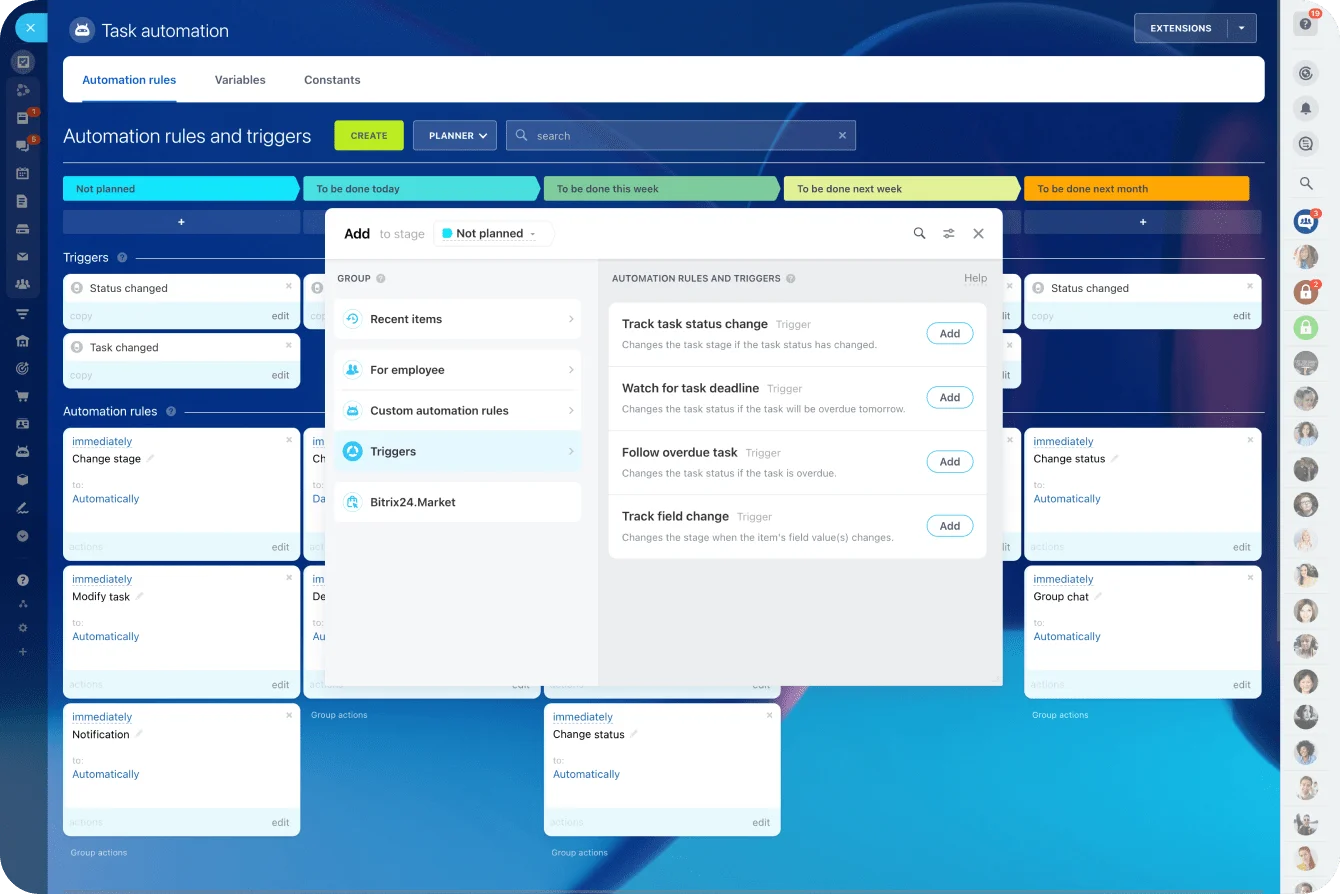
For repeatable internal work, task automation handles the predictable actions: creating assignments, changing task status or ownership, sending notifications.
The VA still checks:
- Failed automations
- Missing inputs
- Incorrect owners
- Unusual client requests
- Tasks that sit open while the workflow moves on
Execution, visibility, and early issue-spotting together are what make ongoing support hard to replace. Automation raises the stakes on attention rather than lowering them. A broken automation fails silently and keeps failing, so a workflow that used to drop one task now drops fifty before anyone looks. The person watching for that is worth more once the automation exists, not less.
Which VA specializations are growing, and which tasks are being squeezed by automation
AI and automation don't hit VA work evenly. Repetitive, predictable work faces the most pricing pressure. Work that needs judgment, context, quality checks, or coordination across systems resists standardization.
Clerical work is under real pressure
The World Economic Forum’s Future of Jobs Report 2025 lists administrative assistants and executive secretaries among the roles employers expect to decline fastest through 2030. It names broadening digital access, AI and information-processing technologies, and robots and autonomous systems as the primary drivers.
The same report puts a number on the shift underneath. Employers estimate 47% of work tasks are handled mainly by humans today, and expect that share to fall to roughly a third by 2030, with most of the drop attributed to automation rather than closer human-machine collaboration. The tasks moving to machines first are the predictable, rules-based ones, which is precisely the clerical core of entry-level VA work.
Administrative support won't disappear. But if your entire offer is basic data entry, routine scheduling, transcription cleanup, repetitive formatting, or templated posting, you're standing where the pressure lands hardest.
Judgment-heavy support is harder to automate cleanly
The more defensible ground:
- CRM hygiene and reporting
- Email and funnel operations
- Client onboarding
- Knowledge-base maintenance
- Content and podcast operations
- Project coordination
- Workflow quality control
- AI-assisted operations
Take CRM hygiene. Software flags duplicates and automates follow-up. It can't decide whether two similar records are actually the same, whether a stalled deal should change stage, or whether a dashboard is showing a sales problem or just bad data. A person does that.
Exceptions are where human support keeps its value
Onboarding tells the same story. Automation creates tasks and sends emails. The trouble starts when:
- The client sends incomplete information
- A contract carries an exception
- The usual owner is away
- A deadline shifts
- The project needs a handoff the workflow was never built for
Picture an automated onboarding flow: a signed deal triggers a welcome email, builds the onboarding task list, and assigns the account owner. A new client signs but leaves the billing contact field blank on the intake form. The automation fires anyway. The welcome email goes out addressed to no one, the task list has no billing owner, and the first invoice has nowhere to land. Nothing errored. The workflow reports success. The VA is the person who reads the intake before the automation runs, catches the blank field, and either fills it from the contract or holds the trigger until the client supplies it.
The valuable VA is the one who checks those edges, works the exceptions, and keeps the automated process trustworthy.
How to choose a specialization that raises your rate without narrowing your market too early
A specialization worth having passes three tests:
- Enough businesses need it.
- Clients can't replace it with a simple automated action.
- It fits skills you have or can build fast.
Pass only one and you'll struggle to turn it into steady work. The second test is the one that shifted most recently.
A specialization that was safe five years ago, inbox management, basic scheduling, now fails it, because a tool does most of the job. Weight that test heavily.
Start broad, then package one critical workflow
You don't have to pick one industry for life. Work from a broad support base, then package your strongest recurring workflow, ideally one from the defensible list above.
You keep taking related work. The positioning just gives clients a sharper reason to pick you.
Compare "I help with admin and marketing tasks" with "I maintain your CRM, clean up pipeline data, and keep follow-up visible." Or "I run the operational side of client onboarding, from intake through kickoff and internal handoff." The specific versions tell a client which part of the business you'll take off their plate.
Build depth before adding another specialization
Once you've picked an area, learn the workflow around it.
Choose CRM support, and understand:
- Where leads come from
- Who owns follow-up
- How stages are defined
- Which reports managers use
- What happens when a deal closes
Choose onboarding, and understand:
- What sales hands over
- What information delivery needs
- Which documents get created
- When billing enters the picture
- Where clients usually get stuck
That knowledge is what lets you solve problems without waiting for step-by-step instructions.
Takeaway: Narrow the problem you solve before you narrow the market you solve it for. "I run client onboarding" travels across dozens of sectors. "I do admin for dental practices" ties your whole pipeline to one sector's hiring.
FAQs
Do I need a certification to charge more?
Rarely. Clients almost never ask for one, and a certificate proves you finished a course, not that you can keep their CRM clean. Vendor certifications help most as a filter on job platforms, and only when a proof-pack sample sits next to them showing you've used the tool on a real problem.
Should I charge hourly or a monthly retainer?
Hourly while the scope is still fuzzy, because neither of you knows yet what the work involves. Once you own a recurring workflow, move to a retainer. At that point the client is paying for the process staying up, and billing by the hour pushes them to watch your time instead of the result.
How do I raise my rate with a client I already have?
Tie the increase to a change in scope, not the calendar. When you take over a workflow, like CRM maintenance or onboarding, price that workflow as a new line rather than folding it into your existing hours. Give notice, name what you now own, and let the old rate stay attached to the old work.
Run client workflows, not scattered tasks
Bitrix24 brings CRM, tasks, docs, automation, and communication together so VAs can keep processes visible, reliable, and on track.
Get Started NowThe bottom line
Every tier in this guide turns on the same hinge: whether a client trusts you to hold a piece of their business without watching you do it. Admin work rents your time. CRM hygiene, onboarding, operations, that work rents your judgment, and judgment is what automation can't buy off the shelf.
The VA who describes their services as tasks competes on price forever. The VA who can point to a process they own, and prove they keep it running, sets the price.
The cost of ignoring this is slow rather than dramatic: another year at the same rate, competing against everyone else who also offers reliable help with anything.
Pick the workflow you understand best, build proof you can maintain it, and describe your work by the problems you solve. That's the difference between being hired and being kept.